
• This forum is the machine-generated translation of www.cad3d.it/forum1 - the Italian design community. Several terms are not translated correctly.

display problems

  • Thread starter Thread starter New Rider
  • Start date Start date

New Rider

Guest
hello to all boys,

I checked in the previous discussions but it doesn't seem to come to terms with it.
basically we went to version 2024 s.p. 5 of solidedge and I am in these conditions.
I press that the level of antialias is already set to high.
video card used p2200 updated to the latest nvidia driver.
someone can turn me any settings.
I tried to ''play'' with the settings of the nvidia menu but I can't get over it.
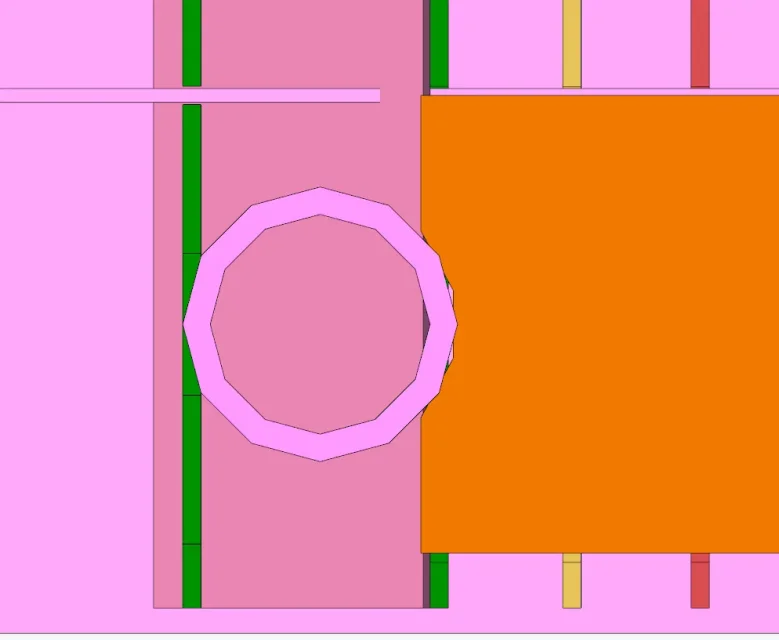
1715766734695.webpthanks as always.
 
hello to all boys,

I checked in the previous discussions but it doesn't seem to come to terms with it.
basically we went to version 2024 s.p. 5 of solidedge and I am in these conditions.
I press that the level of antialias is already set to high.
video card used p2200 updated to the latest nvidia driver.
someone can turn me any settings.
I tried to ''play'' with the settings of the nvidia menu but I can't get over it.


thanks as always.
Is the part "active"? or does it have the yellow and not gray cube in the model tree?
 
I do not know solidedge but nx, which should be the older brother of himself; nx has a specific command to eliminate the polygonal representation of the circles. I think the command is called "show exact". default polygons are represented to lighten graphic management.
 
the command you are looking for is called "nitidezza" set from 1 to 5, by default stands on 2.
every time you press it increases by 1, or you can open the curtain and manually choose what to set.

In addition to this, in solid edge options, tab displays you can choose the starting value with which the circles are represented, by default is 3 that corresponds to 12 segments for a circle (which is how it is represented in your image)
 
the command you are looking for is called "nitidezza" set from 1 to 5, by default stands on 2.
every time you press it increases by 1, or you can open the curtain and manually choose what to set.

In addition to this, in solid edge options, tab displays you can choose the starting value with which the circles are represented, by default is 3 that corresponds to 12 segments for a circle (which is how it is represented in your image)
hi be on edge,

the value of sharpness how do I make it stay on 5? every time I change value does not remain on the value I want. beyond all even in the arc continuity value, which by default is 3, if I want to improve I do not remain by default.
 

Forum statistics

Threads
44,997
Messages
339,767
Members
4
Latest member
ibt

Members online

No members online now.
Back
Top