
• This forum is the machine-generated translation of www.cad3d.it/forum1 - the Italian design community. Several terms are not translated correctly.

dmu kinematics

  • Thread starter Thread starter panormus
  • Start date Start date

panormus

Guest
hi forumisti,

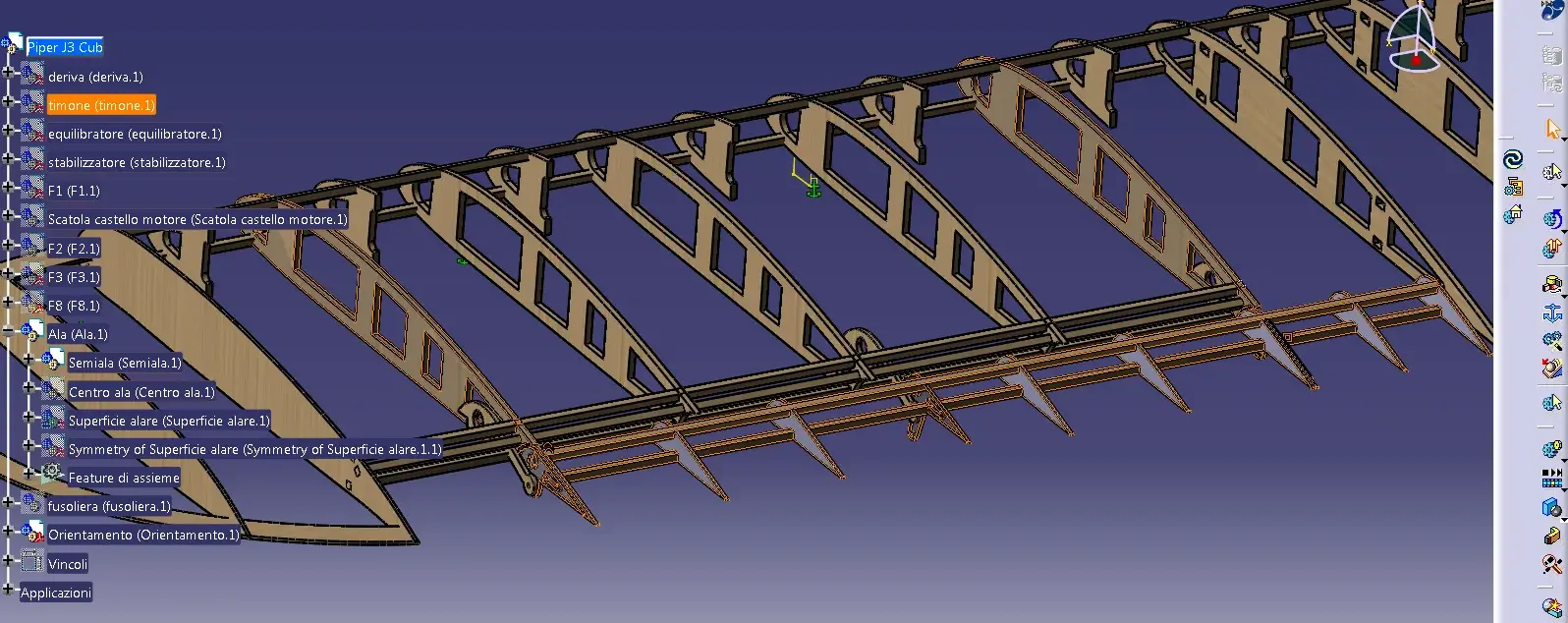
having realized a wing of a piper with relative alettone I wanted to try to animate the product by applying a rotation joint, but I found problems.

It seems, but I do not know if it is actually so, that a joint can be applied between two separate parts or two product and not, as not my case, between product placed in matrioska (one inside the other).

In practice I divided the work:

product piper, which contains the ala, drift, rudder, fuselage, cart. .
each of these in turn contains other product, and in the case of the wing we have, the product semiala, which contains among many, the product alettone. We're here.

if I open the kinematics environment and select the anchor to fix a product, I am forced to select the whole wing which also includes the alettone that will then be also fixed.

instead I should fix the product wing, but unlock the sub-product alettone to allow the rotation.

Can anyone help me?

greetings and thanks
 

Attachments

  • Cattura4.webp
    Cattura4.webp
    156.6 KB · Views: 24
each mobile part must be contained in a product master.
all product masters must be contained in a total product.
example

+piper catproduct
--+ alettone dx catproduct
--+ alettone sn catproduct
--+ thyme dir catproduct
--+ elica catproduct
--+ catproduct port
--+ etc...

In this way after having properly bound the various masters use the automatic coupling creation button etc. etc. to have everything done automatically.
then identifies the joints to which to apply the commands
Hi.
Mar
 
each mobile part must be contained in a product master.
all product masters must be contained in a total product.
example

+piper catproduct
--+ alettone dx catproduct
--+ alettone sn catproduct
--+ thyme dir catproduct
--+ elica catproduct
--+ catproduct port
--+ etc...

In this way after having properly bound the various masters use the automatic coupling creation button etc. etc. to have everything done automatically.
then identifies the joints to which to apply the commands
Hi.
Mar
Thank you for your answer. should therefore review the structure by separating in a product the mobile products and in another product the fixed ones?
- product fixed parts (ala, fuselage, cart,. . )
- product mobile parts (elica, alettoni, timone,...)
and win them back?


How do I do with all the constraints I have created now?
the final part is not clear to me: Does it make me fixed and mobile joints alone?
 
every by-product must have his law of motion.
the fixed part ("enjoyed") is a special case of motorcycle.
the solid parts with fixed or mobile organs can bind them with the "rigid" bond to each by-product.
then established the fixed part to this you can tie (with the "rigid" bond) all that remains fixed. to the mobile part (e.g. alettone) you can hook (always with the rigid bond) everything that moves solidly to it.
the important thing is that cinematics is always defined on the same level as the casket tree.
each by-product is a film component.
 
the important thing is that cinematics is always defined on the same level as the casket tree.
each by-product is a film component.
Hello stiffen,
Thanks for the contribution, I still have to make clarity on this.
I don't understand how much you write, forgive me, you have a way to make me a little
example?
 
someone can help me understand how stiffen means (see that from the number of posts it seems that stiffen rarely sharpens :tongue: )?


I also ask myself, if you can avoid having to reassemble the product, as suggested marcofa (if I did not understand bad) and work on the already bound product.
 
You don't have to reassemble everything.
we suggest that you have placed all the parts of wings, wings, rudder etc. under the same together. Therefore you have only one level of annihilation.
in the product "air" create new empty product, adding them to the whole spleen of part, e.g.
"fixed fuselage"
"right-handed,"
"left bed"
"timone dir"
"timone prof"
"Helix"
Now you can drag each part with the mouse into its subset, and the constraints will not be lost but transferred.
At this point you will have a tree with two levels of nesting.
now you will have to bind these new products to each other in the correct way to perform a simulation.
if you read my catiapedia is all explained, from how to structure a project before starting drawing, to how to make a simulation.
Mar
 
You don't have to reassemble everything.
we suggest that you have placed all the parts of wings, wings, rudder etc. under the same together. Therefore you have only one level of annihilation.
in the product "air" create new empty product, adding them to the whole spleen of part, e.g.
"fixed fuselage"
"right-handed,"
"left bed"
"timone dir"
"timone prof"
"Helix"
Now you can drag each part with the mouse into its subset, and the constraints will not be lost but transferred.
At this point you will have a tree with two levels of nesting.
now you will have to bind these new products to each other in the correct way to perform a simulation.
if you read my catiapedia is all explained, from how to structure a project before starting drawing, to how to make a simulation.
Mar
on catiapedia 04_11.zip?? ?
Why not put it on http://catiawiki.cad3d.it/?
 
I started loading some macros, but I saw no one participates, so I stopped because it is a long job and if no one contributes ....
Mar
 
I started loading some macros, but I saw no one participates, so I stopped because it is a long job and if no one contributes ....
Mar
If every expert did as much as you did, but I do not blame because everyone will have their own commitments, I think a reference text would come out at national level.

thanks to all rotten, you were exceptional; as soon as I realize how much you taught me public a video and step the link:finger: :wink:
 

Forum statistics

Threads
44,997
Messages
339,767
Members
4
Latest member
ibt

Members online

No members online now.
ciao
Back
Top