
• This forum is the machine-generated translation of www.cad3d.it/forum1 - the Italian design community. Several terms are not translated correctly.

do not display raster image contour in print phase

  • Thread starter Thread starter MOREISLESS
  • Start date Start date

MOREISLESS

Guest
I am creating the texture of a prospectus with the use of img raster, since the slabs have a certain size imgs I have duplicated cut out and pulled over (with autocad 2013) among them so as to fill the area of the slab...the only problem is that exporting pdf comes out the unwanted contour of the pictures, I tried to put the edge of the white image or thickness 0.0 mm but nothing!

Thank you.
I don't know if it's the right section!
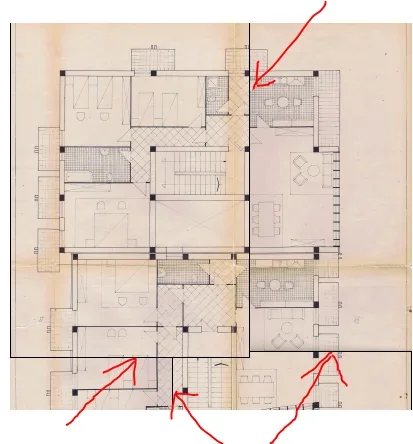
 
I had looked, but the frameimm command suggested in the discussions you posted me, turns out unknown for cad 2013... ! !
thank you for having responded
 
good morning, I put in autocad 2015 4 imagespdf and I joined them together in order to have as final result a single image; in the printing phase on file (dwgtopdf) the frame lines of all images appear.

I tried with imageframe=0 but no positive result

How can I do that? 1111111111.webp
 
good morning, I put in autocad 2015 4 imagespdf and I joined them together in order to have as final result a single image; in the printing phase on file (dwgtopdf) the frame lines of all images appear.

I tried with imageframe=0 but no positive result

How can I do that?
frame variable set to 2 (view but do not print frame)
 

Forum statistics

Threads
44,997
Messages
339,767
Members
4
Latest member
ibt

Members online

No members online now.
Back
Top