• This forum is the machine-generated translation of www.cad3d.it/forum1 - the Italian design community. Several terms are not translated correctly.

double tilted reference plane?

  • Thread starter Thread starter rubincarter
  • Start date Start date

rubincarter

Guest
I need to tilt a reference plane over two different surfaces.I explain, I have to extrude a solid that has normal inclination of 45° regarding the x axis and 30° regarding the y axis.
in practice I can not create on the x,y plane a reference axis (to create it I always need a plane and a surface) oblique that is the element around which you roar the desired plan.
I hope I've explained well.
Can someone tell me how to proceed?Thank you!

ps:I apologize if I opened a new topic, but at least here I can post any other answers related to my case.
 
Can you be clearer? would the boolean in proe be?
pro and is not autocad, the Boolean exist, but only in the environment together, has already spoken several times in the past in the forum...

returning to your problem, I understood very little of what you have to do. . Could you post an image of what you want to do? Thank you.

Hi.
p-h
 
pro and is not autocad, the Boolean exist, but only in the environment together, has already spoken several times in the past in the forum...

returning to your problem, I understood very little of what you have to do. . Could you post an image of what you want to do? Thank you.

Hi.
p-h
I must realize this piece, the problem is the extrusion of the two symmetrical parallelepipeds compared to the central tube. I had thought of a 45° forward tilted reference plane and 30° on the side surface.


uploaded with imageshack.us
 

Attachments

  • elementow.webp
    elementow.webp
    10.7 KB · Views: 11
Last edited by a moderator:
I must realize this piece, the problem is the extrusion of the two symmetrical parallelepipeds compared to the central tube. I had thought of a 45° forward tilted reference plane and 30° on the side surface.


uploaded with imageshack.us
But can't you make a passing plan for the edge of that bevel down there?
do all the work and then mirror everything

Hi.
p-h
 
Last edited by a moderator:
That's what I mean. :smile:

Hi.
p-h
 

Attachments

  • AAAAAAA.webp
    AAAAAAA.webp
    33.4 KB · Views: 15
That's what I mean. :smile:

Hi.
p-h
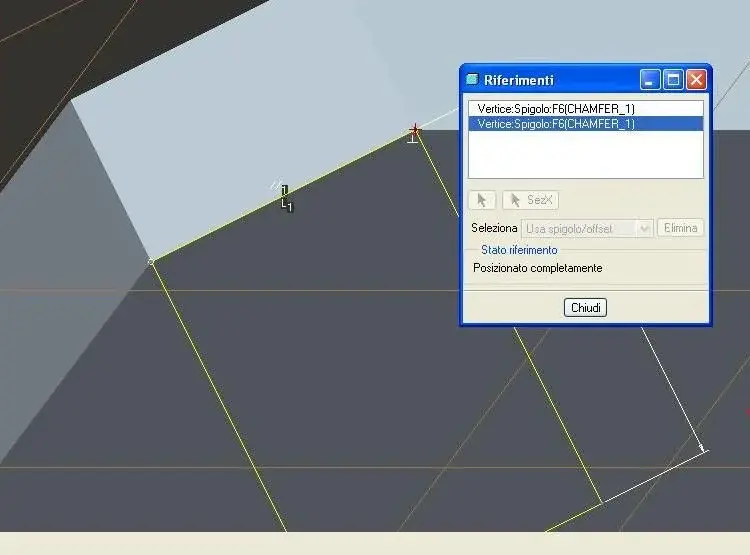
Thank you, but at this point I ask you a further question: When I go to make a sketch in the plan you designed, he asks me some orthogonal references on the floor to be able to place the view. How do I proceed? Do I need to create a further orthogonal reference to the plan in question?

basically as a design in the created plan since I can't position it?

Thank you!
 
Thank you, but at this point I ask you a further question: When I go to make a sketch in the plan you designed, he asks me some orthogonal references on the floor to be able to place the view. How do I proceed? Do I need to create a further orthogonal reference to the plan in question?
seen so, you can refer 2 points... something like that... then draw your parallelepiped that has a side of the length of the bevel.. .

Hi.
p-h
 

Attachments

  • AAAAAAA.webp
    AAAAAAA.webp
    23.4 KB · Views: 8
Thanks p-h! I set the two bevel points as reference and accepted them, thank you very much!

Can I finally do this? I'll stop and disconnect.
easy: in the sketch I see the object placed in 3d having been chosen as dtm1 view plan, that is the plan created. If you want to see the object from above, i.e. use the top view to draw I go vilility and imposed top. I don't change visuals, you know how I can handle it?

Thank you!

edit: solved.. .

Thank you, really!
 
Thanks p-h! I set the two bevel points as reference and accepted them, thank you very much!

Can I finally do this? I'll stop and disconnect.
easy: in the sketch I see the object placed in 3d having been chosen as dtm1 view plan, that is the plan created. If you want to see the object from above, i.e. use the top view to draw I go vilility and imposed top. I don't change visuals, you know how I can handle it?

Thank you!
I don't understand. :redface:
also because I don't understand why you want to view the model from the top floor... :rolleyes:
However it is enough that you re-orient the view... as when displaying the model in the 3d environment

Hi.
p-h
 
I don't understand. :redface:
also because I don't understand why you want to view the model from the top floor... :rolleyes:
However it is enough that you re-orient the view... as when displaying the model in the 3d environment

Hi.
p-h
thanks p-h! I reoriented the view by paying attention to the references. Thank you very much for your help!
 

Forum statistics

Threads
44,997
Messages
339,767
Members
4
Latest member
ibt

Members online

No members online now.
ciao
Back
Top