
• This forum is the machine-generated translation of www.cad3d.it/forum1 - the Italian design community. Several terms are not translated correctly.

draw satisfactory curves

  • Thread starter Thread starter gil
  • Start date Start date

gil

Guest
I would like to make some curved flaws, of which I have no shape or design itchy. I have to realize complex curves and I tried with the spline tool, but hard to get curves with a pleasant curvature.

For example, I would like to realize the curve indicated by the dashed line. I don't have a reference, it's just a hypothesis in my head. when I try to draw it with the spline tool I get similar results to the red line. that as indicated by the brakes is full of not pleasing points, it seems that it has drafts.
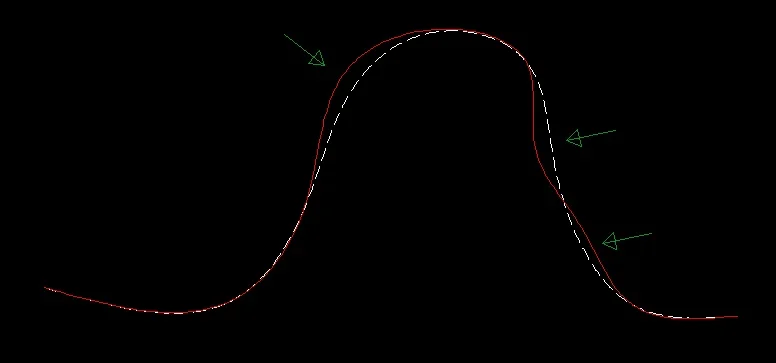
1662555503837.webpof course in this image is exaggerated. and of course I can correct it by moving the points that generate the spline. but in the end the result is never optimal, I can not get to pleasant curves.
I realize this is a strange question, but how could I improve the result?
thanks to those who want to give me an answer.
 
Usually if I have to do something like this I start from a polylinea, more controllable, and then the suitable with the method more consonant for the final purpose among those indicated... for more complex curves of type "artistic" I move on soltware type iluustrator or inkscape to have access to a management with the most... delicious we say.
1662558349491.png
 
If you use the splines you should not encounter difficulties.
drawings above existing curves with a spline and "near" as osnap.
literally recalculating
 
otherwise if your problem consists of poor spline manipulation then you should start drawing it by attributing it to a degree that is higher than value 3.
autocad draws splines with grade 3, but it is possible to increase that value.
increasing that value increase control vertices. at that point you operate the movements using the control vertices.
or you can draw the spline with any degree, select it, take you with the mouse on the blue handles that identify the adjustment points and say to add others, which you will indicate by clicking on the existing spline with near activated osnap.
With a greater number of adjustment points you will therefore have greater manipulation.

when adding an adjustment point always starts from the first and then moves on the following to add more
 
Thank you. Tomorrow when I'm on the PC, I'm watching.
If you use the splines you should not encounter difficulties.
drawings above existing curves with a spline and "near" as osnap.
literally recalculating
I don't have a reference
 
curves that require "particular" variations should be built with the mininor number of possible adjustment points.
to vary it acts on each point, adding others if necessary.
I recommend you first build it "big way" then act on the adjustment points (or on the control vertices in case you prefer to manage it with the control vertices).
this is the correct technique to build curves when for example recalculating existing profiles to build surfaces. curves with fewer control vertices will give rise to more 'read' surfaces
 
the speech is that the curves built with an excessive number of points, are those that, at the time of a change, will give more risk of "bozzi". and correct them is a business.
Therefore it is good to start from the assumption of building that curve with the least number of points possible.
so easy, with that method of the video, to notice whether it is necessary or not to add additional points. all other points that are in excess, that is not necessary, will only give problems in case there is to change the curve. autocad naturally predicts that you can eliminate unnecessary points. or add or delete them.
 
first of all thanks for the suggestions.
I did polyline and spline tests. trace satisfactory curves without a base below is laborious.
but, after comparing me with you, I have the certainty of the method to follow, r that I am not going to drift.
great video tristus!!! Thanks again.
 
even with the control vertices you can have a good management of the curve, both in the construction phase and in change.
in the curve we have taken into consideration in the video it is good that the spline to build is grade 3, not top grade.
But if the curve had curved curves with small rays, then the degree can be increased by 5.
in the curve taken into account in the video grade 3 is more than enough (autocad in fact starts drawing always with grade 3 splines.
for that curve of the video grade 5 is excessive, it is not advisable, because the program adds unnecessary points.
I started with the method of adjustment points (as in the previous video) then I used the method with control vertices.
At some point I brought the spline to grade 5, just to make an example. at the end of the video I will delete some point not necessary by restoring the course of the curve. how to operate (if with grade 3 or higher or with adjustment points rather than with control vertices) depends on what you want to build. are two different manners with which to obtain the same result)
 

Forum statistics

Threads
44,997
Messages
339,767
Members
4
Latest member
ibt

Members online

No members online now.
Back
Top