
• This forum is the machine-generated translation of www.cad3d.it/forum1 - the Italian design community. Several terms are not translated correctly.

drawing settings.dwrdot and .prtdot

  • Thread starter Thread starter Freddygol
  • Start date Start date

Freddygol

Guest
Good afternoon to all.
after a long time I find myself making the basic model settings. Dot, of course something escapes me, one thing is this: I would like that on the table the lines of the fittings, of tangency were thin and not equal to the lines of the rest of the drawing, I can not find where to change this setting. then someone would be so kind to send me the file drawings.dwrdot (intro: c:\programdata\solidworks\solidworks 2019\templates) original??? I didn't make the copy, and by force of change it ruined... thank you to all those who will answer.
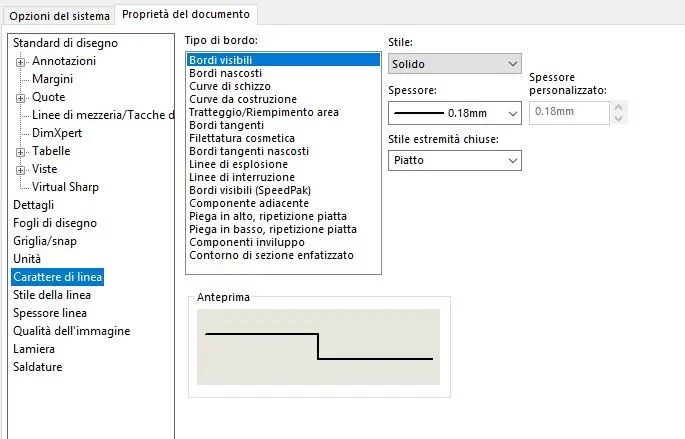
 
the templates you look for I don't have them x because I have not updated sw. regarding the differentiation of lines in the tables, you can try to change in the options within the properties of the document the character of the lineCattura.webpBut I don't think you can change everything you want.
then save your design template with custom settings.
 
the templates you look for I don't have them x because I have not updated sw. regarding the differentiation of lines in the tables, you can try to change in the options within the properties of the document the character of the lineView attachment 53956But I don't think you can change everything you want.
then save your design template with custom settings.
good day drake, the lines are already set as you must, but on the table I do not see differences, both visible edges, and tangent edges are equal. Thank you.
 
sw tangency lines call them visible and not tangent edges, which you can set as you want. test and if it doesn't work feel assistance if you are still in maintenance
 
but did you set tangency lines with character?
view>visualization> tangent bottles with character
 
Massive shields, but if you leave visible tangent edges do not take the setting you set in the document options?
 
Anyway, it's just a little... you exasperate the line type set for the tangent lines and you make two equal views in one with visualization of the visible tangent edges and in a with tangent edges with character
 
Anyway, it's just a little... you exasperate the line type set for the tangent lines and you make two equal views in one with visualization of the visible tangent edges and in a with tangent edges with character
Good morning to all, thanks to Mr. Masses' advice I managed. at the end it was also logical, but remembering all the options is not easy. However I set tangent edges with character, then I set the character I wanted in the table, and eventually I saved the prtdot and drwdot. it works great.
 

Forum statistics

Threads
44,997
Messages
339,767
Members
4
Latest member
ibt

Members online

No members online now.
Back
Top