• This forum is the machine-generated translation of www.cad3d.it/forum1 - the Italian design community. Several terms are not translated correctly.

dxf da inventor

  • Thread starter Thread starter TECNOMODEL
  • Start date Start date

TECNOMODEL

Guest
I will soon need to export a series of files to dxf to be able to use them on a laser marker.

I can't find a way to save an inventor's table in this format, am I or cannot be done?
If the answer is the last how can one overcome the problem?
 
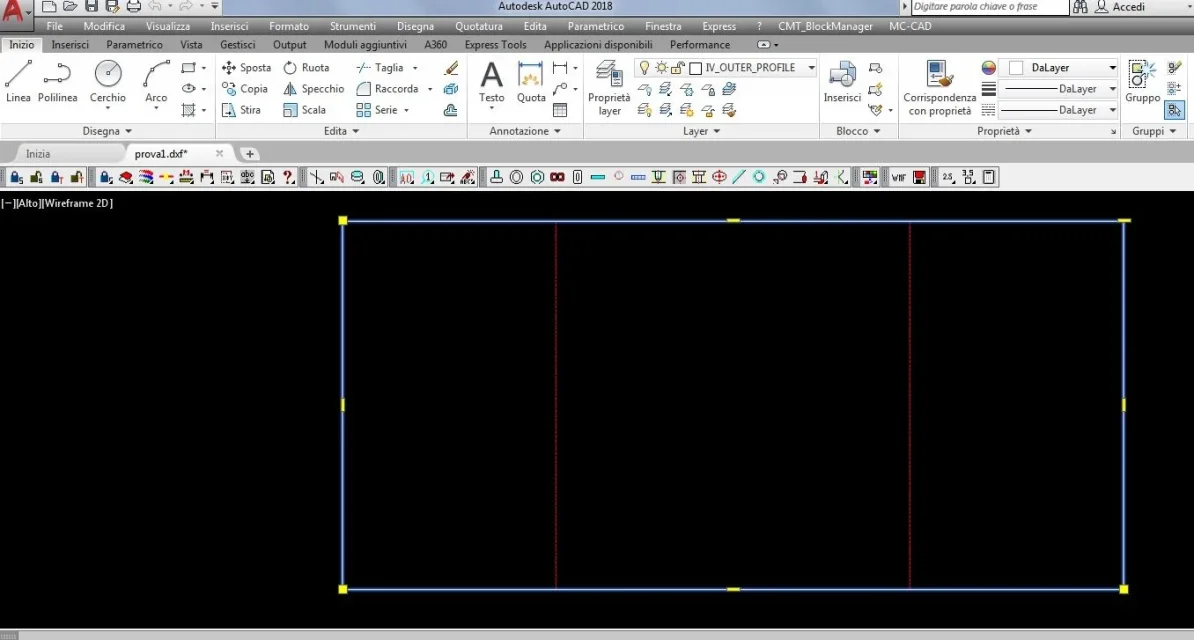
I did, the problem is that it exports all open lines.
the machine you need to use does not digest them. I guess there's a way to close it all, the problem is that autocad I only use it to display old designs and I don't know how to use it. (and I don't want to learn to do that)
 
a closed line in dwg, it is exported closed in dxf.
if you see it open in dxf, it comes from an open in dwg.
Unfortunately the idw design is all broken, always, so it generates a broken dwg.
can try with the command " overkill " given in autocad before saving in dxf.
overkill finds all line breaks aligned and turns them into a unique line as long as the underlying segment series.
 
is the dwg in inventor broken even if before exporting the closed line command?

the closing is only done in autocad or if I leave from closed lines in inventor I can do everything correctly?
 
I will soon need to export a series of files to dxf to be able to use them on a laser marker.

I can't find a way to save an inventor's table in this format, am I or cannot be done?
If the answer is the last how can one overcome the problem?
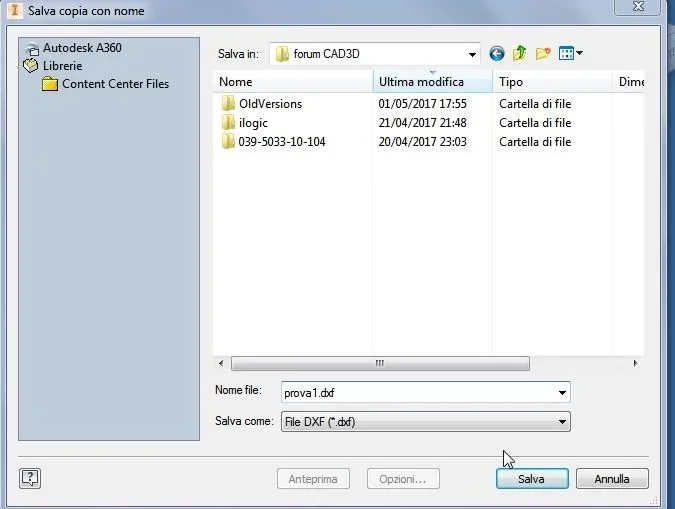
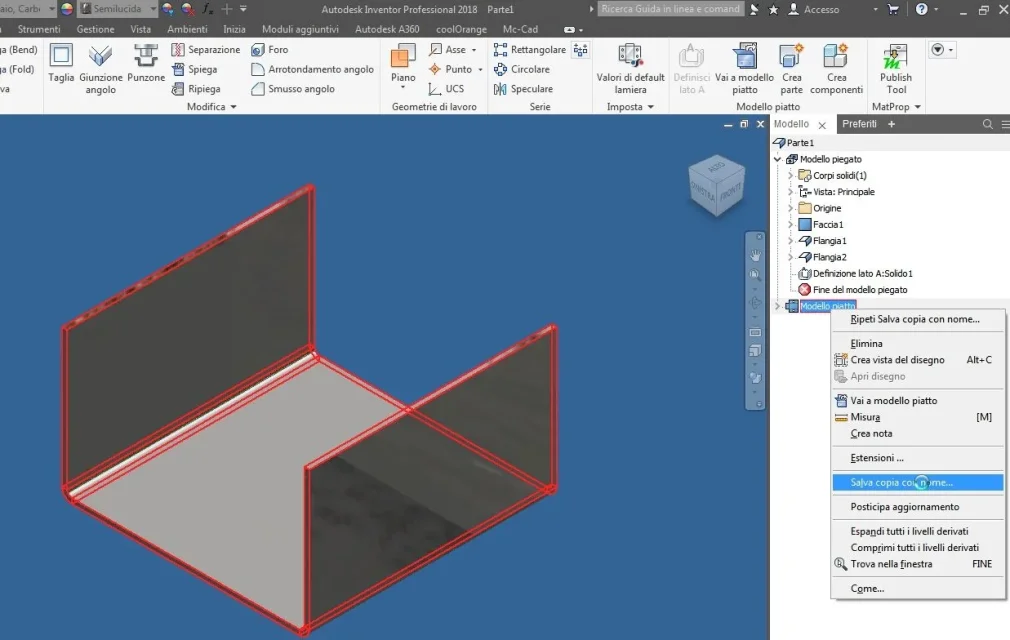
file-save with name-save copy with name-choices dxf.
 
I didn't exactly look at it there.
Of course that in autodesk they know how to complicate life, you can export to dxf only by saving copy with name but not by export and not even by saving by name. That's brilliant.
 
a closed line in dwg, it is exported closed in dxf.
if you see it open in dxf, it comes from an open in dwg.
Unfortunately the idw design is all broken, always, so it generates a broken dwg.
can try with the command " overkill " given in autocad before saving in dxf.
overkill finds all line breaks aligned and turns them into a unique line as long as the underlying segment series.
even using solidworks when I exported to dxf or dwg we found ourselves with all broken lines. It was necessary with the 2d to re-unite one by one.
 
I didn't exactly look at it there.
Of course that in autodesk they know how to complicate life, you can export to dxf only by saving copy with name but not by export and not even by saving by name. That's brilliant.
Hello, it is not clear to me, but if you have to export the dxf for a laser matrix, do you have to export only the development of the sheet or all the table idw??? (cartolic rates etc.)

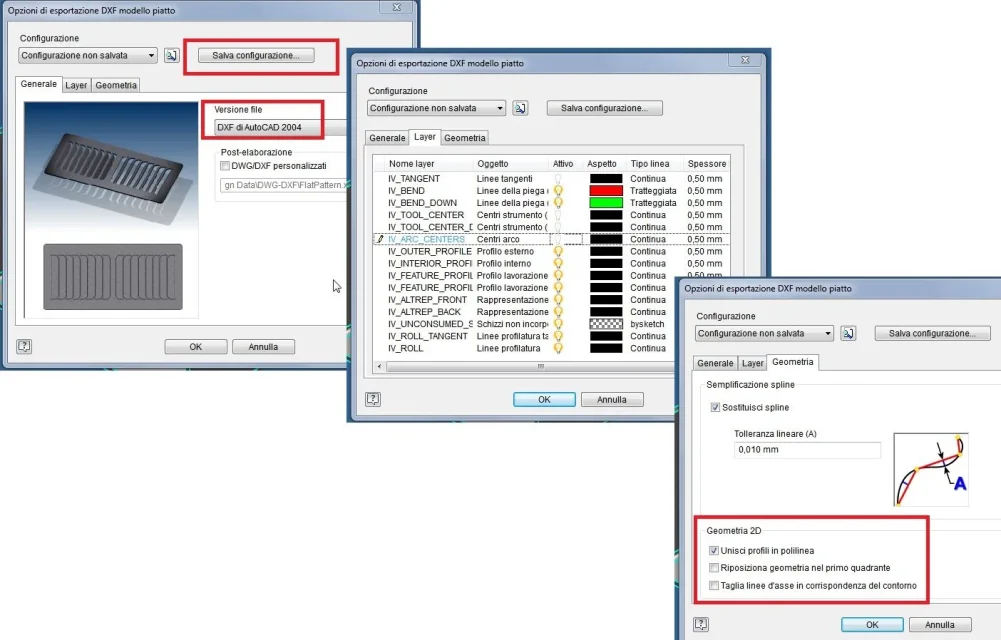
in case you have to export only sheet development, I usually do so:
dxf1.webpselect dxf and save the filedxf2.webpselect the various options (you can then save those choices and call for sucessive configuration)dxf.webpin this way every detail is on its layer and therefore during import into the cam software you can turn off example the fold lines) and the contour is closed in a single polylinea
dxf4.webp
ciao
 
Actually, I was thinking of only creating a 2d design, it's the layout of some tags that we'll have to hack with a laser marker.
I have already created a first part of the layout, but when I sent it to those who will provide us the machine told me that the lines are open and therefore the installed software cannot work them.
 
Superfast:

when you are on the design of inventor, keyboard command
:
press: alt > f > c (where the symbol > means: "After prizes" :-)
And it's dxf.

if you want to always save from keyboard:


> > > > > > > > > > > < > > > > > > > > > > > > > > > > > > > > > > > > > > > > > > > > > > > > > > > > > > > > > > > > > > > > > > > > > > > > > > > > > > > > > > > > > > > > > > > > > > > > > > > > > > > > > > > > > > > > > > > > > > > > > > > > > > > >

have fun
 

Forum statistics

Threads
44,997
Messages
339,767
Members
4
Latest member
ibt

Members online

No members online now.
Back
Top