• This forum is the machine-generated translation of www.cad3d.it/forum1 - the Italian design community. Several terms are not translated correctly.

enlarge an object

  • Thread starter Thread starter matteo0202
  • Start date Start date

matteo0202

Guest
Hi, guys. I have to develop an object (a sole) by magnifying it but not in equal parts, for example by stretching it of 2mm on the tip and, in progression, widening it of 0.5mm to the center and then, always progressively, return to 2mm on the tail behind!! all this can be done automatically with rhino 3.0? ?
Thank you.
 
Hello Matteo

Welcome to the forum.

Unfortunately, I have to answer your question, Mr. 3.0 has no tools to do what you want.
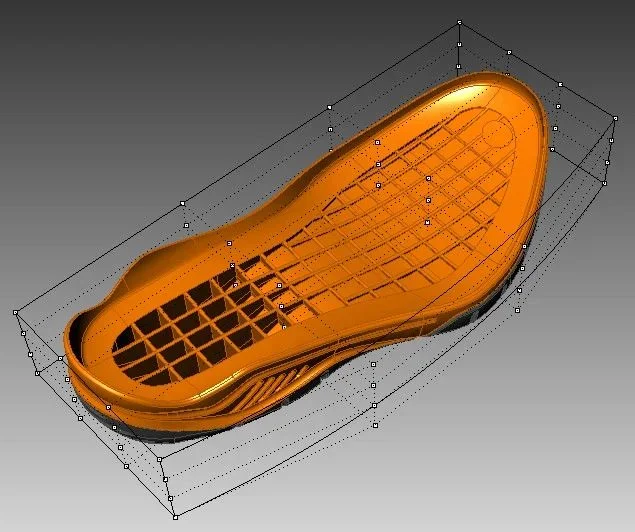
from version 4 a new technology has been introduced that called udt, which allows to deform in a free way any object.

on youtube find dozens of videos you can find by looking for the keyword by typing "cage edit".

It's not an automatic command you have to put us on to master it, but once you know how to use it, it's useful.

personally, he's been avoiding me more than once to do a job.

in the two images that I attach will be more clear to you its use.
 

Attachments

  • Prima.webp
    Prima.webp
    48.2 KB · Views: 5
  • dopo.webp
    dopo.webp
    52.6 KB · Views: 35
cage edit, as marius says, even according to the points imposed
is considerably more powerful, but there is also no uniform scales
on tools scale-
to theNON UNIFORM SCALE.webp
 

Forum statistics

Threads
44,997
Messages
339,767
Members
4
Latest member
ibt

Members online

No members online now.
Back
Top