• This forum is the machine-generated translation of www.cad3d.it/forum1 - the Italian design community. Several terms are not translated correctly.

exclude component from separate materials

  • Thread starter Thread starter Lorenz578
  • Start date Start date

Lorenz578

Guest
Good morning.
second post of day.
as I always pray that I did a research through "distinct materials", but I did not find the topic that interests me.
in a set, I would like to be able to exclude from the distinct materials that will be reported in the table some components.
in sw you can do via dx key on the component / property / exclude from separate materials.
Is there any similar method to be able to do it with inventor?
thanks to who will answer.
Lorenzo
 
hi lorenzo, right-click on the component, go to "different components structure" and select "reference" instead of "default". this will remove it from the distinct only for the current axieme. the components in reference will not be calculated even at the mass level for the affected axieme.
 
hi lorenzo, right-click on the component, go to "different components structure" and select "reference" instead of "default". this will remove it from the distinct only for the current axieme. the components in reference will not be calculated even at the mass level for the affected axieme.
Bye-bye.
thanks for the answer first of all.
I just tried, but the problem is that doing so I no longer see the components even at the visual level on the table.
 
Bye-bye.
thanks for the answer first of all.
I just tried, but the problem is that doing so I no longer see the components even at the visual level on the table.
Yes, the components in reference can be seen transparent and with drawn lines placed at the table.
However by double-clicking on the view, under the tab "model status" there is the possibility to specify that you want to display them with normal lines:1604654519596.webpif you want an alternative to the reference, opening the separate components of the axieme in model 3d, in the model data sheet can change the components affected by "normal" to "hidden". this will hide them in distinct but will continue to be calculated as mass and will be seen at the table.
But be careful that this second case changes the single component, which will then appear as hidden in any set where it is mounted.
 
Yes, the components in reference can be seen transparent and with drawn lines placed at the table.
However by double-clicking on the view, under the tab "model status" there is the possibility to specify that you want to display them with normal lines:View attachment 59855if you want an alternative to the reference, opening the separate components of the axieme in model 3d, in the model data sheet can change the components affected by "normal" to "hidden". this will hide them in distinct but will continue to be calculated as mass and will be seen at the table.
But be careful that this second case changes the single component, which will then appear as hidden in any set where it is mounted.
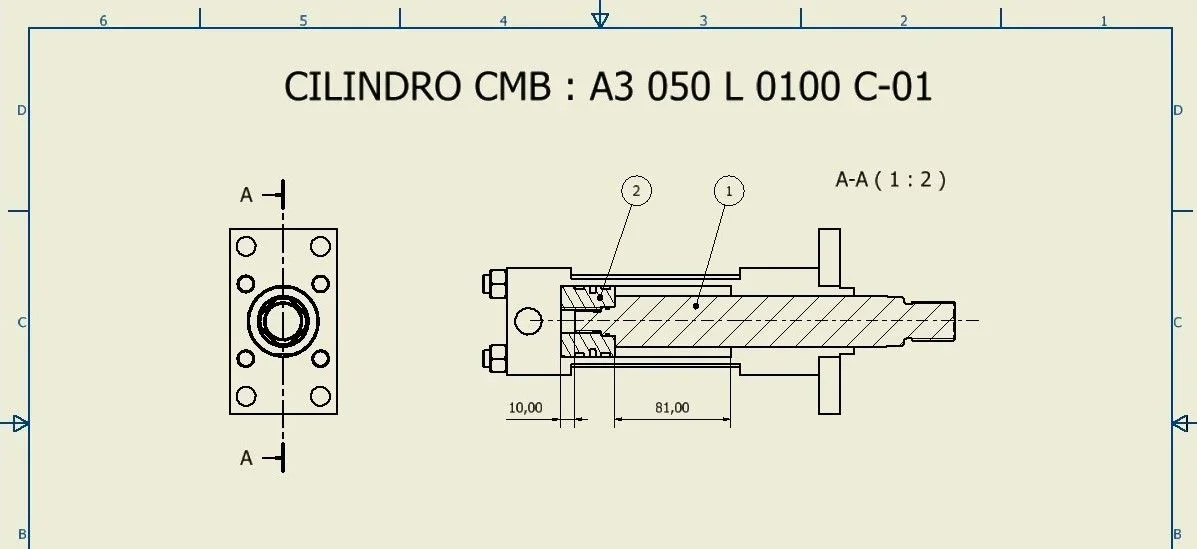
Perfect!! I only had to act on the margin by changing the value, as the view was "cut". I put 10 as a value and now it's okay.
is there a possibility to instantly understand from the tree of the parts in 3d, if a part is in "default" or in "reference? without need to click all times with the right button on the part.
Thank you.
edit : I realized now that the components excluded from the separate materials are not dissected. in my case the shirt and flange of the pistonView attachment 59857
 
Last edited:
I messed with the annex.
I'm here.
edit 2 : As for the previous question about displaying the status of the component, I saw that it was enough to stand on the component with the mouse arrow and tell me what status it is. then solvedPE3.400.010.010.235.jpg
 
Last edited:
Usually standard components (bookshop) are not dissected with inventor.
This can be handled at table in two ways:
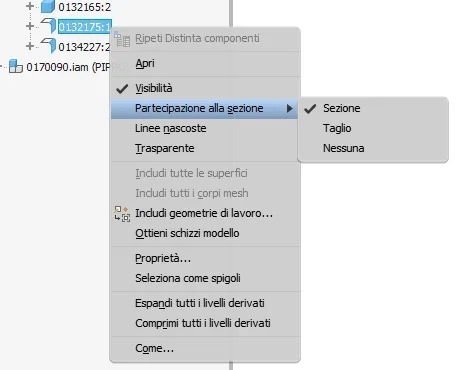
- for single component1604662015126.webp- double click on the section view1604662096501.webp
 
Usually standard components (bookshop) are not dissected with inventor.
This can be handled at table in two ways:
- for single componentView attachment 59861- double click on the section viewView attachment 59862
I've all activated these options, but I don't mind it anyway. can be given by the fact that the cylinder was downloaded from the internet? and so it turns out like an imported? with sw know that these types of files gave problems with sections
 
I've all activated these options, but I don't mind it anyway. can be given by the fact that the cylinder was downloaded from the internet? and so it turns out like an imported? with sw know that these types of files gave problems with sections
components set as "reference" are not calculated in sections in any way. if you want to be dissected, you must set the model data sheet from "normal" to "hidden", with the contraindication that this property always remains set in the model wherever the component is inserted (as mentioned by andrea),
 
components set as "reference" are not calculated in sections in any way. if you want to be dissected, you must set the model data sheet from "normal" to "hidden", with the contraindication that this property always remains set in the model wherever the component is inserted (as mentioned by andrea),
Okay perfect, thank you.
Bad contraindication :)
 
Hello.

How do you see all the hidden details?
if I do it as distinct components only parts me make them disappear !!!
 
in the "model data" view you can see all the components and from them you can manage the status of the single component, the other two are the "result" of the settings made in the "model data" view.

I carry the help description as a reference.
views of the distinct components:

data model
allows you to view the separate components data in a structure equivalent to the axieme data modeling structure. This data display is used for editing reference and hidden components. data is not an effective view of the separate components listed in a list of parts.
structureThis is an effective view of the separate components listed in a list of parts.
solo partyshows all components in an unstructured list. in one view only parts, normal assemblies are not displayed.
 
Thanks dsw, I thought that even under only parts could be seen the hidden details, maybe I know with a flag in some box.
 

Forum statistics

Threads
44,997
Messages
339,767
Members
4
Latest member
ibt

Members online

No members online now.
Back
Top