• This forum is the machine-generated translation of www.cad3d.it/forum1 - the Italian design community. Several terms are not translated correctly.

exists command save and replace files in a set

  • Thread starter Thread starter Giancesa
  • Start date Start date
You have to do a macro... and you have to work a little hard on it to ask which part you want to replace and what.
by itself is the replace command that there is already and that you can customize as a quick command. clearly need the interaction of man because you do not dream about the pc what you replace with who.
 
Maybe I explained badly, I meant save copy by name/replace: the new file is a copy of the existing file, and is already placed in the axieme, without losing the constraints
 
If you have the axieme already opened and take a component and save it by name... you replace it in the axieme. Do some evidence and you'll see.
 
you can also use the "independent" command
directly in the axieme click with the dx, go to the detail that interests you and use the command.
allows you to save the piece in new file without affecting others in the axieme.

Try. .
 
Good morning.
I connect to the discussion, when I save by name on parts created internally to the assembly, I do not replace them automatically, I must go to replace them by hand later.
Surely there is an option to check out because my colleague saves this and replaces it does, you know politely what the option to check?
Thank you.
 
Good morning.
I connect to the discussion, when I save by name on parts created internally to the assembly, I do not replace them automatically, I must go to replace them by hand later.
Surely there is an option to check out because my colleague saves this and replaces it does, you know politely what the option to check?
Thank you.
the cleanest command is the pack and go.
 
Good morning.
I connect to the discussion, when I save by name on parts created internally to the assembly, I do not replace them automatically, I must go to replace them by hand later.
Surely there is an option to check out because my colleague saves this and replaces it does, you know politely what the option to check?
Thank you.
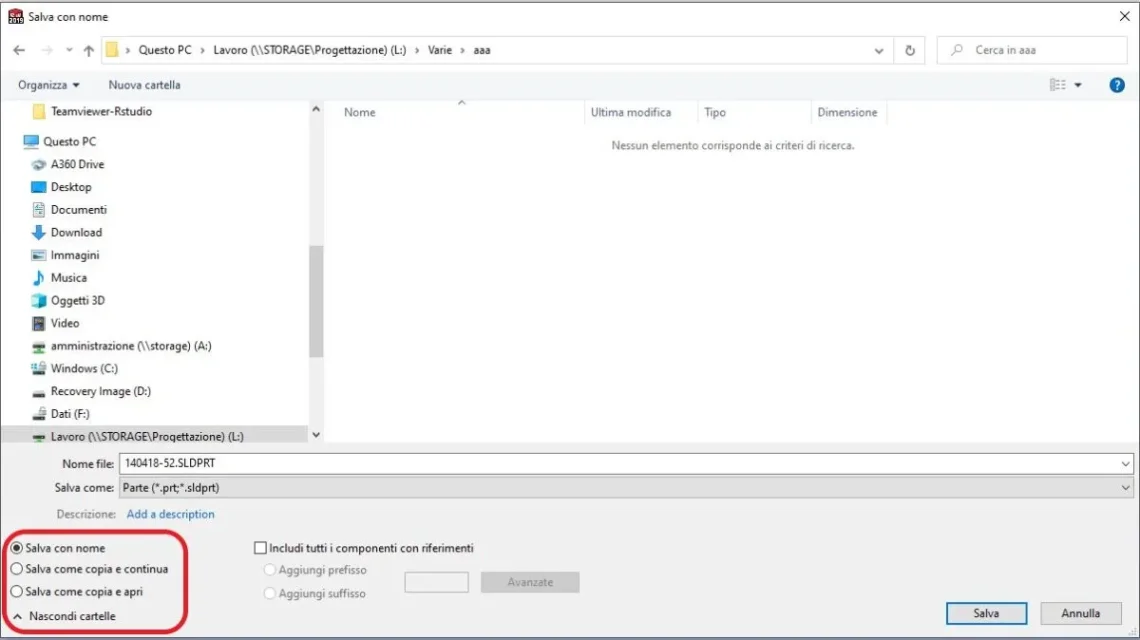
when you save by name you have 3 selectable options with a flag:

1-Save with name: create the new file and replace in the axieme
2-Save as copy and continue: save a copy and not replace
3-Save as a copy and open: save a copy and open it without replacing it in the axieme.
 

Attachments

  • salva con nome.webp
    salva con nome.webp
    32.3 KB · Views: 11
when you save by name you have 3 selectable options with a flag:

1-Save with name: create the new file and replace in the axieme
2-Save as copy and continue: save a copy and not replace
3-Save as a copy and open: save a copy and open it without replacing it in the axieme.
perfect,
thank you so much was what I was looking for, working with the small window and these flags didn't really see them.
 

Forum statistics

Threads
44,997
Messages
339,767
Members
4
Latest member
ibt

Members online

No members online now.
Back
Top
