• This forum is the machine-generated translation of www.cad3d.it/forum1 - the Italian design community. Several terms are not translated correctly.

exploded and put at the table

  • Thread starter Thread starter tonygancio
  • Start date Start date

tonygancio

Guest
Bye to all,
I'm creating explosive designs that will serve as a spare parts catalog, so I've created templates that fit and all right here.
the machines to explode do not have few components therefore I have created several levels of detail that then I will use to create the explosive.
Exploded is a .ipn file with multiple scenes (every scene contains a different level of detail) and a view (istatntanea view).
I go to create a table where each sheet contains one scene exploded and I create the list parts.
on the next sheet there is another scene of the same machine and proposes the table with also the parts of the previous scene. ...
I hope I've explained enough, do you know how to help me out on cpome bring out the table with only the parts related to the scene on that page? I tried in several ways but nothing. .
Thank you so much!!
Niche
 
Sorry I used the level of detail.. . the view I tried to use it but it is not clear to me its operation... more I tried the filters as you say but I did not find a suitable one, and that option seems to me not to be present among the various proposals....can you explain to me a little more in detail the steps? Excuse me but I would like to understand and thank you so much for the help!
 
Hi.
we say that the level of detail, going to suppress the components, in addition to "spegnerli" downloads them from the file together, therefore, reducing the number of files loaded into the axieme, everything becomes very light, so this operation generally I perform it for the "heavy" files.
To suppress a component, there is no variation in the difference!https://knowledge.autodesk.com/it/support/inventor-products/learn-explore/caas/cloudhelp/cloudhelp/2019/ita/inventor-help/files/guid-c0777703-9bb3-4fd9-9955-1dc8949b667f-htm.htmlIf you use visual representation, this gives you the opportunity to memorize the on/off state of the components, and the forcing of their part color.
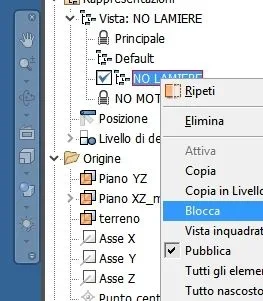
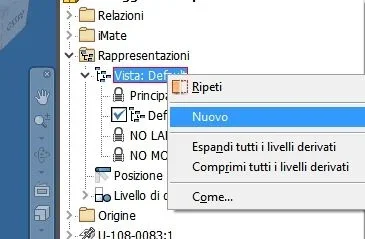
example, from the default view, new dx key, create a new view, _foto__172.webpturn off some components and then select the name of the newly created view, dx key and lock_foto__173.webpblock , adds a padlock, practically "save" the on/off status of the components

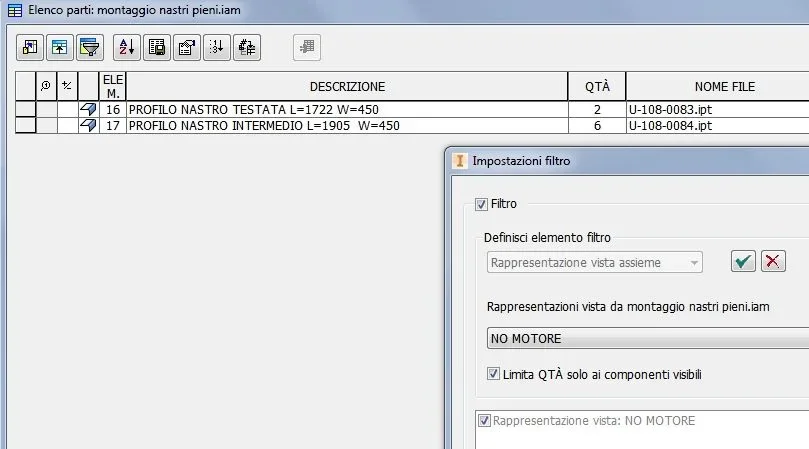
Now proceed with the view exploded, then generate the table 2d with distinct, after you have realized the distinct, the modification and selection of the filter icon, which will allow you to select the name of the view to be represented in the list and limit the quantity _foto__174.webphttps://knowledge.autodesk.com/it/support/inventor-products/learn-explore/caas/cloudhelp/cloudhelp/2019/ita/inventor-help/files/guid-414e16b4-1acb-4e17-a036-d3eaf1602567-htm.html
 
Here I am, I tried the views (which I didn't know and go well), but the tables continue to come out with the numbers of all the views that are contained in the idw file, that is also filtering as you told me the tables, as soon as I add a sheet with another view adds to me the balls of the codes contained on the new page... you know that there is no escape, it touches me to adapt to this.... or are there other roads?
Thank you very much!
 
Here I am, I tried the views (which I didn't know and go well), but the tables continue to come out with the numbers of all the views that are contained in the idw file, that is also filtering as you told me the tables, as soon as I add a sheet with another view adds to me the balls of the codes contained on the new page... you know that there is no escape, it touches me to adapt to this.... or are there other roads?
Thank you very much!
Good morning
each page has its table and the filter must recall the specific view representation of that page
attention to activate the check on the quantity
 
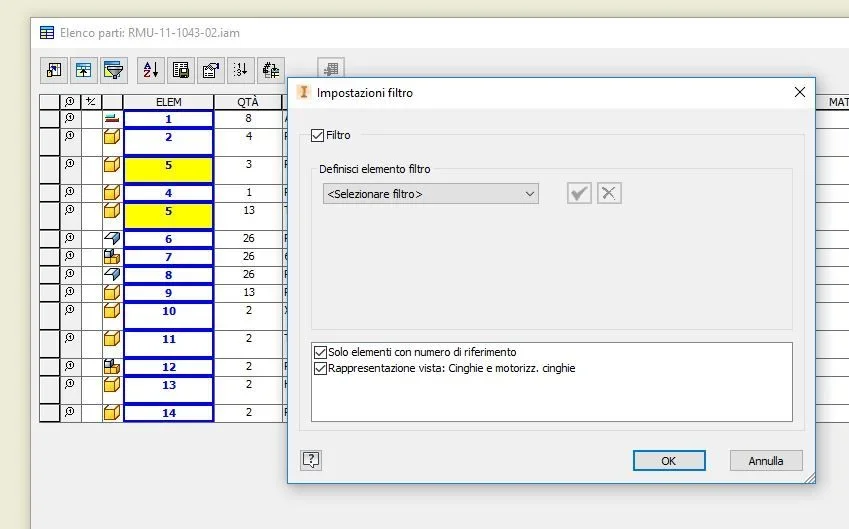
in fact I managed...double filter and viaaaaa
Thank you very much! !
ah...discussed... what does the blue square boxes mean and the blue + blue boxes highlighted in yellow?
 

Attachments

  • Cattura7.webp
    Cattura7.webp
    29.7 KB · Views: 16

Forum statistics

Threads
44,997
Messages
339,767
Members
4
Latest member
ibt

Members online

No members online now.
Back
Top