
• This forum is the machine-generated translation of www.cad3d.it/forum1 - the Italian design community. Several terms are not translated correctly.

extend more entities simultaneously

  • Thread starter Thread starter 8749michelep
  • Start date Start date

8749michelep

Guest
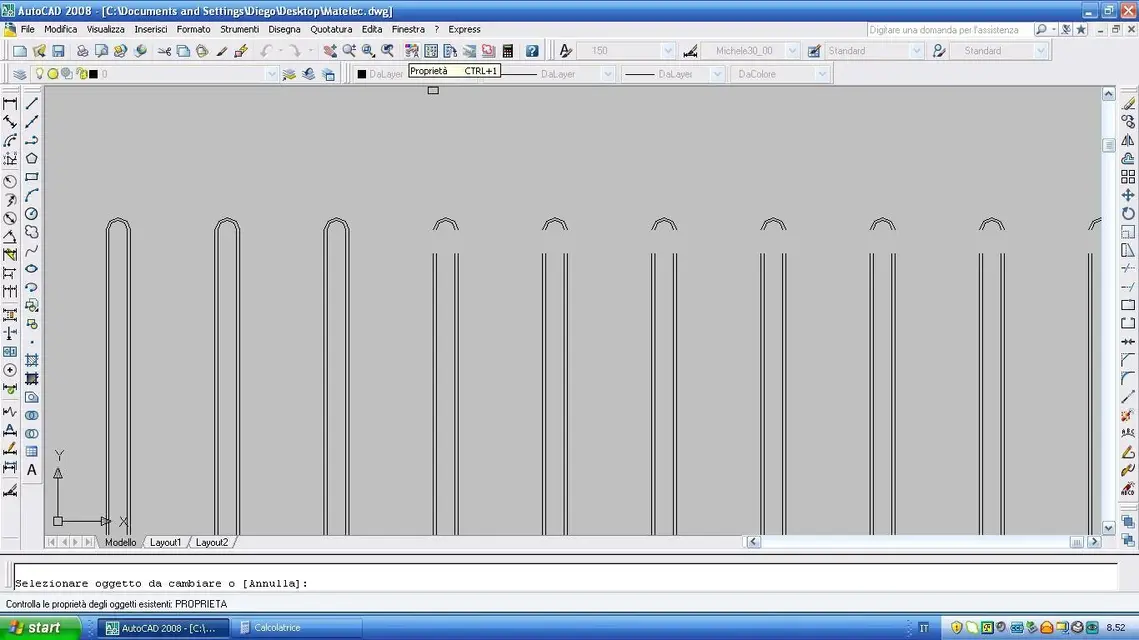
Hi guys when I try to stretch entities by clicking the button created by the menu persolizza ente ente and the delta submenù in practice stretching the specified length body I would like to create a selection to stretch all the entities in one shot only without clicking the body by body. cmq if you have not understood v place also the image
 

Attachments
  • Autocad_forum.webp
    Autocad_forum.webp
    59.5 KB · Views: 11
Last edited by a moderator:
but for that case in the photo why do you not use extend?

ps: entities not:smile:
 
but then should I click line by line?? ? I would like a method where I can select all lines as I do for the command size. Is there a way??? I don't know if I explained well
 
both with estendi with the stira You can use the line selection window, including all you need.

greetings
Mar
 
both with estendi with the stira You can use the line selection window, including all you need.
It seems obvious, but...the window you have to do it from right to left (intersecting window) and from the side of the lines you want to extend.
 
with extending the procedure seems easier but with ironing it seems to be different only that I do not manage the true ironing operation. in practice only some lines stretch others seems to be always at the same point
 
with extending the procedure seems easier but with ironing it seems to be different only that I do not manage the true ironing operation. in practice only some lines stretch others seems to be always at the same point
Are they or do they look the same?
if some lines have remained unchanged the reasons can be: either you have not selected them in the exact way or are on a blocked plane.
Besides extending and ironing do not always give the same results.
 
with extending the procedure seems easier but with ironing it seems to be different only that I do not manage the true ironing operation. in practice only some lines stretch others seems to be always at the same point
Maybe I always say the same things, but...
Explode lines, make sure they are on unlocked layers, select by intersection (and in one shot only!) the ends above lines, right key, first point, second point.
If it doesn't work, it's pretty weird.
 

Forum statistics

Threads
44,997
Messages
339,767
Members
4
Latest member
ibt

Members online

No members online now.
Back
Top