• This forum is the machine-generated translation of www.cad3d.it/forum1 - the Italian design community. Several terms are not translated correctly.

external and internal threads and table mounting

  • Thread starter Thread starter kertus
  • Start date Start date

kertus

Guest
Good morning, guys.

I have a little disappointment to ask you. As known, to perform a hole, from the technological point of view, a drilling is carried out, then a flushing (if internal thread) or a bevel (if external thread) of length at least equal to the pitch of the thread, then the definitive mapping.

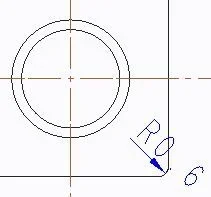
creo offers the hole feature to perform the threaded hole. both by integrating the devading operation inside the feature (example 1 attached for a hole m6) that making a feature apart for the devading, when I go to make the table, it makes me come out an unbeatable and incorrect thing because it shows me three concentric circles (figure 2e 3).

I wonder why to give a compact tool like the hole feature if you can't use it properly.

What do I do?

1) I make a break from the hole feature where I put 6 instead of 7 on the racking (Figure 4) then getting a table as in figure 5 where I return the representation according to the rules of the drawing and handed 1x 45°, although I remain the horror problem in figure 6;

2) I don't just put the slip so much who has to make the drawing knows that it needs (I wonder then what was put to make the option)

3) I use cosmetic thread also for internal thread but with horrible results of figure 7 and 8

please tell me
1.webp2.webp3.webp4.webp5.webp6.webp7.webp8.webp
 
I answer for the hole, in fact it is correct that there are three concentric circles:
1-spigol of hazelnut hole
2-circumference of thread
3-spigol of deburring

in practice thread circumference, it shows you where it starts with devading.

in case you do a hole without rinsing and then put it, as the thread is a cosmetic and not solid, remains the starting point of the cosmetic thread and you see it cum.
 
I answer for the hole, in fact it is correct that there are three concentric circles:
1-spigol of hazelnut hole
2-circumference of thread
3-spigol of deburring

in practice thread circumference, it shows you where it starts with devading.

in case you do a hole without rinsing and then put it, as the thread is a cosmetic and not solid, remains the starting point of the cosmetic thread and you see it cum.
I will make you holy 320i s:)

I can't follow you this time. if I first do the thread with feature hole and then the flapping apart, what difference does it make from having done it all integrated if then the graphic rendering is the same?

I understand the three correct concentric circumferences from the prospective point of view, but in the rules of representation of the technical drawing when a doro is threaded the devading is omitted in the representation in the plant and instead I create it is strongly slammed:)
 
the difference lies in the starting point of cosmetic thread.
in the feature hole, it arranges the program to start the cosmetics from after the rigging (if the latter intersects), while if you do the rigging after, the cosmetic anyway starts from the hole start surface.
cosmetics are not affected by the following features and it is also for this reason that ptc has inserted the flapping in the feature hole.
if you make a threaded laminate hole (it does not exist in mechanics but it is to make an extreme example) in 2 features where you first put the threaded hole and then the lamatura, you will see that the cosmetic, is on the lamatura!
 
thanks for the answer 320i s

It is precisely what I create fails to do if you look at figure 1 and 2 of the beginning of the discussion. There I integrated the devasion inside the feature hole through which I performed the thread and the result is that in figure two, in which the lines of the nominal diameter intersect the devasion when the relative lines the nominal diameter should end in conjunction with the devading as you affirm:)
 
I've done some evidence, but I still don't understand where the problem is.

-if I use the threaded hole feature with the scaling option, the cosmetic begins where there is the slitting intersection = correct in every aspect (left hole)
-if I use the threaded hole feature and then add a flapping feature, the cosmetic is not affected = incorrect concept, but working graphically (central hole)
-if I use the simple hole feature with flapping, then add the thread cosmetic, it can not start from the flapping, but from a plan that is to be created where you want the thread to arrive and directed towards the outside, with limit the rigging =correct, but laborious with 3 steps (right hole)
filettature.webpfilettature_t.webpAmong other things I create in the table, shows the intersection point between cosmetics and flapping in edge, while in view from the top no, so in my opinion it is very complete.
 
1.webp2.webp hi, I will take you back to the two figures above what the standards of representation (figure 1 and figure 2). in the second it is evidenced that in the axial view the thread prevails on the devading; in the first are highlighted the operations for the creation, as an example, of a threaded hole m10: first the drilling to phi 8,5 (which I create integrates in the feature of hole), then the devading depth at least equal to the pitch of the thread (1.5 mm) then the mapping. the problem lies precisely in the difformity of representations of the threaded hole with rigging: as it happens when drawing by hand, the thin line that defines the bottom of the thread must go to coincide with the outer diameter of the devasation, and this creo does not.... In fact, in your representations it happens how much I have shown in my figures at the beginning of the discussion, creating difformity with the fact that the thread hole prevails on the vasation in the representation in axial view as in figure 2 of this message.

recalling now the numbering of such figures (you had made an example with thread m6) to create a 45-degree depth 1mm (the thread step m6) I mathematically set the vasation option as I highlighted in figure 1 by increasing the drill diameter from 5 to 7 mm (it is trigonometry): In this way, drawing shows me the quota 1x 45° but a difform representation (figure 2 and figure three beginning discussion) from that in figure two of this message.

to overcome the thing I have to set in the vasation option of switching from 5 to 6 mm, then trigonometrically the spacing has a depth that is half step of the thread (figure 4 and 5 initial discussion), then change the quota in the drawing giving the true depth value, but then in axial view I do not see the circumference that represents the bottom of the thread.
 
However, the regulations have been designed for representations made with the tecnigraph, where the threading line makes it correspond for convenience to the bevel needed to graft the thread, actually make a bevel consistent with the threading line (which corresponds to the diameter of hazel), is out of place with non-practical values.

to keep in mind then that I create, takes into account the threads for the calculation of the interferences, then set a diameter of hazel to be consistent with the bevel, is even more wrong in this case.
with regard to the pre-driving, creo has the normalized tables already inserted, the case of the m6 that has hole from 5 (smusse from 0,5x45°) is one of the few cases where bevelous and diameter of hazelnut, coincide, already the m8 requires 6,8mm pre-forum, ask a bevel from 0.6x45°, in the workshop they "back you".

By the way, if I need to have a more pronounced bevel to help the input of the screw to the assembly, I do not see why the system should not make me notice consistently where the thread will begin (imagine with a 5x5 bevel on a m8 thread, when the deeper the thread begins than the insert surface.

Ultimately, ask the cad to have the graphic representation as on a tecnigraph, I find it a step back compared to the real possibilities of today (already where I work now, I don't give more quoted designs in production, but a step and a drawing maximum with dimensions and indications that on the step can not appear).
 
Good morning, everyone.
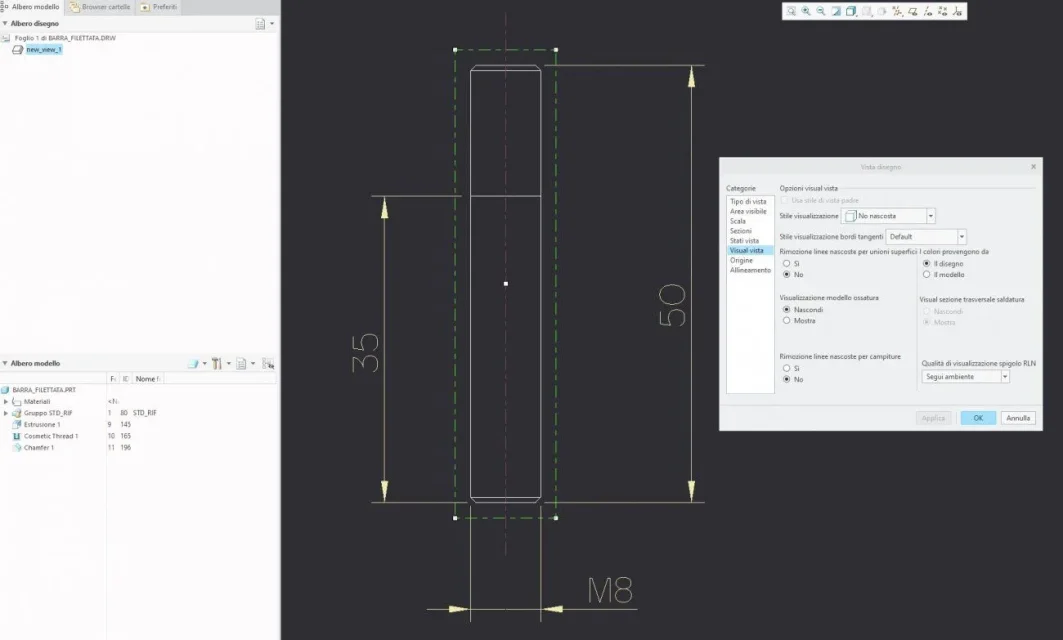
I reconnect to this discussion because I have a problem with displaying a cosmetic thread in the table setting of a threaded shaft with creo 5.
in a few words I can not see the thread unless I impose the display of hidden lines.
If it is a simple threaded tree, the thing can be fine, but in case the piece to be represented at the table is more complex the visualization of the hidden lines makes me the views too complex.
How can I do to display cosmetic thread with hidden lines not visible?
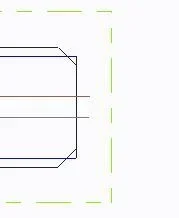
I attach images.Visualizzazione normale.webpthis is the display with hidden lines not visible, the filetature is not represented correctly.
Visualizzazione linee nascoste.webpthis is the view with hidden lines visible. in this case you could also do so because the piece is simple, but in the case of particular complex risks to display a tangle of lines that unnecessarily complicate my view.
 
ciao ragazzi!
se posso esservi utile vi rigiro queste impostazioni da inserire nel .dtl:

thread_standard std_iso_imp_assy
hlr_for_threads yes
hlr_for_quilts yes
remove_cosms_from_xsecs all
draw_cosms_in_area_xsec yes
show_quilts_in_total_xsecs no

a me sono andate bene. ciao!
I solved by following the advice of this post.

Greetings to all.
 

Forum statistics

Threads
44,997
Messages
339,767
Members
4
Latest member
ibt

Members online

No members online now.
Back
Top