
• This forum is the machine-generated translation of www.cad3d.it/forum1 - the Italian design community. Several terms are not translated correctly.

external references lost

  • Thread starter Thread starter lillo5
  • Start date Start date

lillo5

Guest
Hello everyone
I have a problem with external references on a catpart.
I had created a part starting from a set to have reference surfaces.
I made some changes and reorganization of folders and despite trying to be very careful I missed the references I had taken.
in substance I find myself as from image
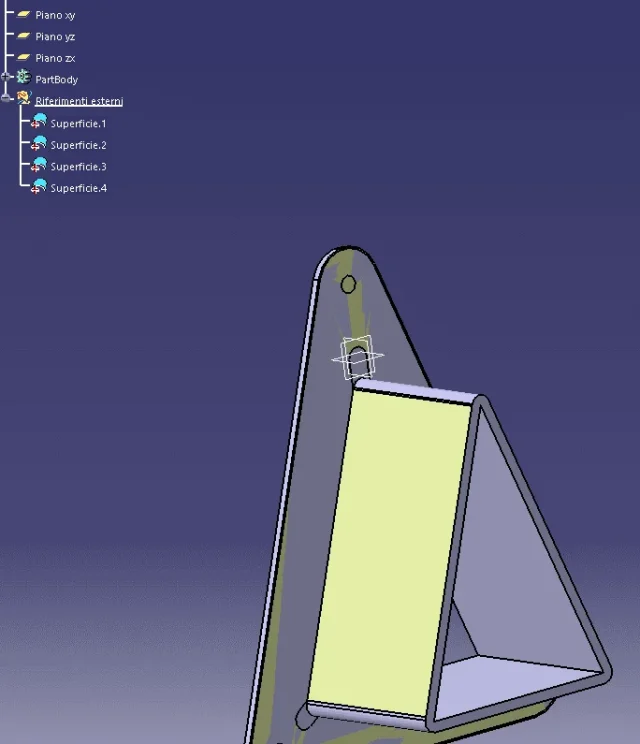
1619170114358.webpIs there a way to reassociate references?
 
you have to use contextual associations
on the partbody, left key
and then redirect your lost surfaces
1619250715614.png
 
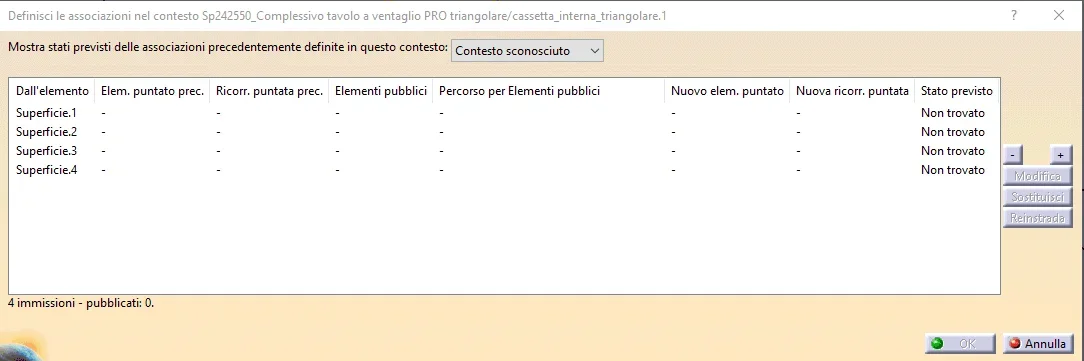
ho provato ma when esce questa finestra1619418334946.webpIf I make "replace" it doesn't make me select anything
If I do "reinstrada" it makes me select the body but nothing happens.
 
no, when I built the piece to I used as reference the surfaces of the piece b.
I didn't do any more operations.
 
you need to define public elements, in such case your surfaces.. then with defined contextual associations go to select the surface you have published
 
no, there is no
also because it has logic
public= that other users can share, and it is not necessarily necessary to share everything...
Did it work as I told you?
 
In the morning, I'll check. but so every time I have to do this I have to make the item public?
I had already done these operations with my system and had not troubled me; maybe even the starting files were better organized and I didn't do all these saves and renames.
 
It is good to make them public.
and then the advantage of publishing them is that the public elements find them at the bottom, so easily identifiable.
Be careful: if you have extrapolated the surface to share it with other caparts..
and if for "x" reasons on the face where you extrapolated the surface, make some changes. the links you lose them.
that is why it is better to make them public.
and I recommend, in your specific case, instead of extrapolating surfaces that, among other things, seem to me like plans,
you should create offset plans with respect to the surface, and publish them
 
where it is possible.. use "planes" "crash" "points" "axle system" to publish and share
 
hi, I did the test and publishing and reassociating everything back to work properly, thanks.
I gotta get my hand.
 

Forum statistics

Threads
44,997
Messages
339,767
Members
4
Latest member
ibt

Members online

No members online now.
Back
Top