
• This forum is the machine-generated translation of www.cad3d.it/forum1 - the Italian design community. Several terms are not translated correctly.

extract file path from parts together

  • Thread starter Thread starter calzand
  • Start date Start date

calzand

Guest
Good morning to all

I would like to extract through vb or ilogic from a set the file name and path of the components that make it,
extracted data then I can save it in a text file or an excel file

I tried to export the distinct components by activating the file path column, but it only exports me the name and not the path

I do not care about other data type quantity or name part

thanks to all
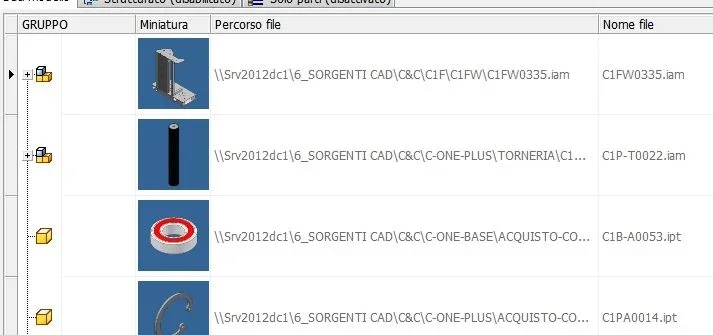
 
Hi.
with distinct if you activate "file path" and possibly "filename" you should solve
with ilogic is a little more complex since, you have to "cycle" inside the tree of the parts
I also attach the code part to do it._foto__001.webp


'inizio comando
nome_file=thisdoc.filename(true) 'with extension (false) without extension
nome_file_no_est=thisdoc.filename(false) 'with extension (false) without extension
percorso=thisdoc.path
estensione = right (nome_file,3)


tipo=iproperties.value("project", "document subtype")'{e60f81e1-49b3-11d0-93c3-7e0706000000} x assieme
if tipo <> "{e60f81e1-49b3-11d0-93c3-7e0706000000}" then
messagebox.show("eseguire il comando da un file di assieme (.iam).", "!!attenzione!!")
exit sub
else
end if


'-----------------------------------------------------------------------------------
dim oasmdoc as assemblydocument
oasmdoc = thisapplication.activedocument
oasmname = left(oasmdoc.displayname, len(oasmdoc.displayname) -4)'nome file privo di . ed estensione (no .iam)
rusure = messagebox.show ( _
"ciclo su tutti icomponenti del gruppo" _
& vblf & "questo comando potrebbe richiedere un pò di tempo.", "www.mc-cad.it",messageboxbuttons.yesno)
if rusure = vbno then
return
else
end if

'-----------------------------------------------------------------------------------
'crea il file di testo per il report dei file (stesso nome dell'assieme ma .txt)
owrite = system.io.file.createtext(thisdoc.pathandfilename(false) & ".txt")
owrite.close()
'-----------------------------------------------------------------------------------

'esaminare i file di riferimento l'assembly
dim orefdocs as documentsenumerator
orefdocs = oasmdoc.allreferenceddocuments
dim orefdoc as document


for each orefdoc in orefdocs

'get the full file path to the original internal references
oorigrefname = orefdoc.fullfilename
'find the postion of the last backslash in the path
fnamepos = instrrev(oorigrefname, "", -1)
'get the file name with the file extension
name = right(oorigrefname, len(oorigrefname) - fnamepos)
'get the file name (without extension)
shortname = left(name, len(name) - 4)
'get the path of the folder containing the file
folder_location = left(oorigrefname, len(oorigrefname) - len(name))


'____open and append to an existing text file_______
dim oappend as system.io.streamwriter
ofile = thisdoc.pathandfilename(false) & ".txt"
oappend = io.file.appendtext(ofile)
oappend.writeline(oorigrefname)'nome dile file 3d
oappend.flush()
oappend.close()

next
'- - - - - - - - - - - - -

thisdoc.launch(ofile)'apertura del file di testo txt con notepad di windows
 

Forum statistics

Threads
44,997
Messages
339,767
Members
4
Latest member
ibt

Members online

No members online now.
Back
Top