
• This forum is the machine-generated translation of www.cad3d.it/forum1 - the Italian design community. Several terms are not translated correctly.

extrusion of a cutting geometry wrapped on cylindrical surface wf4

  • Thread starter Thread starter alemonte
  • Start date Start date

alemonte

Guest
Bye to all,
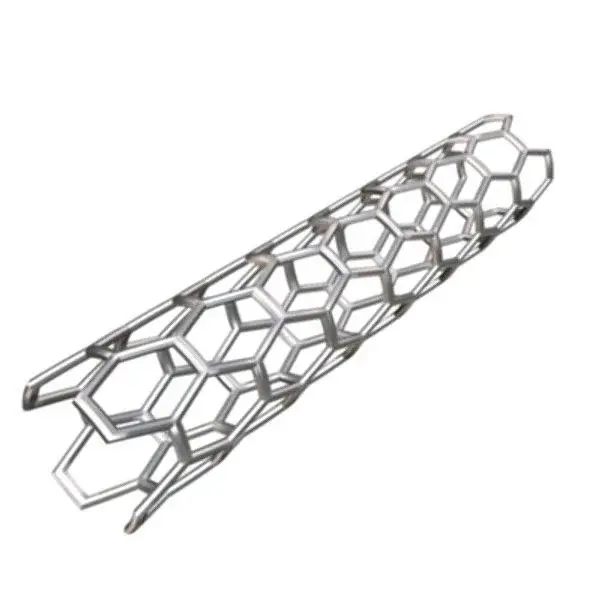
I just registered because I started using proe wf4, I looked in the previous discussions but I couldn't figure out how to solve the problem. if I wanted to build a cutting geometry to wrap on the outer surface of a tube so as to realize a reticular cylindrical structure as I should do? I hope I have been clear, in case I have missed a discussion in which the problem is already dealt with, I thank you in advance if you signal it to me. Thank you!

alessandro
 
I don't understand what you want to do, but you can't make a single cut and proceed with the pattern, maybe in 2 sizes? (length tube and angle)
 
I put an image to give you an idea of what I should do
 

Attachments

  • stent3ds01.jpg432b8a71-7d5f-4424-add6-16176197b828Larger.webp
    stent3ds01.jpg432b8a71-7d5f-4424-add6-16176197b828Larger.webp
    16.7 KB · Views: 51
There are various ways to make it... if you want to proceed with cutting extrusion on a pipe just that after drawing your cylinder you make a hexagonal extrusion (1 2 or 3 depending on how you organize the pattern) chamfer + round where it is and then proceed with the series
 
I saw a discussion a few months ago in which another person asked the same exact thing but did not receive an answer, indeed... you know that until I have several thousand euros to pay the course it is better that I put my heart in peace...
 
hi ale ... I can help you but, you have to have some patience, the time "me" scarcely:-)
 
hi maxopus you are really nice!!I will consult periodically the discussion to see if there are updates!I in while I keep looking for a solution!thank you again:smile:
 
I think with extrusion/cut you go not far if you want proper geometry... since you are on a cylindrical super-ifice

I did this with the vss if you care, it's not very intuitive though... probably you can do something easier. . I am a student.

you have to hide the extrusion of the initial surface since in the rescue I lose what I hide (in fact if someone can explain to me how you can avoid all the times of remaking hiding... :biggrin: )

the ends are to be remade because I didn't cure them... wants to be just a point....
 

Attachments

  • tubo_01.prt.rar
    tubo_01.prt.rar
    948.7 KB · Views: 15
  • prt0001.webp
    prt0001.webp
    152.6 KB · Views: 34
then, the best method I know is to extrude a cylindrical surface, project on it the perimeter of the hole and with the trim command to empty it.
then with two patterns, one axial and the other along the direction of the cylinder you perfectly create the part with the development of perfectly radial holes. there would be something extra, bevels included, but now I'm in a hurry, later or tomorrow if you want to put the example. :smile:
if the longitudinal profile is also a hexagon the thing is equally feasible! !
 
I think with extrusion/cut you go not far if you want proper geometry... since you are on a cylindrical super-ifice

I did this with the vss if you care, it's not very intuitive though... probably you can do something easier. . I am a student.

you have to hide the extrusion of the initial surface since in the rescue I lose what I hide (in fact if someone can explain to me how you can avoid all the times of remaking hiding... :biggrin: )

the ends are to be remade because I didn't cure them... wants to be just a point....
Thank you very much:finger:
 
Thank you so much! hi trot I am very interested in the example!but if I project the cutting geometry on the surface I do not deform it?I try with winds but then I can not use the perimeter wrapped on the cylinder to proceed with the cut. once I wrap the design on the cylindrical surface how can I use it for cutting?
 
It also depends on what you want, for example in the image you post, I think that more than cutting you are talking about an octagonal section "filo" arranged esagonally on a cylindrical surface... thinking of cutting it from something existing may not be the best way. . since when cutting from a cylindrical surface, the cut surfaces are not convergent to the axis of the cylinder but are parallel (unless they have small hexagons and large diameters)

Moreover a cut of the genus + all the bevels could be very heavy (in fact the file I had done in this way I discarded it also for this reason)
 
It also depends on what you want, for example in the image you post, I think that more than cutting you are talking about an octagonal section "filo" arranged esagonally on a cylindrical surface... thinking of cutting it from something existing may not be the best way. . since when cutting from a cylindrical surface, the cut surfaces are not convergent to the axis of the cylinder but are parallel (unless they have small hexagons and large diameters)

Moreover a cut of the genus + all the bevels could be very heavy (in fact the file I had done in this way I discarded it also for this reason)
if you work on a cylindrical surface and only to finished cuts often perform the surfaces of the holes will be perfectly convergent.
in any case it is right to wrap not to lose the size of the original shape. doing the test I realized that it does not run the series for the trim, so it must be repeated for each hole, plus the bevels and we arrive to a nice heavy model. :smile:
 
you have to hide the extrusion of the initial surface since in the rescue I lose what I hide (in fact if someone can explain to me how you can avoid all the times of remaking hiding... :biggrin: )
Bye!
shows the layer tree, right-click on "livelli" (shaft root), "save state", and then save the model.
 
Bye!
shows the layer tree, right-click on "livelli" (shaft root), "save state", and then save the model.

thanks!
if you work on a cylindrical surface and only to finished cuts often perform the surfaces of the holes will be perfectly convergent.
in any case it is right to wrap not to lose the size of the original shape. doing the test I realized that it does not run the series for the trim, so it should be repeated for each hole
Yes, you are right;)

you can do extrude instead of trim (always on the sup) the problem is always in the bevels, that being downstream of the thickness you cannot group, but if you do not need the problem is solved:)
 
I'm trying to explain where I'm coming to see where I'm blocking myself.
extruded tube-> create offsetted reference plan compared to right-> design geometry (do I need to create reference systems?) -> winding. from here forward total darkness, once I have spread my geometry on the cylindrical surface what should I do (pass step) to cut?
 
first select the surface on which you intend to cut, then change -> trim and select the projection of your sketch.
 

Forum statistics

Threads
44,997
Messages
339,767
Members
4
Latest member
ibt

Members online

No members online now.
Back
Top