
You are using an out of date browser. It may not display this or other websites correctly.
You should upgrade or use an alternative browser.
You should upgrade or use an alternative browser.
Tristan
Guest
Have you tried yet? which profile would be?
ocraM999
Guest
the profile could be a circle, a square or a more complex shape, it does not matter.
what I find is that in the 'local mass modelling' can not use a family/profile as in the case of modeling within a family.
that is, in 'local mass model' it seems that the profile to be extruded can only be drawn, while using 'new family' the profile to be extruded can be drawn or exercising a profile/family.
But here we are in the 'local mass modelling'
Mar
what I find is that in the 'local mass modelling' can not use a family/profile as in the case of modeling within a family.
that is, in 'local mass model' it seems that the profile to be extruded can only be drawn, while using 'new family' the profile to be extruded can be drawn or exercising a profile/family.
But here we are in the 'local mass modelling'
Mar
ocraM999
Guest
the profile could be a circle, a square or a more complex shape, it does not matter.
what I find is that in the 'local mass modelling' can not use a family/profile as in the case of modeling within a family.
that is, in 'local mass model' it seems that the profile to be extruded can only be drawn, while using 'new family' the profile to be extruded can be drawn or exercising a profile/family.
But here we are in the 'local mass modelling' so you are trying to make for example a cover to a wall.
in other words, to make with revit a cover (sheet box) on the wall above how do you do it?
Mar
(but where did the command go to re-edit a post? )
what I find is that in the 'local mass modelling' can not use a family/profile as in the case of modeling within a family.
that is, in 'local mass model' it seems that the profile to be extruded can only be drawn, while using 'new family' the profile to be extruded can be drawn or exercising a profile/family.
But here we are in the 'local mass modelling' so you are trying to make for example a cover to a wall.
in other words, to make with revit a cover (sheet box) on the wall above how do you do it?
Mar
(but where did the command go to re-edit a post? )
Tristan
Guest
I'm afraid you're messing up. Although in-place modeling we are talking, an account is shaping a mass, an account is shaping a wall! are two completely different things in revit, which have different functions.
ocraM999
Guest
So the cover on the wall as we put it?I'm afraid you're messing up. Although in-place modeling we are talking, an account is shaping a mass, an account is shaping a wall! are two completely different things in revit, which have different functions.
Mar
Tristan
Guest
We put it if your local model is a wall, not a mass!So the cover on the wall as we put it?
ocraM999
Guest
So let's summarize... I don't understand anything... .We put it if your local model is a wall, not a mass!
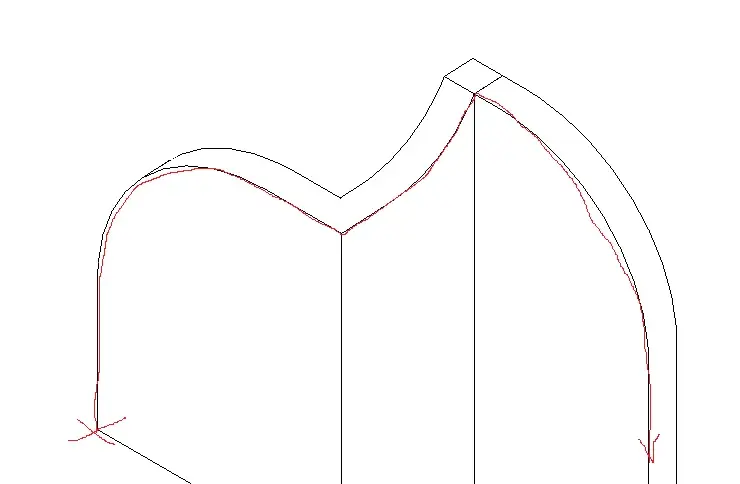
I have a building whose walls of moth at the top, although having forms "say baroque", must be covered with a scossaline.
the walls are walls, their shape was embroidered with the command [modifica profilo].
So now how do you do it?
Mar
Tristan
Guest
I'm sorry. I don't understand anything. Are you leaving saying that you are shaping a local mass and now it turns out that you have walls (system families) edited in the profile?? What about the local mass then? ?
However, you cannot apply wall extrusions on a wall with "modified" profile.
However, you cannot apply wall extrusions on a wall with "modified" profile.
ocraM999
Guest
...because modeling with local mass a profile/scossine that follows a twisty path/tractor, not straight, could be, in my opinion, a way to get a cover that decorates a facade as, being the walls edited in the profile, it is not possible to apply profiles/scosins or frames in other way... .I'm sorry. I don't understand anything. You left saying you're shaping a local mass
to say the truth....the walls (system families) edited in the profile are always existed, they are those (see image attached in the application presentation post) that should be covered by a profile/scosine/frameand now it turns out that you have walls (system families) edited in the profile? ?
....if not local mass as you do...... ?What about the local mass then? ?
right.... so let's go back to head, put a profile/scoss/frameHowever, you cannot apply wall extrusions on a wall with "modified" profile.
in a building with a winding trend it would seem that revit allows it only through the local mass commands........
Mar