
• This forum is the machine-generated translation of www.cad3d.it/forum1 - the Italian design community. Several terms are not translated correctly.

face division

  • Thread starter Thread starter Nic65
  • Start date Start date

Nic65

Guest
Good morning.
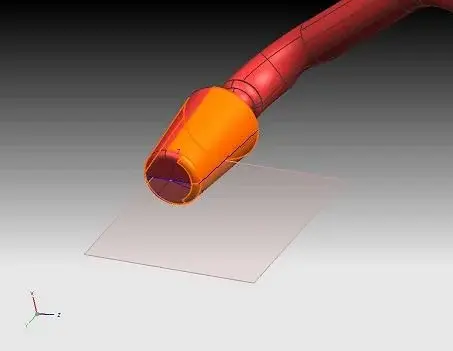
I divided a pipeline into surfaces by means of curves derived from isocline and planes so as to have two upper/lower parts of a mold. when I go to color and/or differentiate by layer the two parts I can not because the selection considers the faces still joined.
to divide faces I used the command "insert ---> delimites ---> dividing face".

as you can see from the attached image the pointer selects the whole face (orange color) while instead it would be necessary to select only the lower or upper part of the plane.

Thank you in advance for your advice and your constant availability.
Good day:
 

Attachments

  • ca54.webp
    ca54.webp
    6.3 KB · Views: 16
to color it is sufficent that in the filter selection imposed face (or face do not know it in English) while it is not possible to move the face of a solid, or of surfaces sewn in a different layer.

at least up to nx5...
 
thanks ser.cad, with your indication I managed to color them.:finger:
for the layers instead if you have to move the faces of the bottom on a layer different from those of the upper part you say I can't do it?
 
to be able to move them on different layers faces must belong to different body sheets.
to get this result you can choose different ways. if the two sheet body you need in the same file, extract a copy of the complete object and then cut while keeping the first half and then the other one; if instead (as often happens) you are + comfortable having the two half in separate files do two region links in two different files.
I hope to have been clear, it is much easier to do than to explain! If you have any doubts, ask yourself!
Hi.
 
Thank you very much omen.
but by curiosity, is this procedure something that in the sucessive versions of nx goes to lose or remains equal? I ask this question as, having worked both on catia v4 and v5, I was looking for a more immediate solution. I try to explain better: in both systems (v4 and v5) it is enough to select the face to change layers, the same face previously divided, without further duplication. ok on the v4 that has a different structure where there are not only faces but also mother surfaces and where the creation of models in free form is, basic, not parametric. but between v5 and nx5 I found really many similarities. I expected faces to be treated the same way.
Thank you again for the answer and availability:finger:
Hi.
 
Thank you very much omen.
but by curiosity, is this procedure something that in the sucessive versions of nx goes to lose or remains equal? I ask this question as, having worked both on catia v4 and v5, I was looking for a more immediate solution. I try to explain better: in both systems (v4 and v5) it is enough to select the face to change layers, the same face previously divided, without further duplication. ok on the v4 that has a different structure where there are not only faces but also mother surfaces and where the creation of models in free form is, basic, not parametric. but between v5 and nx5 I found really many similarities. I expected faces to be treated the same way.
Thank you again for the answer and availability:finger:
Hi.
If the faces are part of a solid (or a sheet body) of course you cannot put them on different layers.
But if your surfaces are faces to themselves, you can do whatever you want.
or you can put them on different layers, but at the time when sewings (solid or sheet body) become one entity.. .
 
but between v5 and nx5 I found really many similarities. I expected faces to be treated the same way.
keep in mind that as cv5 no one exists:biggrin::biggrin:
that beautiful, every now and then, rekindle the fuocherello of passion:wink:
 
always consider that as cv5 there is no one:biggrin:
that beautiful, every now and then, rekindle the fuocherello of passion:wink:
Of course.
cv = computervision... :cool:

catia and nx (note the use of the uppercase/lowercase :tongue:), I think they have some differences in the treatment of faces/sheets/solids. . .
 
If the faces are part of a solid (or a sheet body) of course you cannot put them on different layers.
But if your surfaces are faces to themselves, you can do whatever you want.
or you can put them on different layers, but at the time when sewings (solid or sheet body) become one entity.. .
I probably miss something. The duct I'm working on is a model imported from an iges. the result is a set of 219 faces (in the navigator each face is selectable and is called as body) and if delimito one does not allow me to attribute two layers different to the two resulting parts of the face. it allows me to attribute a layer to each face before the delimitation, but not after. then continue to select the full face.
as a filter, while trying to move a face to a layer, it does not allow me to select the "face" item but only "surface". It is easy that I am making confusion between face and surface even if, since there are no mothers like on v4, I can't quite understand the difference on nx.
I managed to discriminate the two parts only by doing as indicated by omen.
 
I probably miss something. The duct I'm working on is a model imported from an iges. the result is a set of 219 faces (in the navigator each face is selectable and is called as body) and if delimito one does not allow me to attribute two layers different to the two resulting parts of the face. it allows me to attribute a layer to each face before the delimitation, but not after. then continue to select the full face.
as a filter, while trying to move a face to a layer, it does not allow me to select the "face" item but only "surface". It is easy that I am making confusion between face and surface even if, since there are no mothers like on v4, I can't quite understand the difference on nx.
I managed to discriminate the two parts only by doing as indicated by omen.
If the two faces are sewn together you can't put one on a layer... Because there's the sheet body.
if you need to do this you must "staccarle"... insert/combine/unsew
 
I probably miss something. The duct I'm working on is a model imported from an iges. the result is a set of 219 faces (in the navigator each face is selectable and is called as body) and if delimito one does not allow me to attribute two layers different to the two resulting parts of the face. it allows me to attribute a layer to each face before the delimitation, but not after. then continue to select the full face.
as a filter, while trying to move a face to a layer, it does not allow me to select the "face" item but only "surface". It is easy that I am making confusion between face and surface even if, since there are no mothers like on v4, I can't quite understand the difference on nx.
I managed to discriminate the two parts only by doing as indicated by omen.
You can't change layers to the single face. You can just change it to the whole surface.
or stains (as matrix told you) with insert/combine/unsew.
or, "cut" the sheet, with insert - trim - split body, and move layers the part that interests you.
 
perfect, using insert/combine/unsew I managed in the intent.
I'm still a little dark about the body sheet structure. I ask you to have some patience if it is possible, certain things for you obvious I can be insurmountable for us profane:
I made a simple test by creating a surface for 4 points (and this I think is the sheet body). Sucessively I split it with a plan (insert/delimit/face divide). At this point I find myself a superfice divided... but not divided. to be able to select the two parts separately I had to shake the surface.
If I didn't understand wrong by shaking the surface the respective faces were created, practically the surface is as if it had become a superfice mother (as on v4) with faces as children (look out if I continue to compare caia procedures, but it's so easier to understand).
Is that it or am I off the road? :redface:
Thanks again.
 
I made a simple test by creating a surface for 4 points (and this I think is the sheet body). Sucessively I split it with a plan (insert/delimit/face divide). At this point I find myself a superfice divided... but not divided. to be able to select the two parts separately I had to shake the surface.
Once you create the surface and top, use insert - trim - split body, and you will have 2 sheets that you can change layers.
If I didn't understand wrong by shaking the surface the respective faces were created, practically the surface is as if it had become a superfice mother (as on v4) with faces as children (look out if I continue to compare caia procedures, but it's so easier to understand).
Is that it or am I off the road? :redface:
Thanks again.
exact, shaking the surface, you have the individual faces that make it.
 
perfect, using insert/combine/unsew I managed in the intent.
I'm still a little dark about the body sheet structure. I ask you to have some patience if it is possible, certain things for you obvious I can be insurmountable for us profane:
I made a simple test by creating a surface for 4 points (and this I think is the sheet body). Sucessively I split it with a plan (insert/delimit/face divide). At this point I find myself a superfice divided... but not divided. to be able to select the two parts separately I had to shake the surface.
If I didn't understand wrong by shaking the surface the respective faces were created, practically the surface is as if it had become a superfice mother (as on v4) with faces as children (look out if I continue to compare caia procedures, but it's so easier to understand).
Is that it or am I off the road? :redface:
Thanks again.
No.
the concept is simple:
face is the real surface to own
sheet body is the entity "logic", union of many faces

... so when you split your face to 4 sides, you have as a result 2 faces, joined together in a sheet body...
 

Forum statistics

Threads
44,997
Messages
339,767
Members
4
Latest member
ibt

Members online

No members online now.
Back
Top