• This forum is the machine-generated translation of www.cad3d.it/forum1 - the Italian design community. Several terms are not translated correctly.

fault of closing surfaces

  • Thread starter Thread starter iron72
  • Start date Start date

iron72

Guest
Hello.
I'm working with the surfaces. I have built all my surfaces, bound and united.
then when I have to close the surfaces to make it solid, I see this error:
closing operator: it is not possible to close an opening in the selected body
with a flat face. check all body openings for flatness.
What is the analysis tool for this type of error? :confused:
Thank you.
 
means that there is a hole, and that this hole does not manage to close it with a flat surface. to find it, from workbench generative shape design, select the boundary command and your skin, in isolated mode (create reference). you will get the edge of the missing face
 
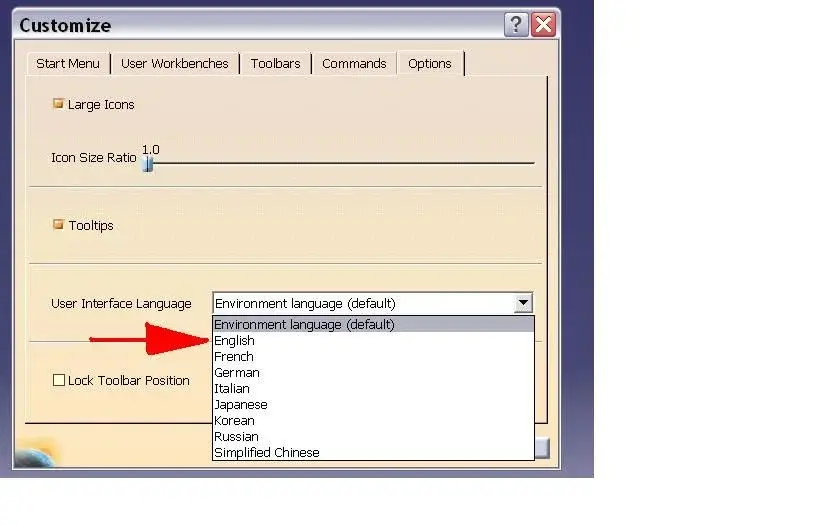
excuse my impediment, but I have a version in Italian of catia, could you send me a picture of what I have to select to do a surface analysis?
 
excuse my impediment, but I have a version in Italian of catia, could you send me a picture of what I have to select to do a surface analysis?
tools/customize that in Italian plays as tools/personality (google translator source, http: //translate.google.it/#en '%t') and then see attached image.
(boundary = edge, source barlafus)

once put in English it will be easier to follow the advice of robcrac

enjoyment
 

Attachments

  • customize.webp
    customize.webp
    22.4 KB · Views: 63
Now I started the surfaces and as I go on I make the union, only that I came to a point where after the union tells me that they are two domains and if I say yes to analyze, it indicates with a yellow arrow and a label the point of error of continuity.
what could be error on the sketch that drags behind everything, or can it be a surface modeling error?
 

Forum statistics

Threads
44,997
Messages
339,767
Members
4
Latest member
ibt

Members online

No members online now.
Back
Top