• This forum is the machine-generated translation of www.cad3d.it/forum1 - the Italian design community. Several terms are not translated correctly.

features manager hidden from the top bar

  • Thread starter Thread starter IlFincoITA
  • Start date Start date

IlFincoITA

Guest
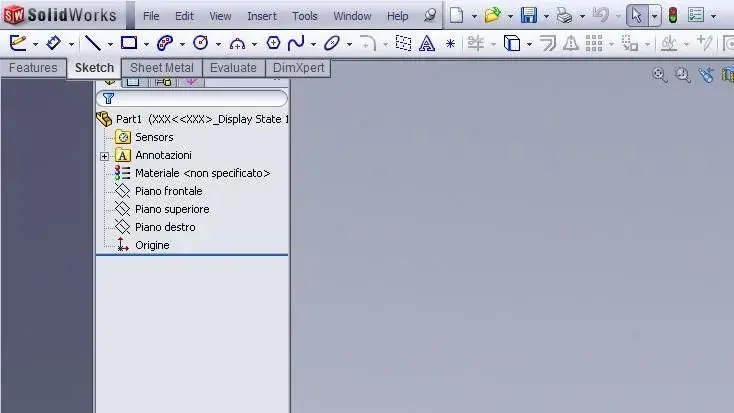
Hello, everyone. also to you the feature manager continues to be hidden, in part, from the top bar? to me it happens from 2010 and now continues with 2011. It's nonsense, but now I'm a little tired. I would like to access configuration tabs etc. normal. . .

Any ideas?
tabsw.png
 
Hello, everyone. also to you the feature manager continues to be hidden, in part, from the top bar? to me it happens from 2010 and now continues with 2011. It's nonsense, but now I'm a little tired. I would like to access configuration tabs etc. normal. . .
already happens since 2009 (both in xp and in win7).
but just widen or tighten the "column" (transject the margin) everything back.

greetings
Mar
 
Yes, it is a nonsense. and it's all right. But then when you open the file you still find it hidden and you have to reopen. since 2009? I didn't realize. . .
 
Hello, everyone. also to you the feature manager continues to be hidden, in part, from the top bar? to me it happens from 2010 and now continues with 2011. It's nonsense, but now I'm a little tired. I would like to access configuration tabs etc. normal. . .

Any ideas?
tabsw.png
My colleagues don't have this problem either with xp or seven, are you sure you don't have adocked fm?
 
are vga drivers certified? Sometimes swx combines strange if drivers are not ok.
 
are vga drivers certified? Sometimes swx combines strange if drivers are not ok.
Yes, drivers are certified and recommended, downloaded directly from swx.com.

Don't you? ?
to me on 4 machines, 2 xp 32 and 2 w7 64. with all the pictures I tried, fx 560, 1700, 3500, 3800 and 5600.. even with gefo.
but not always, usually only at the first opening, then with subsequent files no longer happens (it seems that after the "manual" correction it stores the setting and keeps it for the whole session).

greetings
Mar
 
Last edited:
the problem may be that swx leaves with the file window (not the application) not maximized and moved up. In fact, it's simple to replicate the problem, just push the current file window as high as possible to hide it under the menu bar. Then it's almost impossible to pull it out, it's best to close and reopen the file.

Probably the template was saved in that location that always reopens like that.

p.s. tries to enable the option "maximize document on open", in this way parts with the window of the maximized current file for which it should fit automatically, provided that is the problem.
 

Attachments

  • finestra.webp
    finestra.webp
    22.6 KB · Views: 10
p.s. tries to enable the option "maximize document on open", in this way parts with the window of the maximized current file for which it should fit automatically, provided that is the problem.
"enlarge the document at the opening".. is already enabled, default to installation.

But you put another flea in my ear: I go to check templates, which I have used for more than 2 years.
I don't think so. I also do it with files that are not "native" on my templates.
(2007 did not present this "defect")

But you do it or not? Did you get that image at your opening?

greetings
Marco:smile:
 
Just tried. I just shut down the program manager close all the features bars and reopen the files both on the side and the assemblies. then rehabilitated the program manager (with the right button to tell us) and everything is back to place.. .
 
Just tried. I just shut down the program manager close all the features bars and reopen the files both on the side and the assemblies. then rehabilitated the program manager (with the right button to tell us) and everything is back to place.. .
Yes, but then does the setting keep it? did you close the program, switch off the pc and on/reopening returned to place or as before?

because just above I said that solving is not a problem, just drag the side edge to adjust the width of the fm that fits. and for the whole session stays like this.. but when I turn off and rekindle back with that flaw, but only at the first opening (when regulated).

greetings
Marco:smile:
 
No no I tried that, too. I don't have that problem anymore. Then I don't know if the procedure works to you. I came by chance because I noticed that by deleting the program manager bar the problem disappeared. I thought I'd work like this... using the "s" button. but then he went to posco so...
 
I just wanted to clarify a term I used. the program manager is the command manager. I didn't remember it with the correct name. I think he's messing with me. But I pvato the thing also on a pc cn xp that hid the fm and also there solved the prblem.. .
 
Here we go. voevo only clarify a term I have used. the program manager is the command manager. I didn't remember it with the correct name. I think he's messing with me. But I have pvato the thing also on a pc cn xp that hid the fm and also there solved the prblema...
Well, of course you're making "casino" too...
 
ooooops I see now that I've missed many letters. fault of these wireless keyboards... battery change. Excuse me!
 
Yes, drivers are certified and recommended, downloaded directly from swx.com.

Don't you? ?
to me on 4 machines, 2 xp 32 and 2 w7 64. with all the pictures I tried, fx 560, 1700, 3500, 3800 and 5600.. even with gefo.
but not always, usually only at the first opening, then with subsequent files no longer happens (it seems that after the "manual" correction it stores the setting and keeps it for the whole session).

greetings
Mar
Never did it to me, in return I often pacciuga the area above the fm and I do not see the bars below to scroll, to solve open and close the aspects so swx reconstructs the screen correctly.
 

Forum statistics

Threads
44,997
Messages
339,767
Members
4
Latest member
ibt

Members online

No members online now.
Back
Top