• This forum is the machine-generated translation of www.cad3d.it/forum1 - the Italian design community. Several terms are not translated correctly.

file stl

  • Thread starter Thread starter marcofa
  • Start date Start date
you need the package " stl rapid prototyping", from you can import .stl files.
Hi.
Thanks, I activated and imported a file.
But on this I cannot do anything, no measure or modification or addition.
how can I make the file imported a catpart and then be able to work on it?
Mar
 
Thanks, I activated and imported a file.
But on this I cannot do anything, no measure or modification or addition.
how can I make the file imported a catpart and then be able to work on it?
Mar
What do you mean to make the file imported a catpart? to take measures just use the measure command and select "point on selection".
for editing you must reverse engineering (there are several discussions about the forum).
I can recommend the form
 
What do you mean to make the file imported a catpart? to take measures just use the measure command and select "point on selection".
for editing you must reverse engineering (there are several discussions about the forum).
I can recommend the form
thanks, something I can measure, but it is complicated: the diameters?
to change the design I make?
where do I find explanations in the guide?
Mar
 
a stl file can be transformed into another usable format, for example step or iges? so you can change it?
or a stl file died there and can't do anything?
Mar
 
a stl file can be transformed into another usable format, for example step or iges? so you can change it?
or a stl file died there and can't do anything?
Mar
Hello, Marco.

is dead, as falonef said are files used for rapid prototyping or coming from 3d scanners etc.
If you need the geometry of the editing piece, you need to rebuild it, reverse engineering.
 
about saving a stl known that the settings
general >visualize >precision in 3d decides the resolution of the exported model; Are there other parameters that affect this?

separate problem, when except for the semispheres (or the solids wrecked with 360° revolutions) on the exported model always appears to me a line that runs through the whole surface; Is there a way not to show her?
 
Hi.

the setting: general > views > performance in 3d
decides exclusively the resolution of the texture of the graphic representation, that is the degree of segmentation of the curves represented at video; this without changing in any way the generated mathematics.
I think (I'm not sure, I should see the model) that the line you see, is simply a graphic representation that varies depending on the type of display (try to select the visualization to smooth edges), in fact there is not and you can verify it with sections.

what is not clear is why you want to export it to stl and why you don't want to show the line...
 
I carry out in stl because it is intended for a 3d printer and the line obviously does not have to be on the final product.

I press that in the catia display you do not see (or better you see a line but it is construction) and always appears
when you create a solid through a revolution.
then when the amount in a second optimization software here appears to me so just opened.
(I attach a zoom of one part of the surface from the other software (netfabb))


cattura638_linea.webp
 
I see.

Never happened! If you can send me the catia and stl file I try to analyze them

Hi.
 
Hi.

the setting: general > views > performance in 3d
decides exclusively the resolution of the texture of the graphic representation, that is the degree of segmentation of the curves represented at video; this without changing in any way the generated mathematics.
I autoquote to make a proper clarification by correcting my sentence (removed "exclusively"):

the setting: general>visualize>precision in 3d decides the resolution of the texture of the graphic representation, i.e. the degree of segmentation of the curves represented at video; this in the case of the stl changes the approximate value of the curves. this only in the case of export to stl (while it does not change the maths as catpart, or step, or iges)

was right kadkam
 
Hi.

the stl file is really bad by its nature... everything depends on the creation algorithm that varies from sw to sw, where some have more parameters to change and remedy in part to the problem, which still remains being a triangulation. . .
I did several tests:

1) By decreasing the 3d resolution parameters of catia, the central row is eliminated, but global defects increase.

2) exporting to step and reloading with another sw and remade stl, improves a lot (see attachment) but the file weighs 20 times so much

I think you should export it to a neutral format and import it directly with the printer sw (if you have licenses) acting on the triangulation and smoothing parameters.

I add that exporting stl with catia, any stereolitography or sintered that I made, more than highlighting that defect, marked the z section lines of the laser (more coast = less segmentation)

a manual smoothing on the piece solved everything.

Let me know.

Hi.
View attachment test-sw-est.zip
 
we can therefore establish that it is a cat bug, at least in my version; I hope in the v6 something has changed.

yes regarding the solution we were already using an intermediate software to which we feed a stp in order to get a
correct stl.

Thank you very much.
 
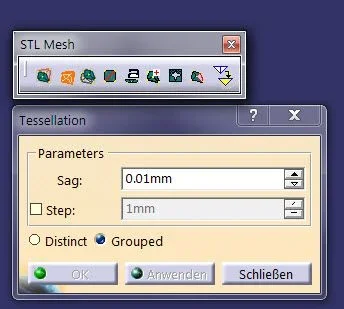
by activating the stl license in the stl mesh toolbar you have to optimize the value of the sag parameter.

Let me know.
sag.webp
 

Forum statistics

Threads
44,997
Messages
339,767
Members
4
Latest member
ibt

Members online

No members online now.
Back
Top
