
• This forum is the machine-generated translation of www.cad3d.it/forum1 - the Italian design community. Several terms are not translated correctly.

filling different areas on single track

  • Thread starter Thread starter hunter81
  • Start date Start date

hunter81

Guest
I press that I hope to have written the topic title correctly, not to create misunderstandings

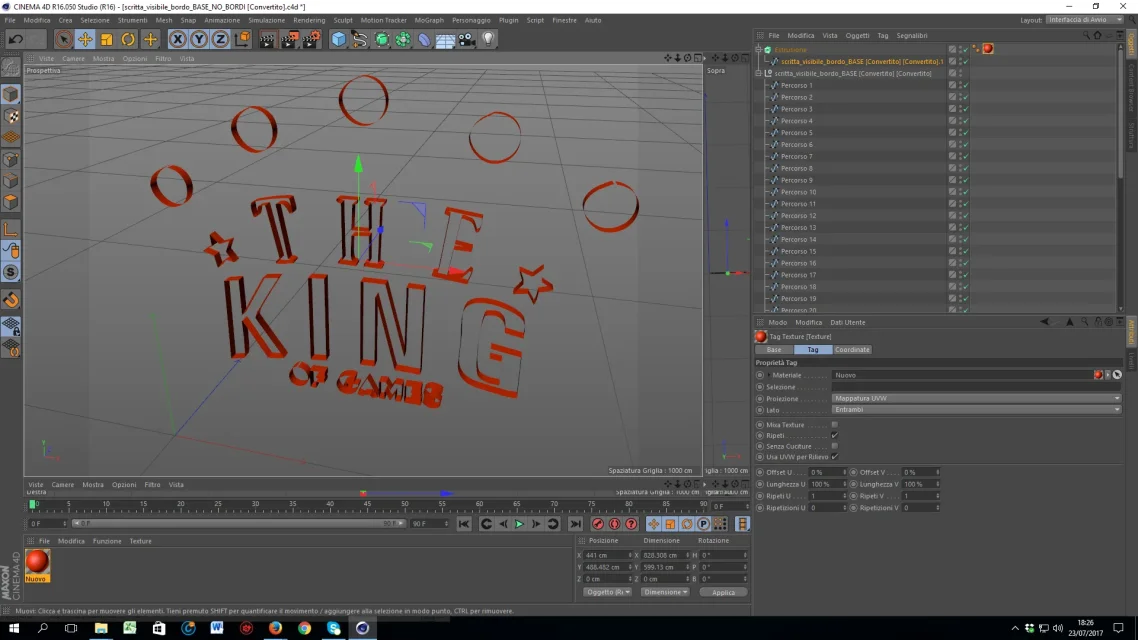
I was recovering this logo in my hand and I had problems with filling some areas.

the track is unique, i.e. I created it with illustrator / photoshop and those contours I exported them all together on a single layer
that I then extruded

what I wanted to do was fill the areas of the written "the" and "of games" of red (so I didn't want to color the extruded area)

I was trying to figure out which splines I had to color separately (if you could do it, because to me color the entire outdoor area at once)
 

Attachments

  • riempimento_materiali.webp
    riempimento_materiali.webp
    144 KB · Views: 2
ok "maybe" I begin to understand something. I tried to create new tracks based on materials/colorations and the result I got is this (besides a new wave of questions)

files, textures, and screens are all in the annex, if you need something please let me know (thanks to the help)

1) the king of games

a) - on the upper part of the crown, I would need to fill it with a texture, only that being a png, a part of the white background is loaded. what procedure is used in these cases?

Unfortunately the "yellow flux" of the writing "king" was one with the crown, at the moment I couldn't understand how it could be separated

b) - I still have (noteable) problems on the caps and bevels, especially because to me it would serve to extrude "the full part" of the logo and not only its edges

c) the stars, the words "the king" I would like to be slightly more embossed, while they are one with the extrusion of the crown.

I had tried to make a track even for the writing "of games" only that at the time of extruding it, I noticed that the letter "or" had been cut in half despite the track with illustrator I highlighted it entirely (and I do not understand why). then I opted to insert the text.

d) I have problems on the material and on the alonies. the writings "the" and "of games" in addition to being of a brighter red, should have a blue shade / aura, only that in setting it, I also twist the basic color

2) pokemon

e) in practice the problem of before (although the logo is not very precise), I needed to extrude also the "full" part of the logo and not only the edges. practically was the problem I had previously, only there was a problem of excess of double spline. this logo has definitely less splinee I don't know how to set them to work on the inside of the logo

3) yugioh

f) here unfortunately I can not use the text because the writing is really "set" in the rest of the logo. here is the speech made for the first logo: I would also need to act on the inside of the letters and not only on their edges

I would need to color the outer edge of gray and the inside white. I don't know if there's also a case of wasteful splines, because I don't know what would be taken away.

4) vanguard

g) the "blue" version had the hand-made track layout. I had problems with the words "cardfight" and I arranged with the text 8 which then I will fix)


Unfortunately recreating that part of the track, the concave bevelling gave me toast, so I opted to make it separately

h) the version "gray/red", instead gave me another scratch: on the export of the track from photoshop, the letters were slightly more roundish than the original image.

I will use the mesh, but for now I have to correct these defects

Thank you.
View attachment LOGHI_PROGRESS_forum.zip
 

Forum statistics

Threads
44,997
Messages
339,767
Members
4
Latest member
ibt

Members online

No members online now.
Back
Top