
• This forum is the machine-generated translation of www.cad3d.it/forum1 - the Italian design community. Several terms are not translated correctly.

flat model extensions

  • Thread starter Thread starter dicifa
  • Start date Start date
two things:
1) the line
otext = round(oflat.width) * 10 & "x" & floor(oflat.length * 10)

must be correct in
otext = round(oflat.width * 10) & "x" & floor(oflat.length * 10)

(the largeness was first rounded and then multiplied by 10: in practice it rounded the measure to the nearest cm and not to the mm as correct.


2) I think I remember some pieces where the developed sheet puts in a strange way, like a square turned 45°. I couldn't recreate it in any way, so I can't tell you how the macro will behave in such cases. If you can let me know... and above all eye to the "historical" developments.
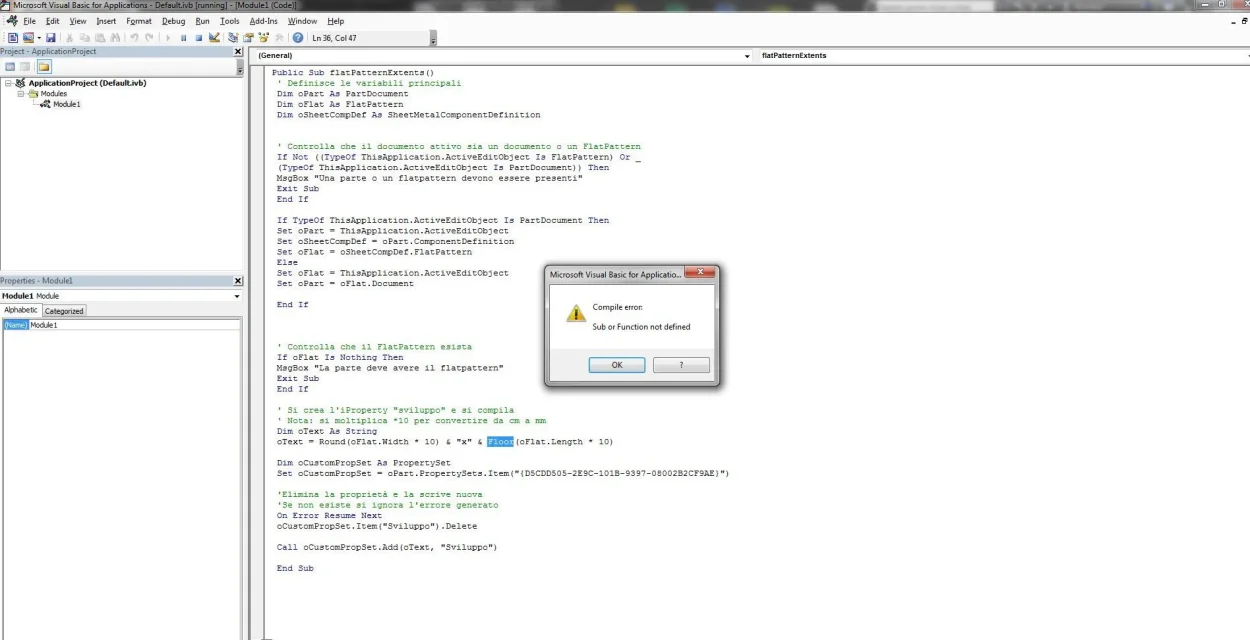
 
I'm trying all the time, but it gives me a mistake. I can't attach a .bas file where I transcribed everything and I don't understand why it's wrong. Can you help me? Thank you.
two things:
1) the line
otext = round(oflat.width) * 10 & "x" & floor(oflat.length * 10)

must be correct in
otext = round(oflat.width * 10) & "x" & floor(oflat.length * 10)

(the largeness was first rounded and then multiplied by 10: in practice it rounded the measure to the nearest cm and not to the mm as correct.


2) I think I remember some pieces where the developed sheet puts in a strange way, like a square turned 45°. I couldn't recreate it in any way, so I can't tell you how the macro will behave in such cases. If you can let me know... and above all eye to the "historical" developments.
 
1) Have you copied the macro with the attached procedure?
2) What error do you have?
3) if you simply do not appear in the macro list to be connected to the buttons I see that the macro begins with private sub... edit it in public sub...
 

Attachments

Bye!
This is the mistake that comes out of me.

However the procedure was accurate and the quick button is already out... .[/ATTACH]errore Floor estensioni modello piatto.webp
1) Have you copied the macro with the attached procedure?
2) What error do you have?
3) if you simply do not appear in the macro list to be connected to the buttons I see that the macro begins with private sub... edit it in public sub...
 
I solved and I answer myself, maybe it can be useful to others.... practically even on unfolded plates you still have to make flat model and activate the command.

Thanks :finger:
 
OK!!! it works!!!! :finger:

I've tried and goes... the only thing I've noticed is that he doesn't pull it out for unfolded sheets. Do you have a solution?
I imagine that the non-plated plates are devoid of flat model: the size of the flat model is linked to the flat model.
 

Forum statistics

Threads
44,997
Messages
339,767
Members
4
Latest member
ibt

Members online

No members online now.
Back
Top