
• This forum is the machine-generated translation of www.cad3d.it/forum1 - the Italian design community. Several terms are not translated correctly.

flat sheet

  • Thread starter Thread starter deep70
  • Start date Start date

deep70

Guest
Hello everyone,
I press that I am not very experienced in creo and in particular in the drawing industry,
I find myself having to put on the table a view of sheet development, only that I have no idea how to proceed.
thank you in advance for the answers given
 
Hello everyone,
I press that I am not very experienced in creo and in particular in the drawing industry,
I find myself having to put on the table a view of sheet development, only that I have no idea how to proceed.
thank you in advance for the answers given
hi deep70, for the development of the plates in the table usually there are two roads:

- Once you have designed your component in the sheet, select the "plug" command and then realize a family table where in the variant you go to activate the created feature. in drawing, in addition to the views of the finished component, go to insert a new model that is your flat plate(developed).

- via the "flat series" command, but I use it little

greetings and good work
 
I understand, thank you very much manbo1988 for the answer and availability.
but how should the family table be compiled?
Thanks again and good evening you.


quota = mambo1988;406112]ciao deep70, for the development of the plates in the table usually there are two roads:

- Once you have designed your component in the sheet, select the "plug" command and then realize a family table where in the variant you go to activate the created feature. in drawing, in addition to the views of the finished component, go to insert a new model that is your flat plate(developed).

- via the "flat series" command, but I use it little

greetings and good work[/QUOTE]
 
for the family, you must insert the flattening feature and select "no" in the line of the instance that will be the development.

"flat series" (or "top series" for previous versions of the creo), is faster as execution.
 
thanks for the answer 320i.
in what way faster as a performer?
after running the command "flat series" the part remains only flat in the darwing.. while I would like the three classic views is the flat view or in development dir turns. .
 
faster because there is the special command, while the flat series with relative family, you have to do it by hand.

in the table, you must insert the flat series model, not from the model still bent.
then on the menu views -> insert model -> select the sheet again and the system proposes you, if to insert the folded model or the flat series between the variants of family table.
 
faster because there is the special command, while the flat series with relative family, you have to do it by hand.
.
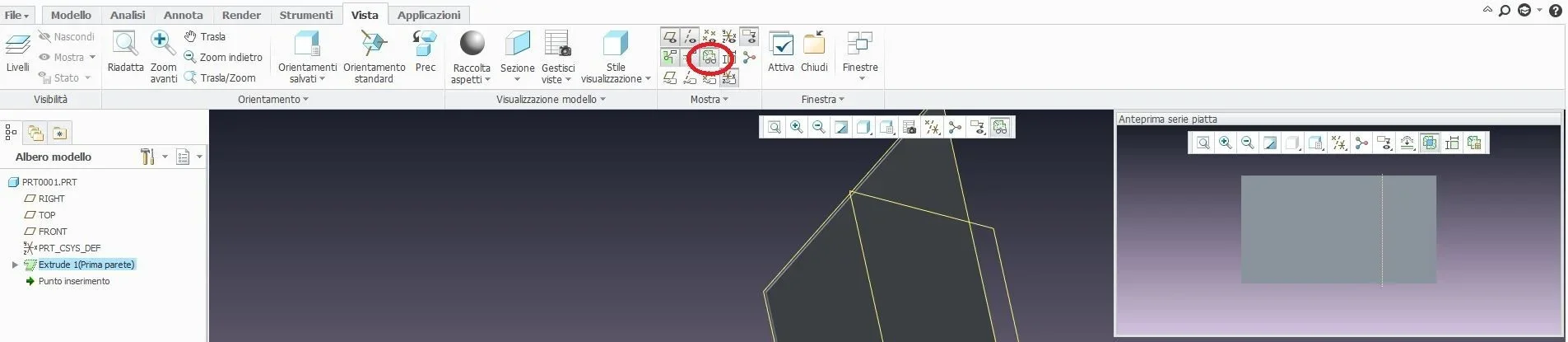
on menu view -> preview series flat -> on the shutter that appears "crea variant".
 
Excuse me 320i if I only answer you now.. but I was struggling with an influence of those basterds. .
returning to us and from where I stayed.. I can't understand why... I'll try to post the file if you want... Of course I'm literally stuck.
 
I have exactly that menu, but what I wanted to understand is:
Can I enter the development view on the same table where I also have the other views of the classic quotes? or do I have to have two separate tables?
 
Yes, as mentioned above, in 2d:
design->adjusting the sheet again, the system proposes the choice between the folded sheet and the "_flat1" (which would be the flat series), selections the latter, from here when entering the views, will be the development.
 
but where do I find - design models > add>... at the beginning the system gives me the possibility to choose the flat, but once I do what I do to insert the normal views? or vice versa.. .
info.webp
 

Forum statistics

Threads
44,997
Messages
339,767
Members
4
Latest member
ibt

Members online

No members online now.
Back
Top