• This forum is the machine-generated translation of www.cad3d.it/forum1 - the Italian design community. Several terms are not translated correctly.

flattening sheet

  • Thread starter Thread starter Roberto96
  • Start date Start date

Roberto96

Guest
Good morning.
I am a new user here and also on solidworks and I am using the internal tutorial just to solidworks to learn something. I arrived at the sheets and match the problems during the flattening of the sheet, the creation of the sketch bending and the creation of closed edges, even if I followed their tutorial, what can I have wrong?

Thank you.
roberto
 

Attachments

  • Cover.zip
    Cover.zip
    22 bytes · Views: 1
  • Screenshot (8).webp
    Screenshot (8).webp
    84.7 KB · Views: 13
  • Screenshot (9).webp
    Screenshot (9).webp
    87.9 KB · Views: 12
  • Screenshot (10).webp
    Screenshot (10).webp
    72.9 KB · Views: 11
I can't open your file now, so I'll attach the tutorial done now and working.
compares both geometry overlapping them in a set, and the various settings of each individual function.
when you found out where the problem was, bring it back to the discussion
 

Attachments

I tried to compare the two files and I can't find differences (I'm just using the program and maybe something escaped).
I tried to remake a new part, doing only the first phase but also there gives me a mistake during flattening.
this is the first time I use sheet metal, is there any setting to change in solidworks options?
I don't know what it might be
 

Attachments

compare all, all settings of each single function.
you have set how bending tolerance a value of 0; sincerely I have never used it and I do not know how to handle it, but certainly 0 is not okay.
Put a classic K 0.5 factor and you're good.
a small magazine of the tutorial
 
perfect ok, I set the value of bending tolerance to 0.5 and now it is flattened.

Thank you very much
 
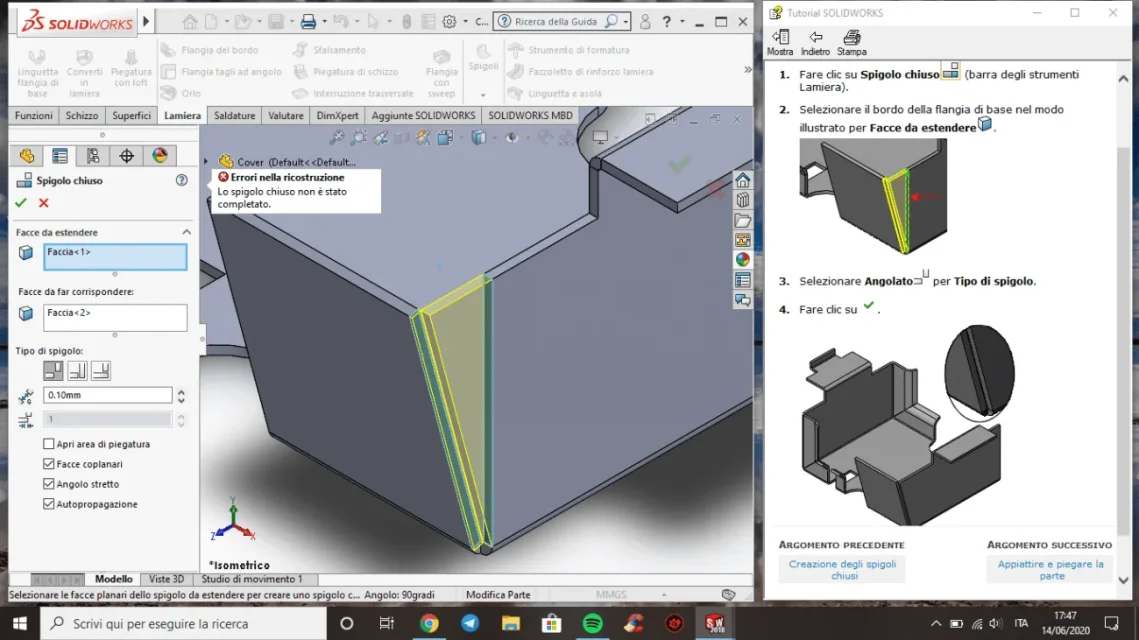
in addition to the problem of flattening, I also solved that of the sketch bending; But I can't solve that of the creation of closed edges. He doesn't tell me what error he finds, he just tells me that the edge was not created
 

Attachments

  • Screenshot (12).webp
    Screenshot (12).webp
    92.2 KB · Views: 7
until tomorrow I cannot see your files; But I repeat to you to analyze every single function and every single option in it contained with my file.
at the end of the feature manager there is a bar, click on it and drag it up, in this way you will suspend all subsequent functions and you will be able to individually focus one by one.
when you want to understand where there is a possible error this is an analytical passage to do.
then:
function :1 settings your vs my settings: ok steps to function 2, no ok fixes and steps to function 2
so for each function
 
I have checked and that function to me applies without problems; I don't know if it's a bug in your version and service pack.
the geometric difference, which you did not see, between our two versions lies in the direction of the sheet compared to the initial sketch.
so while you kept 180 outside I kept it inside, but it has no implications in later functions
 

Forum statistics

Threads
44,997
Messages
339,767
Members
4
Latest member
ibt

Members online

No members online now.
Back
Top