
• This forum is the machine-generated translation of www.cad3d.it/forum1 - the Italian design community. Several terms are not translated correctly.

force black edges

  • Thread starter Thread starter cacciatorino
  • Start date Start date

cacciatorino

Guest
I set modeling in knots that all new parts I create have black edges.

But now it happens that, using a certain macro taken by cad.de to assign materials and densities, this assigns to all the solid of colors associated with each material, and overwrites my beloved black edges.

Is there any way to force the macro to color only the faces and let the edges lose?
 

Attachments

I set modeling in knots that all new parts I create have black edges.

But now it happens that, using a certain macro taken by cad.de to assign materials and densities, this assigns to all the solid of colors associated with each material, and overwrites my beloved black edges.

Is there any way to force the macro to color only the faces and let the edges lose?
PHP:
(sd-call-cmds (set_part_inst_color :parts a_teil :color farbe) :failure nil)
That should be the call.

There are two comments (; at first) and see what he does.

finger crossed...
:smile:
 
PHP:
(sd-call-cmds (set_part_inst_color :parts a_teil :color farbe) :failure nil)
That should be the call.

There are two comments (; at first) and see what he does.

finger crossed...
:smile:
Yes, but so I inhibit the assignment of color to the part. I from the macro instead I would like to cheque on the faces the color associated with the material, but imposed the edges invariably black, would serive the same line as above but with a thing like set_edge_part_color.. .
 
Yes, but so I inhibit the assignment of color to the part. I from the macro instead I would like to cheque on the faces the color associated with the material, but imposed the edges invariably black, would serive the same line as above but with a thing like set_edge_part_color.. .
do a trace of the command to make black edges so we build the string to add. the rows are two one for the part and one for instances (shared copies).
 
do a trace of the command to make black edges so we build the string to add. the rows are two one for the part and one for instances (shared copies).
I've got a little googued and on the site of claus brod I found the info to start the registration of the command:
Code:
(dribble "d:/temp/logfile.txt")
that in the case in species has returned me:
Code:
starts dribbling to d:/temp/logfile.txt (2013/1/25, 6:29:28).
nil

part_prop :the_part :start "/omissis" :select_done
:display_ui :the_part
:color 255 :done
:base_color 255 :done
:edge_color 16776960 :done
:base_edge_color 16776960 :done
:close
(dribble)
Now I see how to put it in the macro! Thank you!
 
I set modeling in knots that all new parts I create have black edges.

Good morning to all,
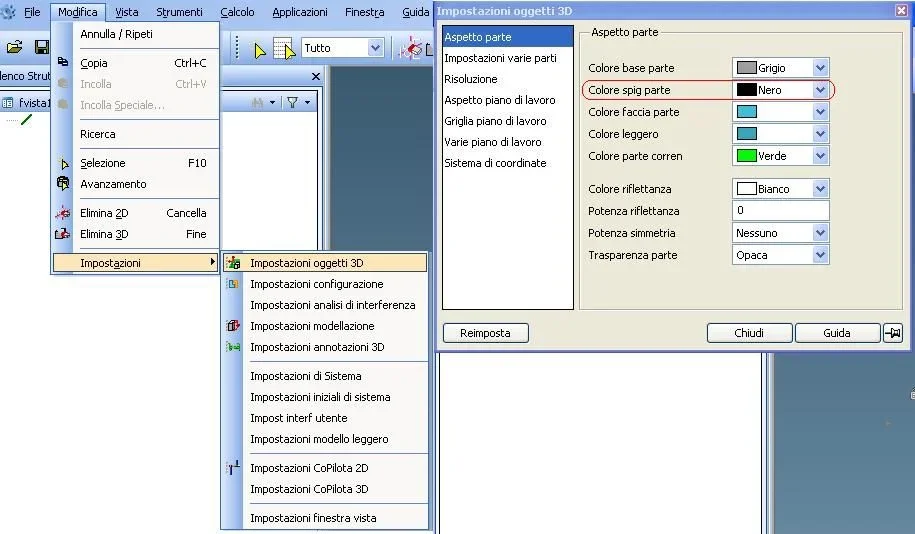
I am very interested in how to set black edges by default in modeling parts.
Could you tell me the procedure?

thanks in advance
 
changes a bit from version 17 to 19 but the procedure is the same: you have to change settings and change the appearance part in "Settings 3d objects"
Colore Spigoli.webp
 
if you want to keep the black edges should just add under the rows related to the color assignment, which should be those type:

(sd-call-cmds (set_part_base_color :parts a_teil :color beard) :failure nil) ; basic colour
(sd-call-cmds (set_part_inst_color :parts a_teil :color beard) :failure nil); colour is

These set strings. commands are slightly different because the macro believes uses commands of old versions.

(sd-call-cmds (part_prop a_teil :edge_color :reset_prop) ;
(sd-call-cmds (part_prop a_teil :base_edge_color :off)); to reset any coloring of the edges of the part

(sd-call-cmds (part_prop a_teil :base_edge_color :rgb 0.0,0)) ; to set the base color of the edge to black (or any other color by writing instead of 0.0.0 a rgb combination

Bye.
 

Forum statistics

Threads
44,997
Messages
339,767
Members
4
Latest member
ibt

Members online

No members online now.
Back
Top