• This forum is the machine-generated translation of www.cad3d.it/forum1 - the Italian design community. Several terms are not translated correctly.

force knots on salomemeca/codeaster

  • Thread starter Thread starter mastraa
  • Start date Start date

mastraa

Guest
Bye to all,

someone would tell me, step by step, how to do the following operations:
  1. force the position of a knot (creating the knot manually and then using meshthroughpoint)
  2. to force the creation of knots along a line previously created with geometry
any fem allows you to create hard point or hard 'line' to perform post processing, I think for example to the hot-spot technique for welding.
I came across some online page that talks about the mehthroughpoint method, but I'm not able to find the command or tutorial that explains where it is.

ok, in the first case you can overcome using the move node function, but it seems like a palliative and does not solve the second problem however unless you risk 'rovinare' a mesh...


andrea mastrangelo
 
Bye to all,

someone would tell me, step by step, how to do the following operations:
  1. force the position of a knot (creating the knot manually and then using meshthroughpoint)
  2. to force the creation of knots along a line previously created with geometry
any fem allows you to create hard point or hard 'line' to perform post processing, I think for example to the hot-spot technique for welding.
I came across some online page that talks about the mehthroughpoint method, but I'm not able to find the command or tutorial that explains where it is.

ok, in the first case you can overcome using the move node function, but it seems like a palliative and does not solve the second problem however unless you risk 'rovinare' a mesh...


andrea mastrangelo
So, it's a long time I don't use salome-meca, anyway you can do both.

for the first point it seems to me you can add a 3d point when you are still in the geometry module, and make sure it belongs to the object you have to meshare. Then the meshatore will think of him alone to get us through the mesh (maybe you can already do it in the mesh module, but I don't remember).

for the second point, you can make a submesh on the edge that interests you, giving it as a criterion to put "n" equidistant points, or to divide into "n" equal parts, I do not remember well what criterion follows.

Obviously both the point that the segment must be part of the solid you have to meshare, so before you switch to the mesh module you have to make a "merge" when you are still in geometry.
 
Yes, you must create the geometry you need in the "geometry" module and make a compound.Immagine.pngyou may need to create a partition if you split a face, for example.
 
Last edited:
oooooh: there had to be the way!!!
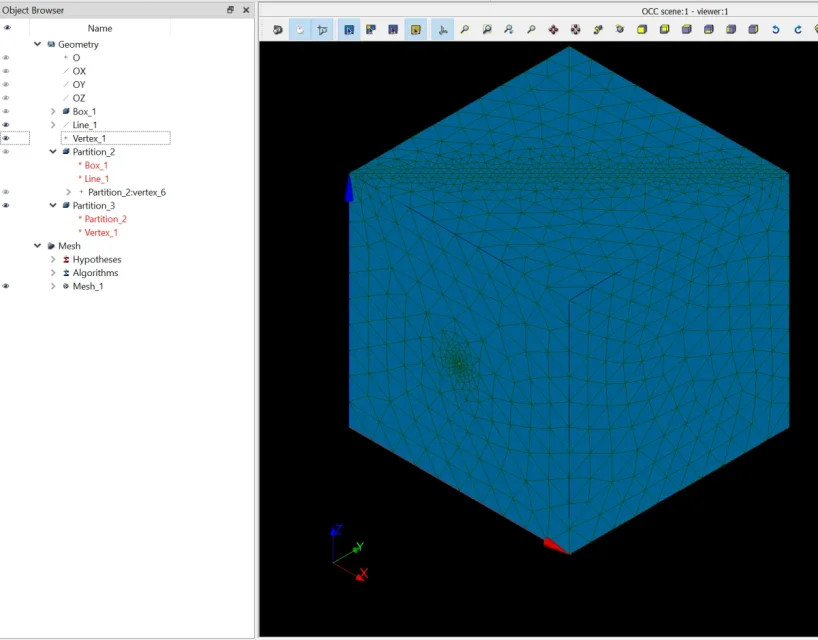
thanks to both: I made a fusion of the two information and I managed, I do not know if it was what you meant, however this is the way I did (I also attach image with tree and result), below the step-by-step procedure:
  1. solid creation
  2. created line jacent on solid
  3. created jacent point on solid
  4. used partition between solid and line
  5. used partition between solid and point
  6. went to the meshatore, in local size selected the line and the point
  7. meshato and below the result
nb_1: I didn't work the 3d selection, I had to do it from the tree, I don't know if it's normal, however so it went

nb_2: using the fuse function (I imagine for merge you meant that because I did not find any merge) between solid and error point. I did not try with the line, but I think it only puts homologue objects. That would make sense.

nb_3: the meshatore will impose the passage on the line or on the point even without indicating the loca size

Thank you.
Andrea


1691400010942.png
 
edit:

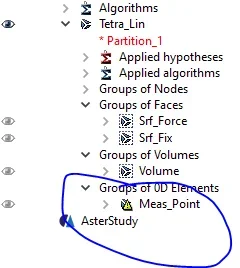
When you go create mesh groups from geometry, I think it's a bit of a mess. It is essential that there be the group with the knot between the 'group of nodes' and not between the 0ds.
0d should not be used in case in aterstudy and force should be set in the group of node


Andrea
 
I noticed something strange when I make a partition mesh, I guess I'm wrong.
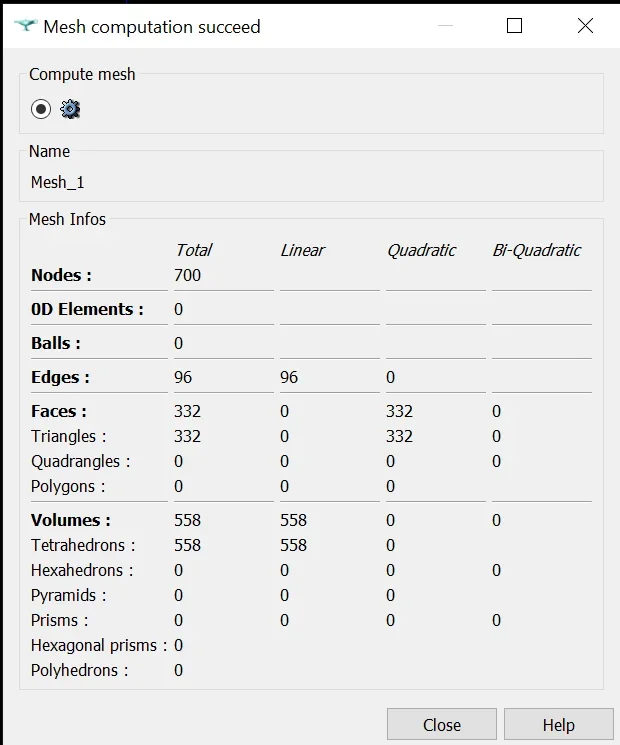
in practice the 3d elements of the same identical geometry (net of adding the point), with the same mesh settings, are created only linear.
If I add a edge this doesn't happen.

below pictures of the situation that you create:

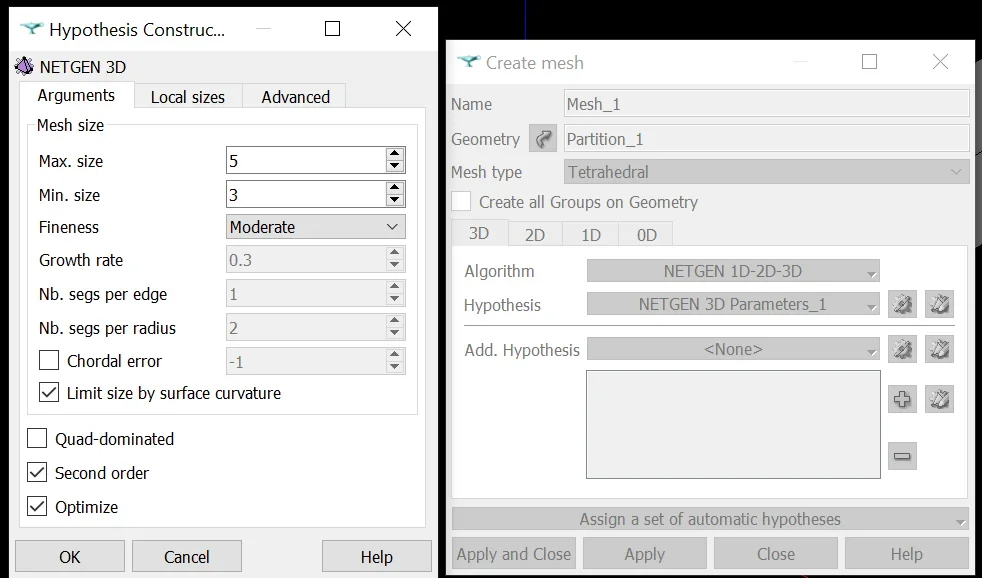
mesh settings (here you see partition, clearly in case without partition I selected the original box)
1691501988256.webpresult with original box1691501806038.webpresult with point partition1691502055630.webpresult with partition with edge added1691502880309.webp
 
I noticed something strange when I make a partition mesh, I guess I'm wrong.
in practice the 3d elements of the same identical geometry (net of adding the point), with the same mesh settings, are created only linear.
If I add a edge this doesn't happen.

below pictures of the situation that you create:

mesh settings (here you see partition, clearly in case without partition I selected the original box)
View attachment 68942result with original boxView attachment 68941result with point partitionView attachment 68943result with partition with edge addedView attachment 68944
curious as a situation. I have never happened since I usually create 0d elements outside geometry. In short, to emulate rbe.
 
somehow I think it's related to the error I found in the benchmark thread. In fact I tried to read the error message, but it refers to something of the mesh that I cannot interpret. as if there were open or not coincidental edges. . .
Code:
the mesh m39445 has a finished edge element, but it does not border any element having a "rigidity"
 
somehow I think it's related to the error I found in the benchmark thread. In fact I tried to read the error message, but it refers to something of the mesh that I cannot interpret. as if there were open or not coincidental edges. . .
Code:
the mesh m39445 has a finished edge element, but it does not border any element having a "rigidity"
what element have you assigned to the "node vacant" in aster code?
 
somehow I think it's related to the error I found in the benchmark thread. In fact I tried to read the error message, but it refers to something of the mesh that I cannot interpret. as if there were open or not coincidental edges. . .
Code:
the mesh m39445 has a finished edge element, but it does not border any element having a "rigidity"
I think the problem is because it doesn't digest orphans.
 
mesh = read_maillage(unit=3)


model = affe_modele(affe=(_f(group_ma=('generico_solid', ),

modeling='3d',

phenomene='mecanic'),

_f(group_ma=('0d', ),

modeling,

phenomene='mecanic')),

mesh = mesh)


elemprop = affe _ cara _ elem (discreetly = _ f (cara = 'k _ trn',group _ ma = ('0d',),

Valley = (0.01, 0.01, 0.01, 0.01, 0.01, 0.01, 0.01, 0.01, 0.01, 0.01, 0.01, 0.01, 0.01, 0.01, 0.01, 0.01, 0.01, 0.01, 0.01, 0.01, 0.01, 0.01),

models = model)


mater = defi _ materiau (elas = _ f (e = 205000.0,

n = 0.29))


fieldmat = affe _ materiau (affe = _ f (mater = (mater,),

tout = 'oui'),

maillage = mech,

models = model)


load = affe _ char _ meca (force _ nodale = _ f (fy = 10.0,

group _ no = ('force',),

Liaison _ solids = _ f (group _ ma = ('0d', 'fix'),

models = model)


Assemblage (carry = elemprop,

cham _ mater = fieldmat,

charge = (load,)

matr _ asse = _ f (matrix = co ('stiff'),

option = 'rigi _ meca'),

models = model,

name _ ddl = co ('nddl')


reslin = meca _ statique (cham _ mater = fieldmat,

excit = _ f (charge = load),

models = model,

option = 'sief _ elga')


unnamed = irc _ champ (cara _ elem = elemprop,

Contrate = ('sigm _ elga',),

critters = ('sieq _ elga',),

Deformation = ('epsi _ elga',),

excit = _ f (charge = load),

force = ('forc _ noda', 'reac _ noda'),

properties = ('mate _ elga',),

Resultat = reslin,

(PHP 4 = 4.1.0)


(PHP 4 = 4.1.0)

tout = 'oui'),

_ f (resulted = unnamed),

United = 80)


materem = calc _ matr _ elem (calc _ elem _ models = 'oui',

cara _ elem = elemprop,

cham _ mater = fieldmat,

charge = (load,)

group _ ma = ('0d',),

models = model,

option = 'rigi _ meca')


number = name _ ddl (matr _ rigi = (matrelem,)
---------------------------------------------------------------------------------------------------
ecco an esempio in nail ho an elemento 0d.
In Grassetto quello che potrebbe interestsarti.
 
I think the problem is because it doesn't digest orphans.
no one, in the sense that he does not see it as element 0d.
or better I think he tries, but then in the assignment elements he finds nothing between the 0ds and this is the simulation that worked.
1691509397625.webp
 
I think he tries, but then in the assignment elements he finds nothing between the 0ds
you must assign it with the following:Immagine.webpkeep in mind that aster code does not present all those commercial sw automatisms.
I can't frame your situation for this would be useful if I shared .med and .comm files
 
I attach all files including results.
this is what works with mesh linear and without adding any element 0d. also because the element 0d is technically detached from mesh and must be connected with a rigid bond to a node already present, is not what it serves me.

Anyway, they're shaking us a little bit and I see how to get out of it. . .
 
I go against the interests of the forum, but find examples on the aster code site (more precisely on the forum), in English or French. I've been asking for help in the past, and I'm a hunter over there.
 
Of course he didn't have an attachment. . .
some things I don't like:
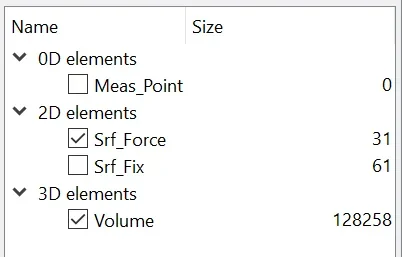
1Cattura.PNGThis is not good, or you fix it or you make it disappear.
----------------------------------------------------------------------------------------------------------------------------------------------------------------------------------------------------------------------------------------------------------------------------------------------------------------------------------------------------------------------------------------------------------------------------------------------------------------------------------------------------------------------------------
2
model = affe_modele(identifier='1:1',

(group_ma=)'srf_force', 'volume'),

modelisation='3d',

phenomene='mecanique'),

maillage=tetralin)
----------------------------------------------------------------------------------------------------------------------------------------------------------------------------------------------------------------------------------------------------------------------------------------------------------------------------------------------------------------------------------------------------------------------------------------------------------------------------------------------------------------------------------
should be:
----------------------------------------------------------------------------------------------------------------------------------------------------------------------------------------------------------------------------------------------------------------------------------------------------------------------------------------------------------------------------------------------------------------------------------------------------------------------------------------------------------------------------------
model = affe_modele(identifier='1:1',

(group_ma=(volume)

modelisation='3d',

phenomene='mecanique'),

maillage=tetralin)
----------------------------------------------------------------------------------------------------------------------------------------------------------------------------------------------------------------------------------------------------------------------------------------------------------------------------------------------------------------------------------------------------------------------------------------------------------------------------------------------------------------------------------
or without 'srf_force', as you have to include only 3d elements
----------------------------------------------------------------------------------------------------------------------------------------------------------------------------------------------------------------------------------------------------------------------------------------------------------------------------------------------------------------------------------------------------------------------------------------------------------------------------------------------------------------------------------
3!
fieldmat = affe_materiau(identifier='3:1',

(group_ma=)'srf_force', 'volume'),

mater=(msteel, )

maillage=tetralin)
----------------------------------------------------------------------------------------------------------------------------------------------------------------------------------------------------------------------------------------------------------------------------------------------------------------------------------------------------------------------------------------------------------------------------------------------------------------------------------------------------------------------------------
also here same thing, that is:
----------------------------------------------------------------------------------------------------------------------------------------------------------------------------------------------------------------------------------------------------------------------------------------------------------------------------------------------------------------------------------------------------------------------------------------------------------------------------------------------------------------------------------
fieldmat = affe_materiau(identifier='3:1',

(group_ma=(volume)

mater=(msteel, )

maillage=tetralin)
----------------------------------------------------------------------------------------------------------------------------------------------------------------------------------------------------------------------------------------------------------------------------------------------------------------------------------------------------------------------------------------------------------------------------------------------------------------------------------------------------------------------------------
Everything's fine for the rest.
 
ciao News, I was very convinced I answered. . .

point 1: I agree. It was what I said he created like 0d but then he didn't fit anything.

points 2 and 3: I disagree, but of course I am novice and perhaps mistaken. looking also at the tutorial you were suggesting that when you want to put a surface force you have to insert between the groups in which to create the elements also the 2d group relative to the surface in question. In fact, if you don't make it a mistake.

Andrea
 

Forum statistics

Threads
44,997
Messages
339,767
Members
4
Latest member
ibt

Members online

No members online now.
Back
Top