• This forum is the machine-generated translation of www.cad3d.it/forum1 - the Italian design community. Several terms are not translated correctly.

formatting table text

  • Thread starter Thread starter Groonge
  • Start date Start date

Groonge

Guest
Hello, everyone.

My name is Sandro, it's a bit that I'm in the forum but I never wrote, so I start today!

I have lt 2015 and a new machine with a nvidia picture card and a qhd+3200x1800 display.

when I open any palette (for example property of objects) I find the title text of the options in a format too large for the box where it is contained and so saying how you see well in the attached photo.

is it possible to change text formatting in palettes? I look for but I can't find the option or the command.

Thank you.
 

Attachments

  • 20140526_175858.webp
    20140526_175858.webp
    501.3 KB · Views: 9
Did you change the font height of the operating system?? ?
in window7 by: control panel\all control panel elements\screen
 
I feel I have never changed the character of the system, which is not 7 but 8.1, however I attach the photo of the screen option to make you clearer what is set.

in lt 2015 (I suggest that the version is the one in test lt 2015 downloaded from the site that I will acquire when they expire the 30 days, it is bad to see "unregistered version" eheh) I find no command either between the options nor in tools>personality.

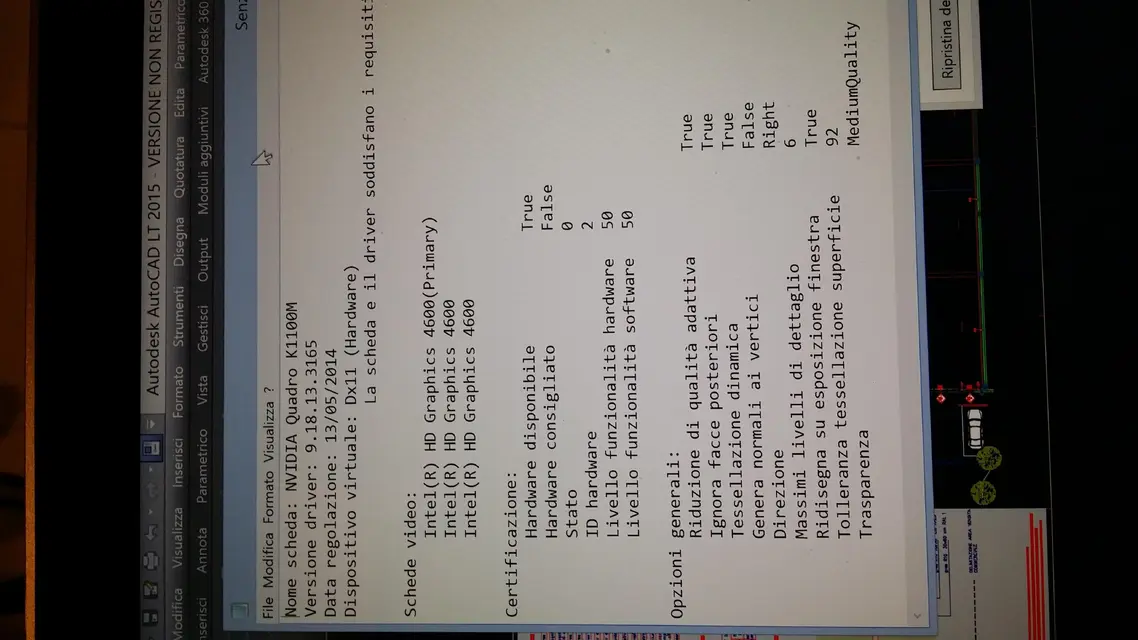
However, looking at this last window I realize that even here things are not just as one if they wait (see photo), at this point I think it is a compatibility problem of the video card with 2015.

Yet the cad automatically loads me the nvidia card and leaves the intel integrated into the processor.

I do a test, imposed lt 2015 so that you directly load the intel card and see what it does and, as you say, I change the text height in the system.

I'll be there
 

Attachments

  • 20140526_184257.webp
    20140526_184257.webp
    338.6 KB · Views: 4
  • 20140526_185448.webp
    20140526_185448.webp
    288.4 KB · Views: 2
I see it difficult but it's very likely that I'm going randomly.

nothing to do, he only sees nvidia, indeed he sees the two cards but uses only that.

this screen "displays register" in configgraphic.

even if I launch lt 2015 in screen mode with integrated graphics (which refers to the intel hd 4600 integrated in the processor i7) the configgraphic response is always nvidia picture k 1100 m.

regarding the adjustment of the screen in w 8.1 I tried to change it but it concerns only some components of windows and does not solve for the installed programs.

Thanks again............
 

Attachments

  • 20140526_191632.webp
    20140526_191632.webp
    345.5 KB · Views: 4

Forum statistics

Threads
44,997
Messages
339,767
Members
4
Latest member
ibt

Members online

No members online now.
Back
Top