• This forum is the machine-generated translation of www.cad3d.it/forum1 - the Italian design community. Several terms are not translated correctly.

formatting text in viewport

  • Thread starter Thread starter zetadierre
  • Start date Start date

zetadierre

Guest
Good morning

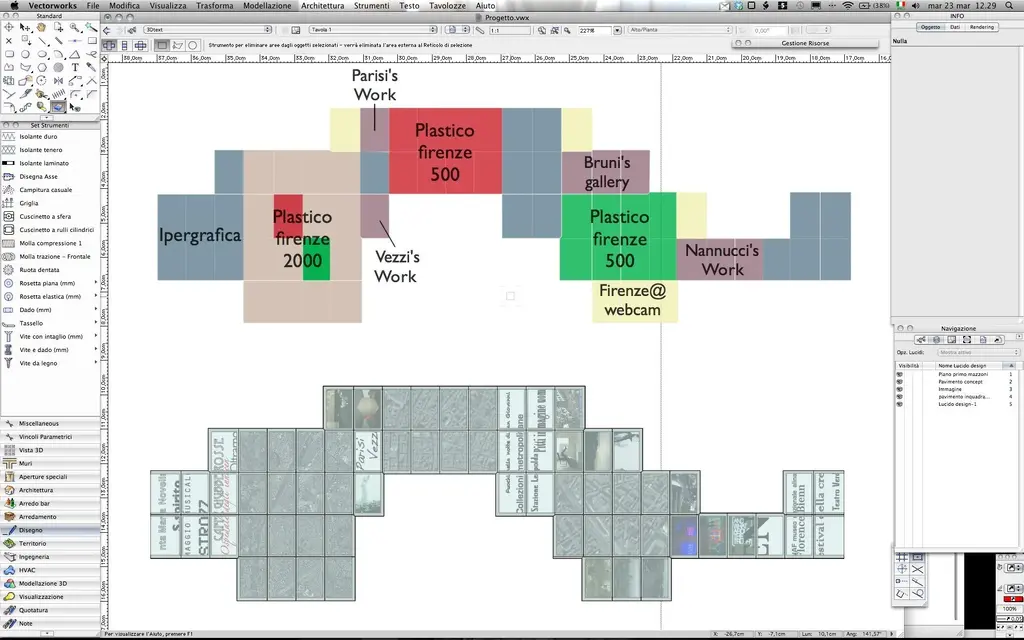
I am carrying out a platform hypothesis for an exhibition, in which there are writings that run on monitors under a floor tramplable

I tried to insert the writings in the glossy design and then create a viewport, but change the orientation! How do I put them as I want?? ?

Thank you.
 

Attachments

  • testo design.webp
    testo design.webp
    214.9 KB · Views: 13
  • testo viewport.webp
    testo viewport.webp
    182.4 KB · Views: 12
Maybe it's better if you write them as a record at the viewport. the writings turn according to the general settings > readable tipping text
 
I tried to insert the writings in the glossy design and then create a viewport, but change the orientation! How do I put them as I want?? ?
Thank you.
the text is always oriented in order to be readable.
but you can convert it to polylinee and then position it as you want. :-)
 
the text is always oriented in order to be readable.
but you can convert it to polylinee and then position it as you want. :-)
Thank you.

This does not remove that, readable or not, I have not changed anything from one situation to another. I wanted to understand why the viewport result is different from the design, which should be subordinated to the fact that the text is set on the legible or not. but then apologize, but what does readable mean? I mean... You can't convert to polyline because you don't rotate... Come on.
 
Maybe it's better if you write them as a record at the viewport. the writings turn according to the general settings > readable tipping text
also deactivating this option the writings are oriented by themselves the same
 

Forum statistics

Threads
44,997
Messages
339,767
Members
4
Latest member
ibt

Members online

No members online now.
Back
Top