
• This forum is the machine-generated translation of www.cad3d.it/forum1 - the Italian design community. Several terms are not translated correctly.

from polylinear sketch

  • Thread starter Thread starter Geppetto82
  • Start date Start date

Geppetto82

Guest
Bye to all,
is it possible to convert a shizzo composed of lines and arches in a polylinea?
Thank you.
greetings
geppetto82
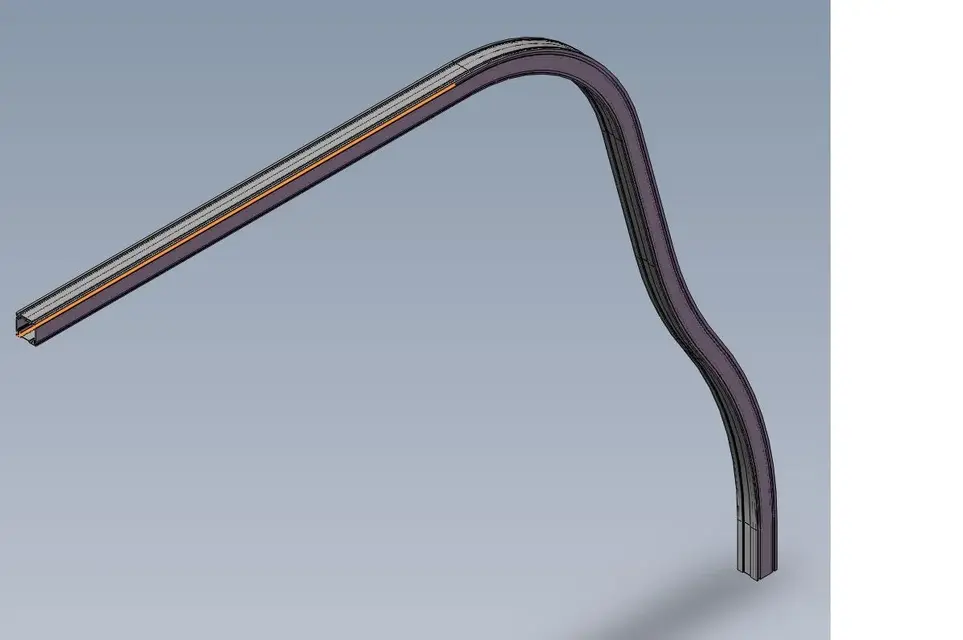
 
I'll explain better.
My purpose is to run the trolley inside the curved guide.
I had thought of using the path coupling, at the top of the component I inserted the top of the wheel and on the path I inserted the path of the guide.
the problem is that the program does not recognize the entire path of the guide therefore understood the curves but only the first stroke (see image).
How can I do that?
 

Attachments

  • Guida curva.webp
    Guida curva.webp
    33 KB · Views: 23
  • Motore interno guida.webp
    Motore interno guida.webp
    23.8 KB · Views: 22
hi geppetto 82:
just enter the sketch select the elements then tools.spline tools and finally optimize spline you will find yourself with a single item(spline). Hi.
 
spectacular!
thank you 10,000 times fremposta!
Good to make... .
greetings
geppetto82
 
I tried to do something like that using the cam constraint but it only works if the path to follow is closed on itself. Does it actually work like that or did I get it wrong?
 
I tried to do something like that using the cam constraint but it only works if the path to follow is closed on itself. Does it actually work like that or did I get it wrong?
Yes,
the bond cam That's how it works. the path must be to "ring" closed.

greetings
Mar
 
I'll explain better.
My purpose is to run the trolley inside the curved guide.
I had thought of using the path coupling, at the top of the component I inserted the top of the wheel and on the path I inserted the path of the guide.
the problem is that the program does not recognize the entire path of the guide therefore understood the curves but only the first stroke (see image).
How can I do that?
You could use the 'path' coupling.
 
That's exactly what he tried to do right away.
but it was time and apparently had already solved::biggrin:

greetings and good year
Marco:smile:
Marco... is to use, but you need to know how to use it.
If you select a sketch line or bow, he uses that.
you need to select the sketch from the feature manager to take the whole route and however there is the 'selectionmanager'.
 

Forum statistics

Threads
44,997
Messages
339,767
Members
4
Latest member
ibt

Members online

No members online now.
Back
Top