• This forum is the machine-generated translation of www.cad3d.it/forum1 - the Italian design community. Several terms are not translated correctly.

frozen layer in bookshelf styles

  • Thread starter Thread starter Tarkus
  • Start date Start date

Tarkus

Guest
Hello to all:biggrin:
Can someone tell me why I can't overwrite my style library with a frozen layer?
open my .idw template;
within the style editor and congelo a layer of the current style (slim iso mask)
except for the change;
I overwrite the style library with editing.
save and close the template.
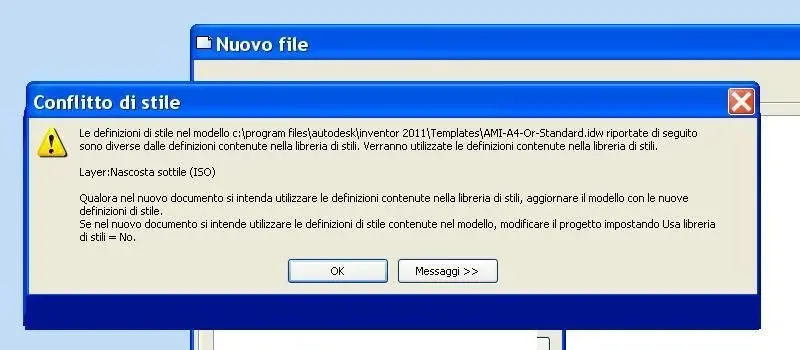
When I go to use the template, I get out of the usual puzzle message attached.
Maybe it's not the right procedure? :confused:
Am I wrong?:Mother:
 

Attachments

  • Conflitto di stile.webp
    Conflitto di stile.webp
    29.1 KB · Views: 11
on the project file
use style library = no

or you need to update the system style library and then
on the project file
use style library = yes
 
on the project file
use style library = no

or you need to update the system style library and then
on the project file
use style library = yes
I want my style library updated with that change that must be present in all my new designs.
So in my projects, the use of the library is always on "yes."
I have always used the "Save" of management styles and norms to overwrite the library styles with the changes I make in a file,template or not.
If for example I want to add a color or material or make a change to the quota styles that remain permanent in the style library, I have always done so.
I don't understand why it shouldn't work for a frozen layer.
Is there another way?
 

Forum statistics

Threads
44,997
Messages
339,767
Members
4
Latest member
ibt

Members online

No members online now.
Back
Top