• This forum is the machine-generated translation of www.cad3d.it/forum1 - the Italian design community. Several terms are not translated correctly.

generate correct pdf

  • Thread starter Thread starter AlbeLav
  • Start date Start date

AlbeLav

Guest
Bye to all,
I have the problem, with I create 3 in the new workplace, to fail to correctly generate pdf files with the direct export command.

if I try to export with the direct command generates a color pdf.
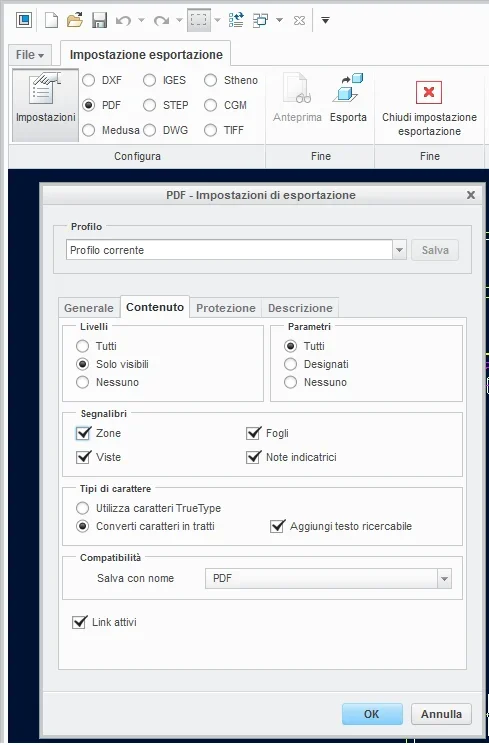
if instead I use the command exports undirected, I go to set the definition of pdf, that is monochromatic and that must export the text as lines... everything works well and I get the pdf with only black lines.
I have seen that the settings I go to change refer to a profile, but even if saved at the crack restart is not maintained.

I haven't put my hands on creo for a few years and I'm a little rusty. . .

Can you help me?

I just can load 2 pictures of the setting window I'm talking about.

Thank you.
Tree.
 
hi alnerviani,with "fast export(*pdf)export the active object in
pdf without making changes, then color and 300 dpi.
by selecting "export" you can, in "sets", define its characteristics, but you must create a custom profile (see enclosed jpg) and save it.
create save the file in the work directory where you are in .dop format example
jambo1970.dop, so if you move, you should copy it to the new directory.
I personally prefer to use a "macro" in this way with a button create pdf in any directory you find.
in case you want to try:

mapkey $f7 @mapkey_labelesport_pdf;~ close `main_dlg_cur```appl_casc`; ♪
mapkey(continued) ~ command `procmdexportpreview`;~ command `procmddwgpubsettings`;\
mapkey(continued) ~ select `intf_profile` pdf_export.pdf_color_depth` 1 `pdf_mono`; ♪
mapkey(continued) ~ open `intf_profile` `pdf_export.pdf_raster_dpi`; ♪
mapkey(continued) ~ close `intf_profile` `pdf_export.pdf_raster_dpi`; ♪
mapkey(continued) ~ select `intf_profile` `pdf_export.pdf_raster_dpi` 1`600`; ♪
mapkey(continued) ~ activate `intf_profile` `okpshbtn`;~ command `procmdddwgpubexport';\
mapkey(continued) ~ activate `file_saveas` `ok`;~ activate `main_dlg_cur`` `main_dlg_cur`; ♪
mapkey(continued) ~ activate `main_dlg_cur` `main_dlg_cur`; ♪
mapkey(continued) ~ command `procmddwgpubcloseexportpvw`;

as you know it is enough to paste this text into the config.pro, the key to launch it is the f7 function key.

Hi.
jambo
 

Attachments

  • PDF_SETTINGS.webp
    PDF_SETTINGS.webp
    26.8 KB · Views: 6
I created the macro that I needed and works, but I respond to a centring problem for formats a1 and a0, on others seems to export well.
the problem is that I find that the sheet is not centered and the left and upper edge of the sheet is eliminated.
Is there any way to solve the problem? maybe applying export offsets (as in direct printing)?
 
I don't know about it, with my configuration I have no problems with any format.

greetings
jambo
 
I think I understand!
I have formats that are not aligned to x=0;y=0 coordinates.
Now I will see to align all formats, with a first test on a format the problem has resolved.
 

Forum statistics

Threads
44,997
Messages
339,767
Members
4
Latest member
ibt

Members online

No members online now.
Back
Top