
• This forum is the machine-generated translation of www.cad3d.it/forum1 - the Italian design community. Several terms are not translated correctly.

get 1500 adhesive labels with image, code, description and bar code / qr?

  • Thread starter Thread starter reggio
  • Start date Start date

reggio

Guest
I need to create sticker tags with image, code, description and bar code / qr of many parts and subaxes, I started with the idea of exploiting the preview image that we can see in explore resources of win10, but then I remembered that from some version to this part it is no longer possible to unzip the files sldprt and sldasm to get the miniature image of preview ...

Now I find myself point and head... would you have a method to suggest to get those adhesive labels to print?thanks for the help
 
I need to create sticker tags with image, code, description and bar code / qr of many parts and subaxes, I started with the idea of exploiting the preview image that we can see in explore resources of win10, but then I remembered that from some version to this part it is no longer possible to unzip the files sldprt and sldasm to get the miniature image of preview ...

Now I find myself point and head... would you have a method to suggest to get those adhesive labels to print?thanks for the help
would you like to get them directly from solidworks or from an external app?
 
would you like to get them directly from solidworks or from an external app?
ciao @jenuary Let's say I don't care, the important thing is the result,
certainly the images in sw are already there so maybe it would be better/ easier to sw ...

I would have come here for now: including thumbnails in boms exported to microsoft excel - 2019 - what's new in solidworkswhich, however, is to be arranged and regular as cuffs to center labels, so if you have other methods, I gladly listen to you :)
 
the qrcode you can do it on solidworks only by developing an addin, which extracts the information you need and incorporates it into an image, the qrcode.
the preview of the files can always be obtained from bees, but sometimes it happens that if the file has been saved with the view outside the piece, you see it empty, or sometimes it is empty anyway.
all this could be done without opening the files, using the documentmanager bees, but it is not a quick thing to do, even if feasible.
 
Have you tried with word press-union?
Thank you. @cacciatorino let's say that the main obstacle is the reperire of the tablets;
press-union word I had tried time ago, probably does not happen thoroughly and abandoned: say it would be easier to give the size and center the individual labels?
but for pictures and descriptions? Where would I go? always from the excel sheet say or how?
 
the qrcode you can do it on solidworks only by developing an addin, which extracts the information you need and incorporates it into an image, the qrcode.
the preview of the files can always be obtained from bees, but sometimes it happens that if the file has been saved with the view outside the piece, you see it empty, or sometimes it is empty anyway.
all this could be done without opening the files, using the documentmanager bees, but it is not a quick thing to do, even if feasible.
ciao,@jenuary How do you know the only bees I know do honey and from what you say is an uphill road and without certainty of image ... instead the external app road you mentioned?
 
the qrcode you can do it on solidworks only by developing an addin, which extracts the information you need and incorporates it into an image, the qrcode.
the preview of the files can always be obtained from bees, but sometimes it happens that if the file has been saved with the view outside the piece, you see it empty, or sometimes it is empty anyway.
all this could be done without opening the files, using the documentmanager bees, but it is not a quick thing to do, even if feasible.
hi roberto, but your add-in does not save the pictures?, if I don't remember badly does it
 
I need to create sticker tags with image, code, description and bar code / qr of many parts and subaxes, I started with the idea of exploiting the preview image that we can see in explore resources of win10, but then I remembered that from some version to this part it is no longer possible to unzip the files sldprt and sldasm to get the miniature image of preview ...

Now I find myself point and head... would you have a method to suggest to get those adhesive labels to print?thanks for the help
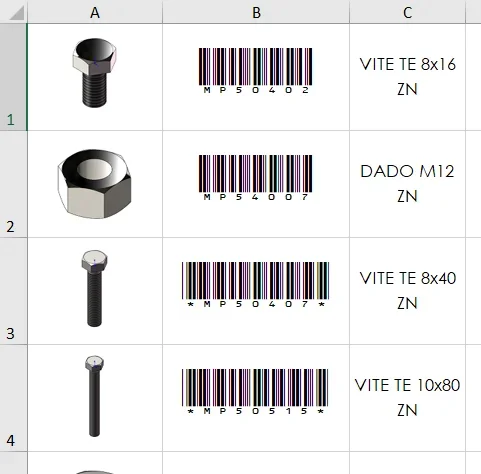
if you invest a hundred euros you bring home a specific software for labels and you can do everything1659118841875.webp
 
if you invest a hundred euros you bring home a specific software for labels and you can do everythingView attachment 66204
I couldn't understand what software it is, but it looks so much like what I get with sw/distinct/excel without having to save the images one by one and create and insert in excel sheet apart.. .1659120151530.webp
 
Thank you. @cacciatorinolet's say that the main obstacle is the reperire of the tablets;
press-union word I had tried time ago, probably does not happen thoroughly and abandoned: say it would be easier to give the size and center the individual labels?
but for pictures and descriptions? Where would I go? always from the excel sheet say or how?
if your obstacle is the picture, then you can export them from the excel sheet that I presume derive from the export of the distinct materials with images (solidworks >=2019)
if you have solidworks 2019 go directly to minute 1.12, from the beginning if you have previous versions.
in a folder are saved images that have been inserted in the excel sheet (big size of the image) for previous versions to solidworks 2019.
in xls folder are saved thumbnails exported from excel sheet
 

Forum statistics

Threads
44,997
Messages
339,767
Members
4
Latest member
ibt

Members online

No members online now.
Back
Top