• This forum is the machine-generated translation of www.cad3d.it/forum1 - the Italian design community. Several terms are not translated correctly.

handrails/walkers

  • Thread starter Thread starter mullah
  • Start date Start date

mullah

Guest
Hello I wanted to know if it is possible to realize the cls parapet of the monolithic scales cls unlike the default steel one imposed by the program. Could you give me some insight into this?

 
Hello I wanted to know if it is possible to realize the cls parapet of the monolithic scales cls unlike the default steel one imposed by the program. Could you give me some insight into this?
How should this parapet be done? post an image maybe...cmq everything you can with revit, you just need to know where to put your hands
 
How should this parapet be done? post an image maybe...cmq everything you can with revit, you just need to know where to put your hands
scala.png
instead of the metal one I would like one of concrete
 
the image is too big.
However, the correct procedure to attach images is:
- select the "advanced mode" button under the message edit picture, and then select the "adjoined management" button from which you can upload an image to the web, or from your pc
 
Thank you gfrank, I followed the procedure and had to buy it.
 

Attachments

  • Scala.webp
    Scala.webp
    17.8 KB · Views: 55
Last edited by a moderator:
tristan, a simple parapet, merely indicative of the thickness of 10 cm. I don't know what other indications you provide. . .
 
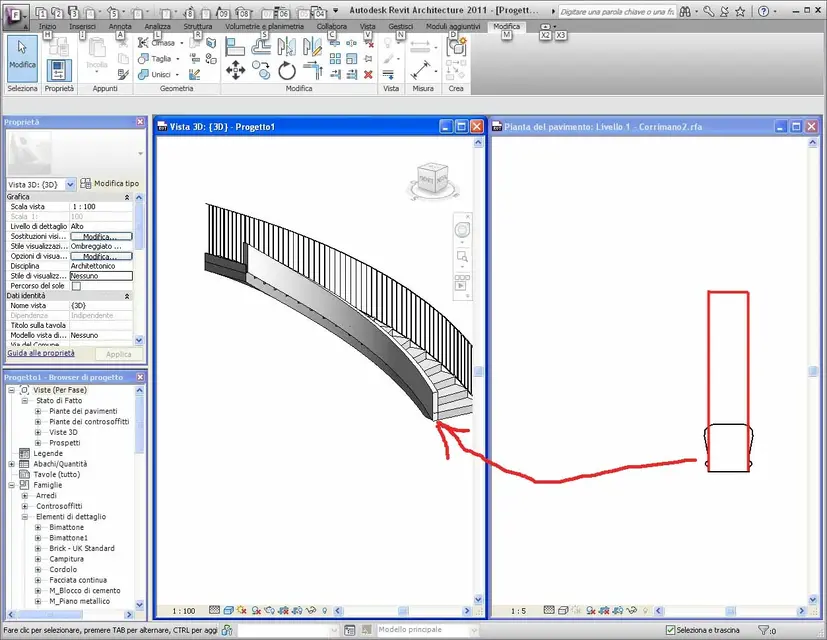
So...nothing? I tried by myself modifying the element properties --> materials and finishes, but there is no verse. alternatively, attrverso hustles (mo) of parapetto) and with the command 'modifies profile' shaped them in correspondence of the two ramps..the problem arises when the body scale begins to rotate..so and true that "modifies profile" does not appear.
 
try to change the "corriman" section so that it is as large as the wall section.
 

Attachments

  • Corrimano.webp
    Corrimano.webp
    105.7 KB · Views: 67
Last edited:
hi gfrank are a bit prevented "the first weapons" can I know how to do it?
 

Attachments

  • 2010-12-12_165356.webp
    2010-12-12_165356.webp
    121.8 KB · Views: 41
open the family of the handrail (you find it in the profile folder) which is present in the revit family archive.
from the family properties (of the handrail) modifies the profile (the magenta line) as you veins in the screenshoot (right image).
saves the family with a new name (e.g. wall handrails) and upload it to the project.
in the project, select the courier of the scale, and from the properties of the type, replace the new family instead of those of the "corriman"

p.s. how did you create those on the straight ramps?
 
Last edited:
I managed to create this hahahahha not laugh hahahaha, I can not give it the thickness and height of the wall
 

Attachments

  • a.webp
    a.webp
    46.4 KB · Views: 18
in the family assigns to the wall the necessary height. measurement is expressed in millimeters
 

Forum statistics

Threads
44,997
Messages
339,767
Members
4
Latest member
ibt

Members online

No members online now.
Back
Top