• This forum is the machine-generated translation of www.cad3d.it/forum1 - the Italian design community. Several terms are not translated correctly.

help wall composition.

  • Thread starter Thread starter Ciuchin0
  • Start date Start date

Ciuchin0

Guest
Hello.
I'm creating partition walls between my quarters. the fact is that all the walls I create "would" be in plasterboard.
between the various apartments in particular, I have to insert partition walls of thickness 20 cm. taken from the kaufman catalog (an attached image taken from their site).
As I intended to create a group for each apartment, my idea, correct me if blasphemy, was to create a type of wall in which I basically create half the section of the wall itself.
from the example below I create a wall with layering of the nucleus equal to "h/2" and external of the nucleus equal to "d". obviously the file then flanked with that of the neighboring apartment should return to the plant of the final premises the desired thickness. Am I wrong?
I hope I've been clear.
Thank you.

p.s. the cardboard material between the defaults does not exist. are there sites where you can download types of wall to be loaded in revit already "prepacked"?
Thanks again.
 

Attachments

  • Cartongesso.webp
    Cartongesso.webp
    50.4 KB · Views: 18
I think it's wrong.
walls must be defined independently.
if you use groups for the single "module" of apartment, define in the group only the internal partitions of the apartment itself.
the states of the walls can be defined with the preferred graphic views, if they require other samples, they can be edited.
for executive details it is advisable to use the details.

your way to manage the wall, although possible, needs to join the two walls, so that they become a single entity, then they always return to a single object.

using your method, you lose the use of abachi (or at least counts are duplicated in reference to the "two" walls) very useful for surface and quantity counts.
 
Thank you gfrank, and I really think I'll do this.
In essence of my building I create external walls with a "wall type", then I hold internal partitions with groups, this only to speed up the work of copying/paste for the equal apartments.
Let me ask another question:
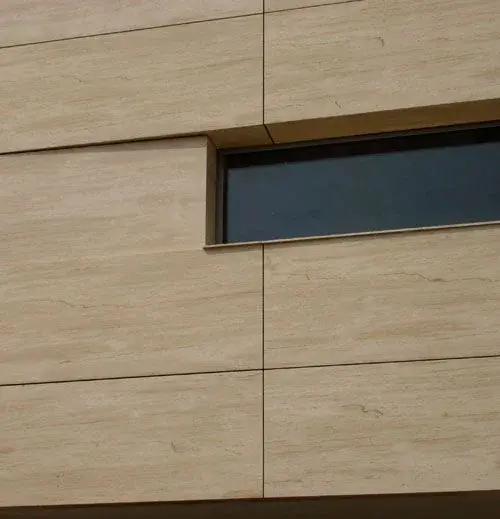
in prospectus, in the first 2 floors I should get a "texture" effect similar to that in photo.
such "stone panels" of coating should have a module (h.30 * l.100)cm

I created the structure of the outer wall as well as you can see in the attached figure below. (substantially it is a system with buffer masonry, insulation, frame for supporting stone panels coating)
how to indicate now to revit, the retino or the texture to be used in the front?
and above all, that for me is very important because this regulates the size of the windows then. how to set the pace of these modules?

thanks for the help
 

Attachments

  • img_right_folio_01.webp
    img_right_folio_01.webp
    21.6 KB · Views: 8
  • rivestimento-di-facciata-in-pietra-naturale-147920.webp
    rivestimento-di-facciata-in-pietra-naturale-147920.webp
    43.6 KB · Views: 11
  • Composizione muro.webp
    Composizione muro.webp
    45.5 KB · Views: 12
in the layer of the material, column "material" find a key [...](see fig. 1)
activate it, access other masks
(Fig. 2)
- section "graphic": management of surface motifs (a) and section (b)
or changing sector
(Fig. 3)
- section of rendering composition: access texture management

selecting some types of material, from "material class" (a1 - fig. 4) go to specific menus to manage materials, including also "the plot" in rendering
 

Attachments

  • M1.webp
    M1.webp
    33.7 KB · Views: 20
  • M2.webp
    M2.webp
    47.2 KB · Views: 20
  • M3.webp
    M3.webp
    55.5 KB · Views: 20
  • M4.webp
    M4.webp
    94 KB · Views: 22
if the material you apply is that of the 1st figure, it is quite simple:
Just find a texture (jpg/bmp/ file or other graphic file) with size proportional to cm 30 x cm 100, amounts it to substitution of the default material, impose the size, the plot (which must be on the perimeter) = "flag", and ... try try a little ....

if instead, you have to use the second material, it is necessary to find a texture that contains the different colored "blocks", with proportional size to several blocks (e.g. 5 x5 blocks = cm 30 x 5 = 150 and in the other dimension cm 100 x 5 = 500 cm)
in the second case the plot will be placed so as to "frame" the perimeter of all 5 blocks
(a crosslink) as indicated in the last figure above

if I don't remember badly, in the roberto site (frcprogetti) there is a great tutorial about the realization of a coating (of the walls) of the bathroom. explains everything.
good reading
 

Forum statistics

Threads
44,997
Messages
339,767
Members
4
Latest member
ibt

Members online

No members online now.
Back
Top