
• This forum is the machine-generated translation of www.cad3d.it/forum1 - the Italian design community. Several terms are not translated correctly.

how to create a macro for thickness solid sheet works!!! ! ! !

  • Thread starter Thread starter Donald Haxhiu
  • Start date Start date

Donald Haxhiu

Guest
Good morning.
if someone can kindly enlighten me I would be really grateful :d
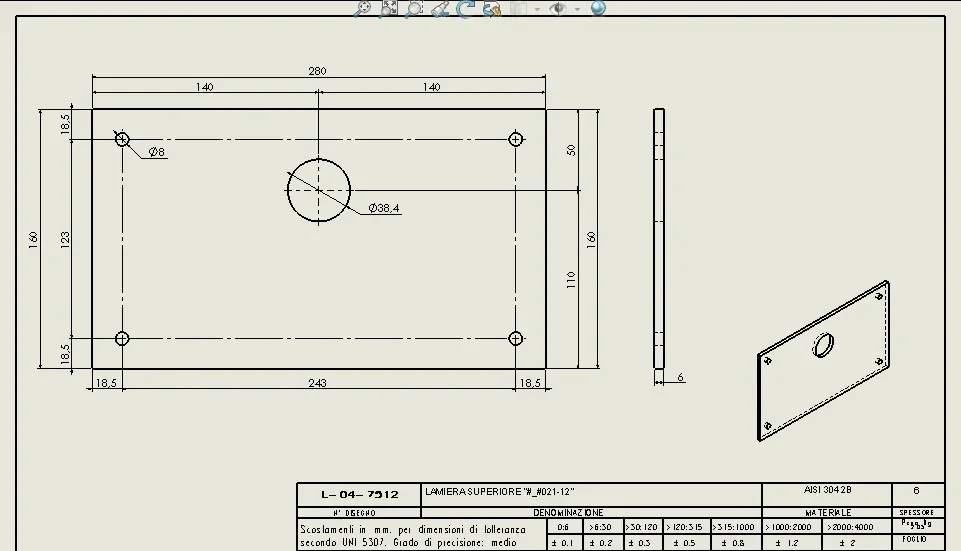
how can I create a macro to be able to attach it to solid works that read me directly the thickness of the sheet is then detected on the paperboard the thickness through the specific field?
see attachment: as you can see the cartilage of my old wax company on the bottom right a specific field for the thickness of the sheet. and once set to me it was enough that in the model I premitted alt+s (command from us decided) that he did some sort of update and then he found in the cartiglio the appropriate thickness. How can I do that?
 

Attachments

  • 2018-04-10_142352.webp
    2018-04-10_142352.webp
    21.2 KB · Views: 36
help me please
After five minutes you asked the question? absurd. .

You don't need a macro. when creating a sheet is automatically created the variable thickness eche can be recalled in the properties of the file and then inserted in the folder
 
good morning to all, use inventor for 10 years and I definitely more familiar with vba.... I am finding it difficult to extract the values of the development of the sheet in a variable, variable that then I would like to report as fields in the cartiglio to have, x development, y and thickness.... someone more experienced can help me? thanks to all
Good job
 
good morning to all, use inventor for 10 years and I definitely more familiar with vba.... I am finding it difficult to extract the values of the development of the sheet in a variable, variable that then I would like to report as fields in the cartiglio to have, x development, y and thickness.... someone more experienced can help me? thanks to all
Good job
if you are talking about solidworks the sheet metal development automatically returns the thickness, length and width of the flat sheet
 
thanks for the speed in the answer. Then I think I have difficulty recovering these parameters in the table that sw creates.

I think that where I'm looking, there are only properties and not variables... is that correct?
 

Attachments

  • Immagine 2023-02-25 121357.webp
    Immagine 2023-02-25 121357.webp
    45.1 KB · Views: 18
sheet properties are found inside the body folder, not in the file properties.
I don't use more solidworks and I have no way to check if you can recover those properties as a variable to put in the cartilage or if you have to do special steps.
 

Forum statistics

Threads
44,997
Messages
339,767
Members
4
Latest member
ibt

Members online

No members online now.
Back
Top