
Alfred_V
Guest
Good afternoon to all,
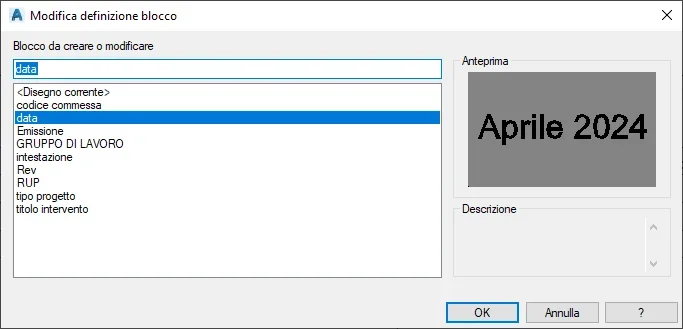
generally when I need to create a block on autocad, select objects and type "block", check the name to the block and my problem is solved. When I have to change it, I click twice on the block and a window appears to me with the list of blocks in the drawings, select the one to edit and let me enter the editor to make the changes. what I see doing this is the following screen:
 the other day I received a file and I noticed that to change the blocks created by other people a "published definition" window appears to me where instead of getting into the block, I can write directly the new text in the "tag" line and so I can quickly change what I need, the screen is this:
 So I wanted to ask you how I can create blocks that when I need to change the text part, can change them by acting on this window? Unfortunately I couldn't find an indication in autocad guides, also because maybe I don't know exactly how this command/option is called.
Thank you all.
generally when I need to create a block on autocad, select objects and type "block", check the name to the block and my problem is solved. When I have to change it, I click twice on the block and a window appears to me with the list of blocks in the drawings, select the one to edit and let me enter the editor to make the changes. what I see doing this is the following screen:
the other day I received a file and I noticed that to change the blocks created by other people a "published definition" window appears to me where instead of getting into the block, I can write directly the new text in the "tag" line and so I can quickly change what I need, the screen is this:So I wanted to ask you how I can create blocks that when I need to change the text part, can change them by acting on this window? Unfortunately I couldn't find an indication in autocad guides, also because maybe I don't know exactly how this command/option is called.Thank you all.