• This forum is the machine-generated translation of www.cad3d.it/forum1 - the Italian design community. Several terms are not translated correctly.

how to import dxf in drafting

  • Thread starter Thread starter supertramp
  • Start date Start date

supertramp

Guest
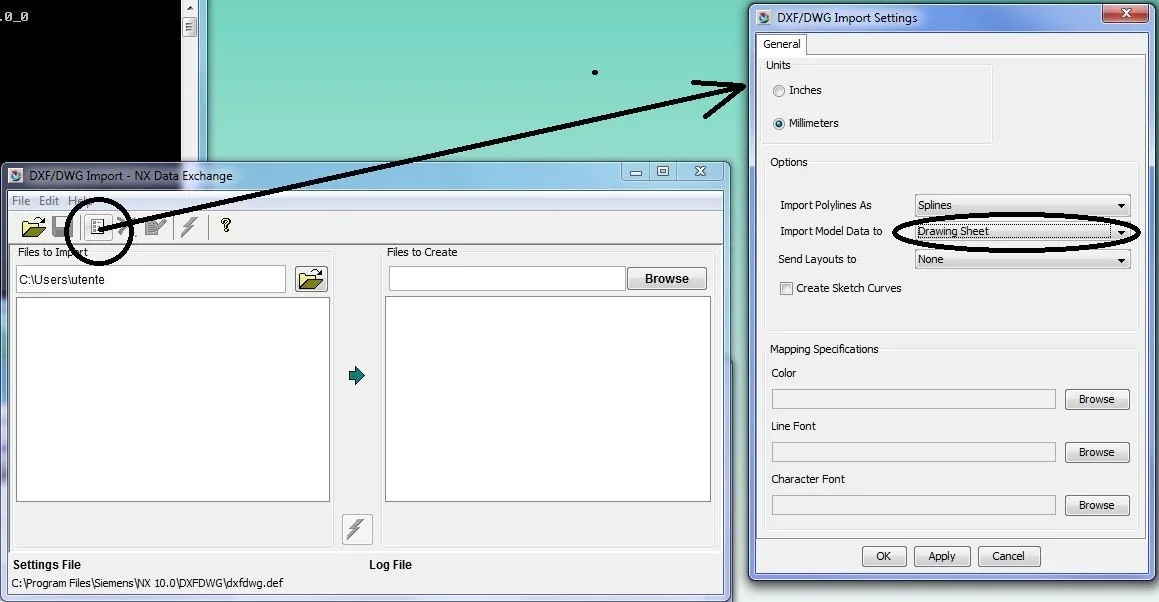
So far, for those two times that served me, I imported the dxf in 3d and then I made the table. But now I need to convert different dxf boards to .prt boards. Is there a way to import dxf directly into the drafting environment? I did some tests but when amounting a dxf even if in the preview window I see everything, then when I give the ok, the translation happens, but do not appear the drawings on screen - white sheet. Can you tell me where I'm wrong?

hello and thanks in advance:smile:
 
in import window options, go to send model data lov and put
- drawing view if you want dxf lines to import you into a view inside a sketch
- drawing sheet if you want to import it to sheet 2d
do not use drawing otherwise end up on top of 3d

Of course, choosing between view/sketch and sheet depends on multiple factors. . .
 
in import window options, go to send model data lov and put
- drawing view if you want dxf lines to import you into a view inside a sketch
- drawing sheet if you want to import it to sheet 2d
do not use drawing otherwise end up on top of 3d

Of course, choosing between view/sketch and sheet depends on multiple factors. . .
hi the_matrix, thanks in the meantime of the answer, but unfortunately I in the options of import do not have that lov, could it be due to the fact that I have a mach 1? Or am I wrong?Immagine 1.webp
 
It's all clear, thank you... Now I have to run the external converters that aren't going anymore... I must have messed up with java some time ago:angry:
 
I used that inside and it's okay.
Do so, though...
- create an empty table
- import dwg/dxf
(try both in work part and in a new part)
 
I used that inside and it's okay.
Do so, though...
- create an empty table
- import dwg/dxf
(try both in work part and in a new part)
Boh.
I will be hidden but from the internal translator I can not.
It matters everything in the top of the model, and I can't find options.
I can only from the external translator.

@ supertramp:
you need to set in the ugii_env.dat installation location java.
For example:

ugii_java_home="c:\program files\java\jre1.8.0_66"
 
Boh.
I will be hidden but from the internal translator I can not.
It matters everything in the top of the model, and I can't find options.
I can only from the external translator.

@ supertramp:
you need to set in the ugii_env.dat installation location java.
For example:

ugii_java_home="c:\program files\java\jre1.8.0_66"
found.

works with file - open - dxf

not working with file - import - dxf
 
I used that inside and it's okay.
Do so, though...
- create an empty table
- import dwg/dxf
(try both in work part and in a new part)
only works if amount in a new part but I was unable to add the cartilage unfortunately... I solved the amount by importing the dxf into modelling and putting it on the table, thank you anyway.
 
@ supertramp:
you need to set in the ugii_env.dat installation location java.
For example:

ugii_java_home="c:\program files\java\jre1.8.0_66"
nothing to do does not work the same external translators. I also tried by inciting java older to 32 and 64 bits, but nothing. I also set the variable in ugii_env.dat but nothing the same.
I remember that during an update java the pc asked me if I wanted to uninstall the old java and I answered yes. from that time the external translator no longer worked... and even internal translators give me a " missing file" error but still work.
thanks to the same and the prox:smile:
 

Forum statistics

Threads
44,997
Messages
339,767
Members
4
Latest member
ibt

Members online

No members online now.
Back
Top