• This forum is the machine-generated translation of www.cad3d.it/forum1 - the Italian design community. Several terms are not translated correctly.

how to insert/open parasolid files or step in inventor

Rossano.Nana

Guest
Good morning to all,
a provider sent me files, first in parasolid format (.x_t) and then in step (.stp). when I open them I can't view them, the problem also shows me with other (.step) files from other providers.
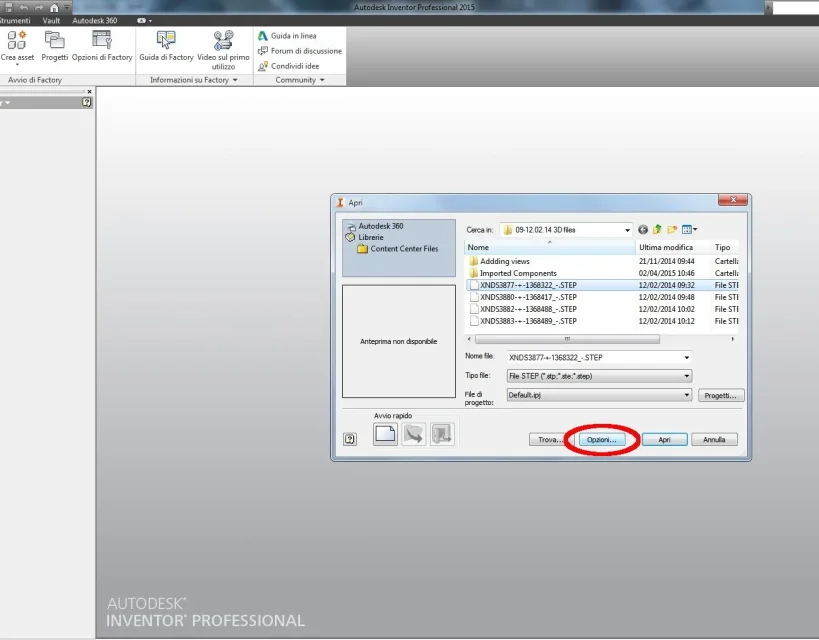
the procedure that I use is as follows:
  • command open
  • select extension
  • the file
  • open the file
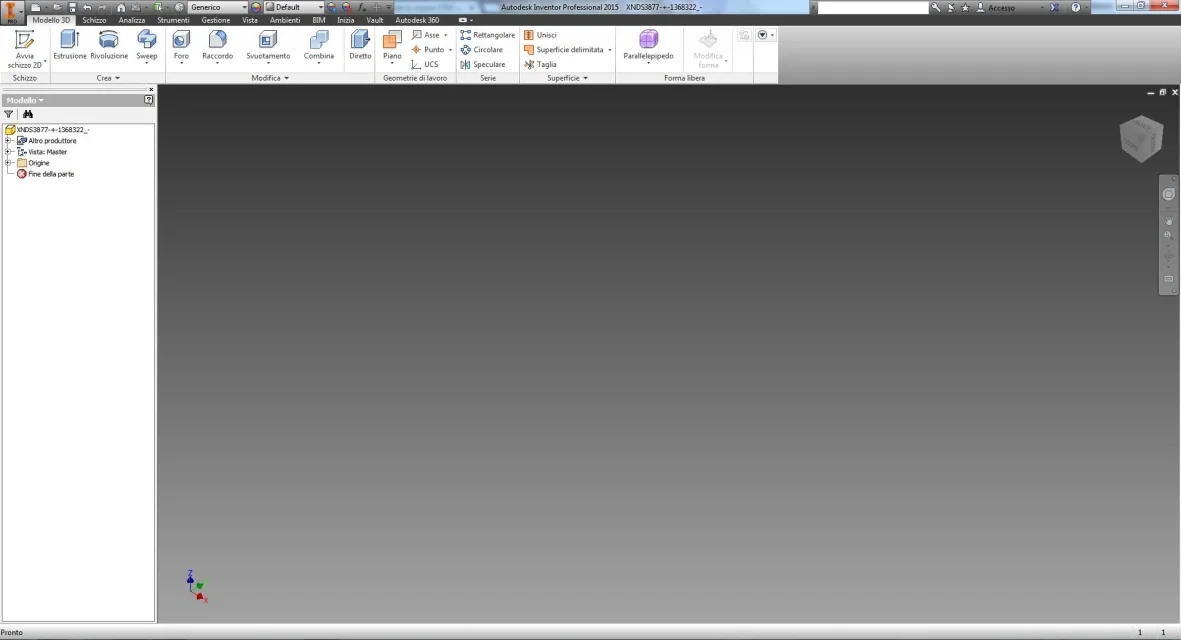
  • opens the page but you do not see the drawing
I attach a print screen after I tried to open the step file.

Thank you for your help

Step-inventor.webp
 
in addition to trying different import options, when I happen a similar thing, to solve amount the step in autocad (it is less "schizzinoso") and take it back from there...
 
@eugenesis:
I just used the open command, what other ways can I use? I'm a neophyte so I'm slowly discovering the inventor world.

@giga:
I'll try to do as you say and I'll let you know.

 
from what you read in the browser, in that file there is nothing.
more than import options is a matter of what you are exporting.
Ask him for an export in igs, if there's something you should be able to see it more easily.
don't let you know that there is something usable, I repeat, depends on who generates the output file, not by inventor.
inventor opens well the stp files done well, others, those done badly, go open with a thousand cautele, maybe passing by rhino, which has a more tolerant stomach.
 
from what you read in the browser, in that file there is nothing.
...
inventor opens well the stp files done well, others, those done badly, go open with a thousand cautele, maybe passing by rhino, which has a more tolerant stomach.
what I don't understand is that I had already opened them before... small "problem" I don't have rhino:-)

thanks for the suggestions you are giving me!

 
Unfortunately it is not that you can say so much, already having the files in hand you have to invent things.
without even having them available, any response is a shot.
You've already opened them like that?
I in the stp files I open, see in the browser, under "origin", some indications related to the object present in the file, in your there is nothing.
 

Attachments

I also tried to open them from autocad mechanical, but nothing.. .
the problem is that they are files that I can't "turn"... you know how it is
other question, when you open the window to select the file to open, what kind of project should I select? That's the problem? that I am wrong with some setting when opening the file?

Thanks again
 
the problem is that they are files that I can't "turn". . .
normal, even if it precludes the possibility of targeted aid.
other question, when you open the window to select the file to open, what kind of project should I select?
It's influential.
determines only the location where the treated file is saved by default (imported components of the project folder )

The only thing you can do is talk to your client and find a solution together.
If they don't, I'd start worrying.
 
Last edited:
solution found.. .
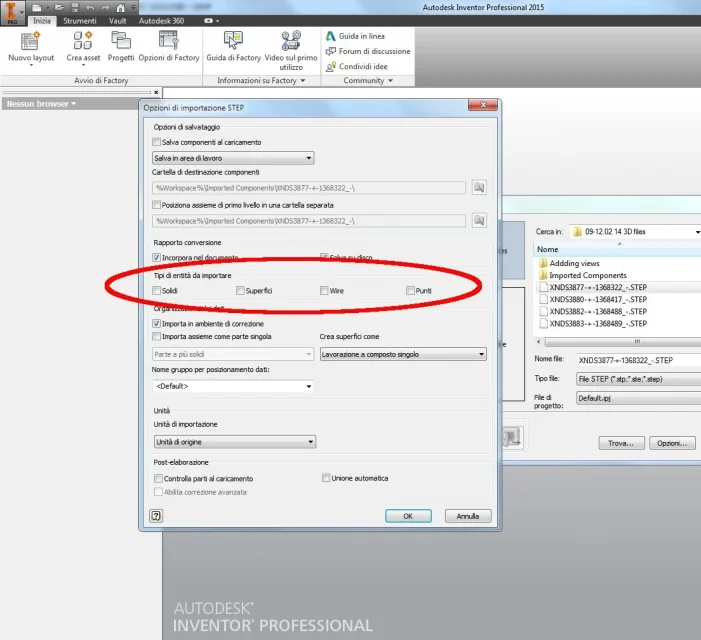
I heard a friend and told me to look in the opening options, in fact, all entities were unchecked. . .
select those the file is "magically" open!
procedure and result below:finger:


01 - Opzioni apertura step.webp02 - Entità da importare.webp03 - Opzioni apertura step selezionate.webp04 - STEP Aperto.webp
 

Forum statistics

Threads
44,997
Messages
339,767
Members
4
Latest member
ibt

Members online

No members online now.
Back
Top