• This forum is the machine-generated translation of www.cad3d.it/forum1 - the Italian design community. Several terms are not translated correctly.

how to print pdf in correct scale from model space

  • Thread starter Thread starter tatyb295
  • Start date Start date

tatyb295

Guest
good morning, when I do a pdf print from the model space the designs are never printed properly, since at the time when I go to measure with the ruler on the printed sheet the measurements are not accurate. what settings do I need to insert? as a measuring unit I use the meters. if for example I have to print in scale 1:200 and I have already scaled the drawing in that scale and inserted inside a sheet a4 (always drawn on the model space) click on print, then dwg to pdf and as settings in the scale window what should I insert (where there are mm and units)?
 
no need to insert an a4 into the model.
in the printing phase there is a very clear (in my view) approach.
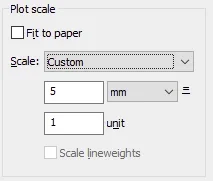
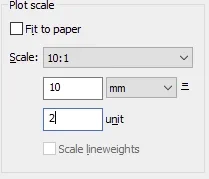
how many mm (printed) match how many units (model).
If you designed in meters, at 100, 1 unit would be (printed) 10mm, do you agree?
If you have scaled your design to 200, it means that 1 meter is 0.5 units, then 1 unit is 2m, which (printing to 200) should be printed 10mm long, then the ratio 10mm/1 unit returns.
It is essential to understand this value.
the use of "suitable to the sheet" (which you definitely used, otherwise it would have been useless to draw a4) is to use only if you do not need a printed drawing in scale.
 
as a measuring unit I use the meters. if for example I have to print in scale 1:200 and I have already climbed the drawing in that scale
Probably your mistake is this. In the model space you draw in scale 1:1, so if you scaled the drawing you made a bullshit.
 
Probably your mistake is this. In the model space you draw in scale 1:1, so if you scaled the drawing you made a bullshit.
Tristan forgive me, but I disagree.
point 1 makes no sense to say 1:1.
1:1 what? Unit=1: What=1? everything depends on the report in print scale. Everything.
I can draw even 1:1 in km technically I did not wrong.
and then the fact of drawing everything in m (or cm or mm) and then climbing it in the printing phase presents different plasters.
a)-if you have tables with different scale reports, you are forced to arrange a table with layout;
b)-if you have different scales, you will have to scale texts, quotas, quotas, extensions, line scales for each scale of rappr. different.
c) if you work in the layout you will need to lock the windows otherwise 99.9% of the cases you lose the scale reports;
d) if you have the psltscale activated, the type in the model (where I remember, the man works) will all be scaled and maybe a short dotted line, you will see it continuous. If you don't have it, when you print, maybe a dotted one will seem continuous.

point b) and point d) will not allow you to have visual control over the drawings. you will only notice in print, how ugly and uneven is a design.
You will tell me "to overcome this there are quotas and annotative texts." Okay, for the subject itself. but the distance between objects? 2 distinct lines of text in the 100, then I decide to do it at 50, what happens? h halved texts, distance between the two double of before (printed).
then use mtext and this does not happen (but the problem remains for example for a parallel battery).

at this point I ask: is it better to read 2 units knowing that being 50 is 1m, or read in model 1 and have all the bookmarks that come out in print?

I repeat: there is no rule that requires drawing 1:1 (or 1:100 that you want).
this "consuetude" is only the result of the mental laziness of the operators, which in fact in the printing phase do not know why the design is not exactly in scale, but only approximately, and attribute it to the software. by now the scale ratio is considered an orpello, a detail to be easimare at the end of everything, while instead it is the constituent and propedeutic bone of a table.
 
Last edited:
Probably your mistake is this. In the model space you draw in scale 1:1, so if you scaled the drawing you made a bullshit.
ok then in the model space I leave scale 1:1, then in print phase how do I set? I'm a little ignorant in this field.
 
ok then in the model space I leave scale 1:1, then in print phase how do I set? I'm a little ignorant in this field.
 
point 1 makes no sense to say 1:1.
1:1 what? Unit=1: What=1? everything depends on the report in print scale. Everything.
I can draw even 1:1 in km technically I did not wrong.
is a fast way to indicate that "1 current unit = 1 unit of measurement chosen for the design". I agree with you that if you want to use the kilometers it is not absolutely wrong, just then impose a correct press report
a)-if you have tables with different scale reports, you are forced to arrange a table with layout;
...and what's wrong with using the layouts?? at my home you print from model space only for test prints, otherwise you use the layouts.
point b) and point d) will not allow you to have visual control over the drawings. you will only notice in print, how ugly and uneven is a design.
if you use the layouts configured as a god commands, you notice well before printing
For the rest, I respect your opinion but I don't share a single word.
 
ok then in the model space I leave scale 1:1, then in print phase how do I set? I'm a little ignorant in this field.
I use a trick: I set the paper units (the field where the "mm" unit appears) in relation to the unit of measurement used in the drawing (e.g. if I designed in 1000 mm imposed meters, if instead I drew in 10 mm imposed cm) while in the second field of the current units imposed the scale denominator.
in your case, with design in meters and scale at 200, set in this way
scala.jpgwhich means that 1 m represented on the card is equivalent to 200 m in reality, which looks randomly the meaning of the 1:200 scale
 

Forum statistics

Threads
44,997
Messages
339,767
Members
4
Latest member
ibt

Members online

No members online now.
Back
Top