reggio
Guest
Hello, would you be able to help me quote the diameter with a partial share in a detail?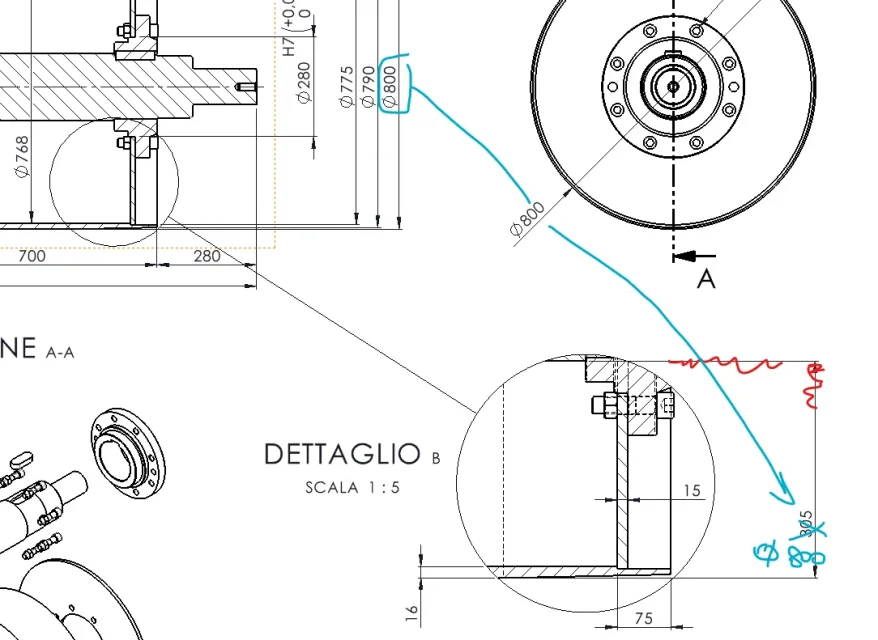

including in detail also the axis should work equallyHello, would you be able to help me quote the diameter with a partial share in a detail?
thanks, big circle then shredded =View attachment 71890After you can hide the extension line but I did not find way to hide the arrow and shorten quota line.If with shift or ctrl you can't move/copy the price in detail, the only trick I know is to make the circle of detail as large as the object, quoti in detail and once you have 800 regret ol circle of detail. I hope I explained.
I tried with the axis but it doesn't work (but I have 2021)including in detail also the axis should work equally
Quote interrotte su particolare in dettaglio
Salve a tutti, Avrei bisogno di rappresentare la quotatura diametri come riportato nell'immagine sotto (cioè parziale) esiste un metodo dedicato per fare ciò in ambiente drawing? come sempre ringrazio tutti in anticipo per le eventuali risposte date e buona giornata a voi.www.cad3d.it
ok "hide quotation line" found!! :quoting normally the diameter
> hide extension line
> hide quotation line
the quota is correct but the workaround of magnifying the detail does not need, it is enough in fact to click the first edge on the detail b and the second edge in the father view, the rest does not change. I want to specify it because on very heavy tables enlarge the sketch of detail may not be so nice.If with shift or ctrl you can't move/copy the price in detail, the only trick I know is to make the circle of detail as large as the object, quoti in detail and once you have 800 regret ol circle of detail. I hope I explained.
I didn't know this trick and thank you for suggesting it, it will be very useful. I also did a detail enlargement to include all the necessary items, and then regret. 2021 works.the quota is correct but the workaround of magnifying the detail does not need, it is enough in fact to click the first edge on the detail b and the second edge in the father view, the rest does not change. I want to specify it because on very heavy tables enlarge the sketch of detail may not be so nice.
I forgot... I don't remember if this function has been introduced recently, so not available on old versions, but I don't think.