• This forum is the machine-generated translation of www.cad3d.it/forum1 - the Italian design community. Several terms are not translated correctly.

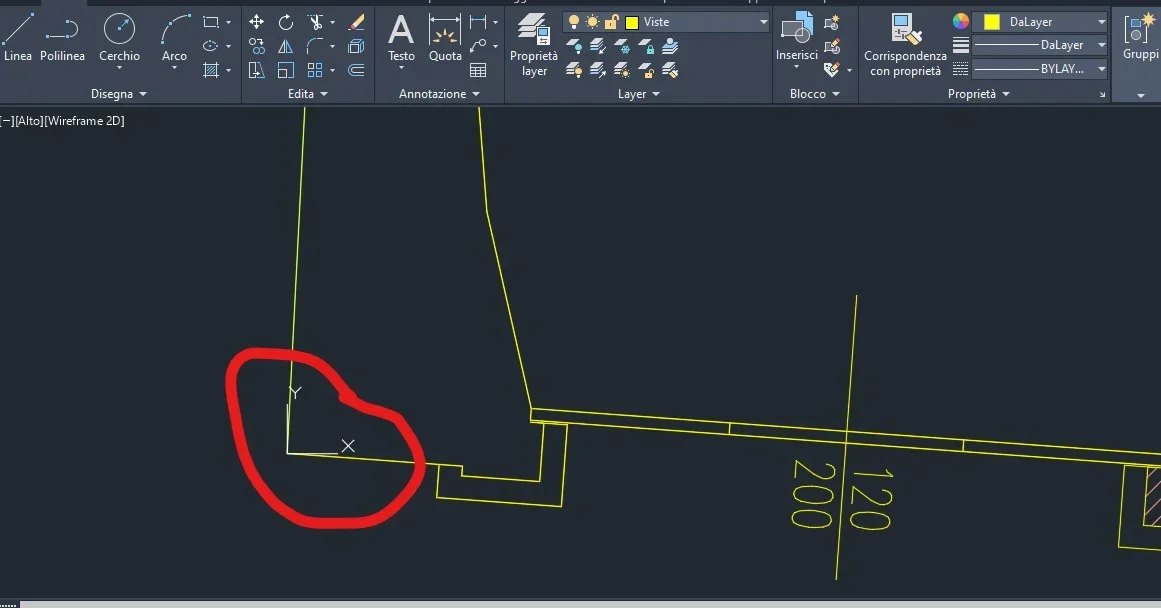
i can't put x,y axes on the origin of the design.

  • Thread starter Thread starter Alex97
  • Start date Start date

Alex97

Guest
I can't put x,y axes on the origin of the design. I click on the axes but I can't move the axes, with the mouse I move the axes but then they come back. I wrote on the command line ucs, clicked sending, I take with the mouse the axes put them on the drawing but then return to the bottom left. What can I do? Thank you.
 

Attachments

  • UCS2.webp
    UCS2.webp
    38.5 KB · Views: 11
  • UCS.webp
    UCS.webp
    17.3 KB · Views: 10
I probably moved the axes into a design edge, see attached image, but it's not yet what I have to do to correctly bring the plant into a software for the modeling of the energy certification, as the software tells me that I did not model the file on the absolute origin 0 of the design, how can I do?
Thank you.
 

Attachments

  • UCS.webp
    UCS.webp
    34.4 KB · Views: 5
If I click zoom everything, the axes I see them left detached from the drawing. I counterbalanced even though there are dots of lines around the design.
 

Attachments

  • Tutto.webp
    Tutto.webp
    14.1 KB · Views: 8
to post the drawing in 0.0.0, I selected it>sposta>#>0>0, but the value that is in the cell takes the zero but by sending again a series of numbers as at the beginning and the design does not move.
 
if you write 0<0 means that you move 0 units to the right. Why don't you move... have you ever thought about taking a nice autocad course? These are the basics!
 
That's what I have. the sign> I have meso to make understand the seizure of the passages.. .
 
definitely is a "sporty" design with presence of entities dispersed in space and should be clean. Anyway... .
#0.0 only works if dynamic input is enabled (activable and deactivable with f12), if it is disabled, after switching the command, simply type 0.0
 
Last edited:
in a file clicking f12 does not change anything i.e. does not hear this command, what I can do.
Thank you.
 
if I try to manually move the axes, once clicked with the mouse the axes return to the position of origin qundi to the bottom left and do not remain in the desired position?
How do I proceed?
Thank you.
 

Attachments

  • Torna indietro.webp
    Torna indietro.webp
    20.9 KB · Views: 7

Forum statistics

Threads
44,997
Messages
339,767
Members
4
Latest member
ibt

Members online

No members online now.
Back
Top