• This forum is the machine-generated translation of www.cad3d.it/forum1 - the Italian design community. Several terms are not translated correctly.

ilogic or rules

  • Thread starter Thread starter MB_MAN
  • Start date Start date

MB_MAN

Guest
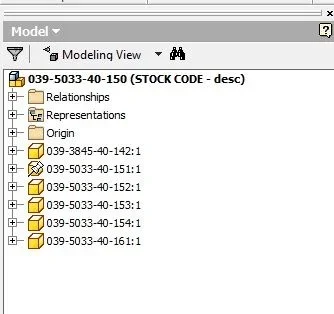
hi to everyone, I'm looking for a rule that can start when I need to see in the file tree (browser) together, next to the file name (part) a couple of information from the iproperty I customized.
only temporary display until that detail together and open.
I need this information to be able to insert into the company program the cysts of the raw material we use to create that part.
Thank you very much

ps use inventor 2015 base in English.
 
there can be 2 solutions
the first, that I currently use it with software installation + pdf in this post:http://www.cad3d.it/forum1/threads/...isualizzare-iproprietis?highlight=iproperties
la seconda, utilizzando questa regola ilogic che allego sotto:

sub main
dim asmdoc as assemblydocument
asmdoc = thisapplication.activedocument
shortname=thisdoc.filename(false) 'with extension (false) without extension

' change the name for the assembly.
asmdoc.displayname = buildname(asmdoc)

' change the name in every referenced document.
dim doc as document
for each doc in asmdoc.allreferenceddocuments
oorigrefname = doc.fullfilename

fnamepos = instrrev(oorigrefname, "", -1)'find the postion of the last backslash in the path
name = right(oorigrefname, len(oorigrefname) - fnamepos)'get the file name with the file extension
shortname = left(name, len(name) - 4)'get the file name (without extension)
iproperties.value(name, "project", "part number")=shortname'scrive sul numero parte il nome del file
doc.displayname = buildname(doc)
next
end sub


private function buildname(doc as document) as string

dim new_name as string
dim designtrackprops as propertyset
designtrackprops = doc.propertysets.item("design tracking properties")

new_name = designtrackprops.item("part number").value & " - " & _
designtrackprops.item("description").value

' new_name = designtrackprops.item("part number").value


buildname = new_name
end function
 
Thank you so much matteo, for the moment with the rule you gave me does not work, while for the software I have to wait for it manager of the company back in order to have the permissions to install.
 
Hi.
kindly if you send me a 3d part and highlight the iproperties you want to view in the browser so I look at it

Thank you.
 
Hi.
kindly if you send me a 3d part and highlight the iproperties you want to view in the browser so I look at it

Thank you.
Can you write the rule indicating where I have to add the name of custom iproperties? However tomorrow I send you the file together with two parts so that then see in person.

the ideal would be that I appear in the assemblies next to the file name, maybe in parentheses, the two main iproperties I need. very important thing and that it does not alter anything, i.e. it does not change name or make some modification to the file itself because I work with vault on the network.
 
sub main
dim asmdoc as assemblydocument
asmdoc = thisapplication.activedocument
shortname=thisdoc.filename(false) 'with extension (false) without extension

' change the name for the assembly.
asmdoc.displayname = buildname(asmdoc) ' metti l'apostrofo ad inizio riga se non deve "rinominare" anche l'assieme

' change the name in every referenced document.
dim doc as document
for each doc in asmdoc.allreferenceddocuments
oorigrefname = doc.fullfilename

fnamepos = instrrev(oorigrefname, "", -1)'find the postion of the last backslash in the path
name = right(oorigrefname, len(oorigrefname) - fnamepos)'get the file name with the file extension
shortname = left(name, len(name) - 4)'get the file name (without extension)
iproperties.value(name, "project", "part number")=shortname'scrive sul numero parte il nome del file
doc.displayname = buildname(doc)

next
end sub


private function buildname(doc as document) as string

dim new_name as string
dim designtrackprops as propertyset
designtrackprops = doc.propertysets.item("design tracking properties")
name_file = designtrackprops.item("part number").value

dim designtrackprops_custom as propertyset
designtrackprops_custom = doc.propertysets.item("inventor user defined properties")


custom_iprop = designtrackprops_custom.item("finish").value & " - " & _
designtrackprops_custom.item("title-1").value

'ho richiamato le tue iproperties personalizzate "finish" e "title-1"


buildname = name_file + " (" + custom_iprop + ") "

'rinomina il browser con nome file ( valore di finis _ valore di title-1)
'se non si aggiorna, devi mettere nei comandi di produttivit. rinomina nodi browser in default
'se vui ripristinare il valore standard, apri il singolo ipt e cancella il valore dall'intestazione
'in alto nel browser (solitamente il nome file)

end function
RISULTATO FINALE.webpRINOMINA DA INVENTOR.webpRIPRISTINA IL NOME.webp
 
then send me the rule file you created and also the file together?

I started the rule and it doesn't look like you.
this and the first error that appears to meerrore1.webpand then the window looks like thiserrore2.webp
 
Hi.
the files together I have already saved them with iv2017 so I guess you can not reopen them (they were in iv2015)
I did not put controls on iproperties, so the files must have all the iprops you look for!
 
Hi.
the files together I have already saved them with iv2017 so I guess you can not reopen them (they were in iv2015)
I did not put controls on iproperties, so the files must have all the iprops you look for!
Hi.
Too much I can't understand why you with this rule works and I don't.
 

Forum statistics

Threads
44,997
Messages
339,767
Members
4
Latest member
ibt

Members online

No members online now.
Back
Top