• This forum is the machine-generated translation of www.cad3d.it/forum1 - the Italian design community. Several terms are not translated correctly.

importazione step

  • Thread starter Thread starter Alessio83
  • Start date Start date

Alessio83

Guest
good morning to all, a builder sent me steps of a machine, when the amount are surfaces, and they are transparent arancino, I struggle to work them, can you see opaque surfaces?

 
with inventor you can do it:
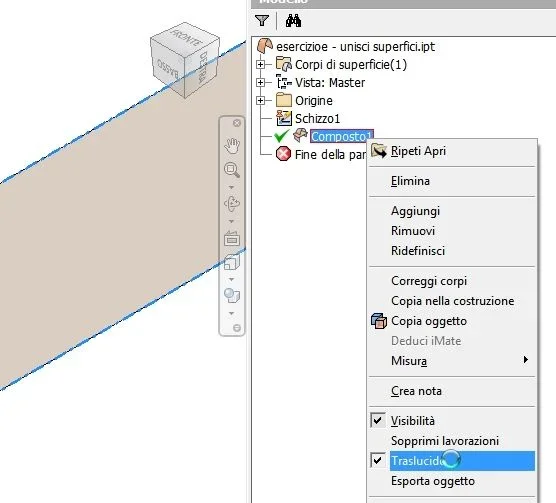
by selecting from browser the surface, button dx, remove the check from "translucent"
_foto__295.webp
_foto__296.webp... as I always say... when you don't know what to do... the dx key can save you
 
with inventor you can do it:
by selecting from browser the surface, button dx, remove the check from "translucent"
Okay, this is a palliative that usually makes you see the piece better.
often visual improvement is really minimal.
better would correct the surfaces and turn everything into solids.
 
did you try to load the step model with a different program and get it back? I tell you this because I use solidworks I sometimes have your problem and if I step first from freecad I get new step models to import into solidworks clearly better and above all solid and divided by parts.
 
How do you turn them into solid?
excuse the banal question but I with the surfaces are not practical
- - - updated - - - -when I enrolled I used nx now use inventor, I correct
 
How do you turn them into solid?
I describe the procedure I use with 2014, I have 2017 mounted but not use, my customers arrive until 2016.
on 2017 it has changed and I find it less linear than 2014, it will be because I have not spent time so much.
in 2014, open the file with the open surfaces, in the browser of the expanded processing until you see the surface, with the dx key do " copy in the construction ".
in the browser form a "building" item, double click, expand it and go to the surface.
with the dx button opens a curtain where I use in sequence " separates ", which makes all single surfaces, " quality control ", where you can correct small imperfections in a semi-automatic way, then I do " join ".
generally, so doing, you can get a solid, which then, with "copy object " will become your usable solid.
if it does not solidify due to lack of surfaces, as long as simple, you can add them with "contour surface " and try to close the whole.
If the surfaces are particularly degraded or complicated, I don't waste any time and step right away on rhino, which has all other tools and has always allowed me to solidify the ugly models that, fortunately rarely, I receive from my customers.
 
Thank you very much. .
I'll try, but tell me if it's logical that a builder won't give me the files already set up.
 

Forum statistics

Threads
44,997
Messages
339,767
Members
4
Latest member
ibt

Members online

No members online now.
Back
Top