
• This forum is the machine-generated translation of www.cad3d.it/forum1 - the Italian design community. Several terms are not translated correctly.

[include geometry]

  • Thread starter Thread starter volaff
  • Start date Start date

volaff

Guest
Hello everyone,
I tried to use the "search" function but found nothing interesting.

for modeling needs I would need to select lines and arches of existing geometries instead of recreating them for a new feature.

I wondered if there is a "include geometry" command of solidworks in which, in a new sketch, you can select lines and strings of a different sketch used to create a previous feature.

I don't know if I was clear.

Thank you all.
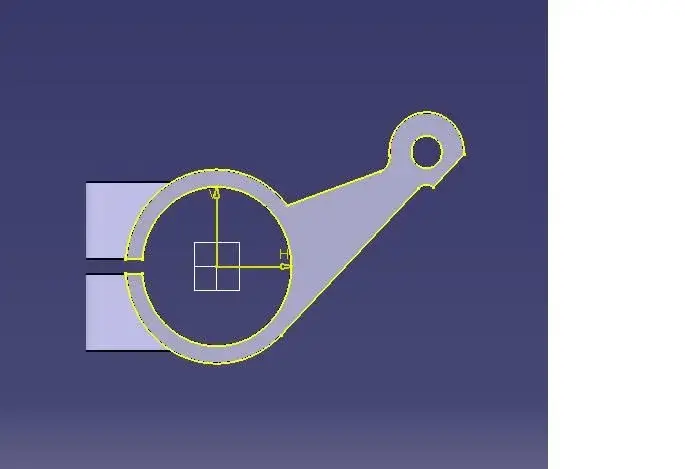
 
after a more careful research I realized that the command that in solidworks is "include geometry" in the catia is called "project 3d elements", but I have a problem not recently.

I have the need to copy to make a cut part of a previous feature.
select the reference plan then go on sketch and on "project elements 3d".
using the command the part relative to my selection becomes yellow (see figure) but I can neither make cuts nor other operation as making it tangent to a sketch created and similar.

I don't know if I was clear.
Am I wrong with something? !

greetings to all and thank you!
 

Attachments

  • Immagine.webp
    Immagine.webp
    10.2 KB · Views: 5
then isolate it with the right button on the projected part and after you can change it

Hi.
 
Thank you now I understand how to do it.

the only boring thing is that each line or arch should be isolated individually.

Thank you so much again.

if there are lightenings are always accepted!! !

:-)
 
Hi.
you are not obliged to project all the elements. . you can just project the lines or strings that serve you and then add your changes.
If geometries are yellow.. are associative and therefore change with the change of the originals. If you isolate the sketch as dandao suggested... Lost the Absoluteness
 
thank you very much for the clarification.
you can not create a sketch with "yellow" geometries and new sketch to what I understood, unless you isolate them!
 
thank you very much for the clarification.
you can not create a sketch with "yellow" geometries and new sketch to what I understood, unless you isolate them!
Of course you can create a sketch with yellow elements.. the important thing that there are no open or isolated profiles.. or points (+) along with lines and arches
 
thank you very much for the clarification.
you can not create a sketch with "yellow" geometries and new sketch to what I understood, unless you isolate them!
You probably don't know the command to analyze a sketch.. I'll attach your image
 

Attachments

  • Cattura3.webp
    Cattura3.webp
    241.4 KB · Views: 6
thank you so much in fact I am a neophyte of catia.
better go by degrees.
the potential of the instrument are impressive, better know how to manage (for now) few tools but for good.
Thanks for the help! !
 

Forum statistics

Threads
44,997
Messages
339,767
Members
4
Latest member
ibt

Members online

No members online now.
ciao
Back
Top