
• This forum is the machine-generated translation of www.cad3d.it/forum1 - the Italian design community. Several terms are not translated correctly.

insert group of coordinate points

  • Thread starter Thread starter bruno85
  • Start date Start date

bruno85

Guest
Hello everyone,
I would have a necessity that I could satisfy as many simple ocmands, but I would like to know if there was a method to speed this up.
I have to take from a suspension film software the coordinates of the nodes of the suspensive system of a vehicle, and import them into swx as a 3d sketch, in order to create a reference system to draw the cads of the suspension with top-down methodology.
I could put point by point, but there are several dozen. Is there a possibility of importing from a text file, or from a table, the coordinates of all points simultaneously?
Thank you very much.
 
creates a 3d sketch that contains as many points as they are in the input file.
Yes, that's exactly it!

Now I just have to figure out how to get her started... :biggrin:

I see the online guide that tells me.

Thanks marcof and hunter!
 
Unfortunately my knowledge of macros and their use in swx is too lacking.
Could you suggest how to insert the code that is in the link, or, if I don't ask too much, attach the macro already ready to use for swx?
I'd be grateful!
 
Unfortunately my knowledge of macros and their use in swx is too lacking.
Could you suggest how to insert the code that is in the link, or, if I don't ask too much, attach the macro already ready to use for swx?
I'd be grateful!
the macro is already ready, you just have to launch it:
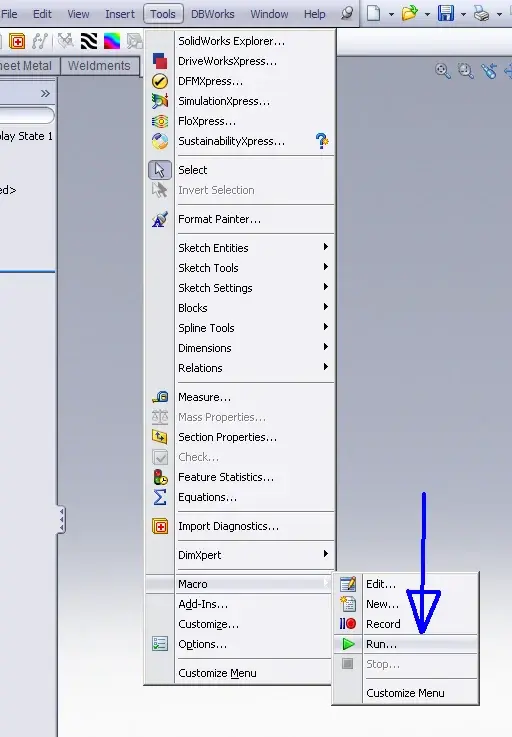
activate the macro toolbar, click on the play icon, select the file, from the ok and open the window where you have to go to select your file content the xyz points.
even better do this:
right click the toolbar menu. customize/commands/macro and drag the "new macro barrel" button into the toolbar and exit with ok
when clicking on the new added button opens a mask in which you indicate the location of the macro file associated with that button, possibly a different icon and other options of the button, including the keyboard shortcut which is the most convenient solution.
Be careful because I noticed that random, with full-screen swx, when you launch the macro mask for the choice of data to enter does not appear in the foreground and you do not even have the icon on the taskbar. Maybe it's just a problem on my pc...
 
Otherwise, an image is worth more than a thousand words.
 

Attachments

  • makro.webp
    makro.webp
    29.1 KB · Views: 39
Unfortunately I am late: I did as you say, but it is not.
the code that is on the site you put me the link is saved in a macro file, right?
That's what I can't do.
 
I'm still trying, but I can't get the macro started! I created a macro file, I copied the link code equal, I created the button, but cmq does not work!

I attached the macro file I created without much success. Is there any soul that looks at us and sees what I'm wrong?
 

Attachments

I'm still trying, but I can't get the macro started! I created a macro file, I copied the link code equal, I created the button, but cmq does not work!

I attached the macro file I created without much success. Is there any soul that looks at us and sees what I'm wrong?
Look, if I did that, I'm a Tibetan goat who can succeed anyone.
You don't need to go copy any code. when you create the button you just need to choose to associate the "gen3dpointcloud.swp" file that you downloaded from the link we have shown you. That's the macro. point.
Similarly if you choose to simply click the Macro Run button then choose that file. :
 
I missed the link to download the macro... :biggrin: I thought the macro consisted of the page code... Now it works!:finger:
Thanks again!!! ! !
 
I have a problem with the use of the macro, despite the measures of the file that I give it in the meal is in mm, and the unit that imposed in the mask of the macro is in mm, the size of the 3d sketch created are in meters. Why does that happen?
 
I do as a hammer, I asked the question, and I also give the answer.

I used the list with the coordinates of the points, but it had the ocme separator point between whole and decimal. this made solidworks read an incorrect value. replacing the point with comma, using the blocknote replace function, I solved everything.
 

Forum statistics

Threads
44,997
Messages
339,767
Members
4
Latest member
ibt

Members online

No members online now.
Back
Top