• This forum is the machine-generated translation of www.cad3d.it/forum1 - the Italian design community. Several terms are not translated correctly.

insert jpg pictures on a floor

  • Thread starter Thread starter thedifference
  • Start date Start date

thedifference

Guest
hello to all
as I want to draw a car in 3d with cat and reading on the internet I found a guide in English where it tells me at a certain point to apply the image on the newly built floor!
I thought of acting on the material of the plan but then how do you put the jpg image?? the catalog of the materials does not preview the insertion of a jpg.


Thanks :)
 
Hi.

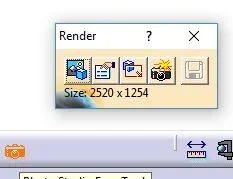
in rendering and photo modules there is a command called paste image image (stick) - is a yellow leaflet that animates to the mouse passage - and is what allows to apply the images on the surfaces.

of the noble
 
I am honored that the first answer I had from her!! the king of the cat:)
Maybe I didn't explain myself well...I have to paste it on a surface created by me.I attach an image so maybe you understand better...(in the red ellipse)
 

Attachments

  • Immagine part1.webp
    Immagine part1.webp
    23.8 KB · Views: 147
Yes, I understood the problem.

I will send you, if I can tomorrow, a more detailed example. Could you send me a private message or my email ciak77@gmail.com so I send you a couple of explanatory images that I prepared for the 6th edition of my manual (not yet released).

of the noble
 
Hello.
I have a similar problem. I have to insert a jpg image in sketcher environment and then create a profile... but I don't find any function that allows me to do it! Can you help me? ? ?
Thank you! ! !
 
Hello.
I have a similar problem. I have to insert a jpg image in sketcher environment and then create a profile... but I don't find any function that allows me to do it! Can you help me? ? ?
Thank you! ! !
I don't know a command like that, but you could try with...

1) open a catdrawing
2) Insert the image
3) create silhouette with strings lines and splines
4) copy created items and paste them into the catpart into the sketch function.

Hi.
vittorio
 
if I don't run out in 3d you need the freestyle sketcher license.

I didn't prove it. could work even though a little hardy
 
hello to all
...how do you put the jpg image?? the catalog of the materials does not preview the insertion of a jpg.


Thanks :)
probably you have already solved, but I think that by inserting an image or two in the forum, you can make a contribution to others too.
from the photo studio module take the command Apply adhesive sticker then select the surface and then go to "take" the image you need.
I did an example with a curved surface just to generalize.
 

Attachments

  • img_01.webp
    img_01.webp
    15 KB · Views: 88
  • img_02.webp
    img_02.webp
    14.9 KB · Views: 75
Hello.
I have a similar problem. I have to insert a jpg image in sketcher environment and then create a profile... but I don't find any function that allows me to do it! Can you help me? ? ?
Thank you! ! !
on the catdrawing I don't think you can do it because the img doesn't give me a way to see what design (I could even wrong because I'm now going to memory).
instead it is more practical to use the sketch tracer module and in particular the command with the red scarabocchio.
I attach a couple of pictures, however it is quite intuitive. Just use the snaps at the top of the rectangle or type measures to proportion the image to concrete quantities.
done this then you go on drawing with the usual sketcher, however you have to be careful especially in the choice/processing of images.
 

Attachments

  • imgA.webp
    imgA.webp
    33.5 KB · Views: 64
  • imgB.webp
    imgB.webp
    49.3 KB · Views: 41
I don't know a command like that, but you could try with...

1) open a catdrawing
2) Insert the image
3) create silhouette with strings lines and splines
4) copy created items and paste them into the catpart into the sketch function.

Hi.
vittorio
how does the image fit in catdrawing environment? Could you please tell me the steps?
 
in the drawing environment you have on top a drop-down menu that allows you to insert images. You should find it easily. test
 
probably you have already solved, but I think that by inserting an image or two in the forum, you can make a contribution to others too.
from the photo studio module take the application adhesive command then select the surface and then go to "take" the image you need.
I did an example with a curved surface just to generalize.
Hi.

I have to insert an image on a model face and then make rendering, but in the photo studio I do not find the applied adhesive command. is it a "limited" version?

Thank you.
 

Attachments

  • FACCIA.webp
    FACCIA.webp
    11.2 KB · Views: 3
  • BARRA.webp
    BARRA.webp
    6 KB · Views: 5
has already been explained --> read here
but with the texture you "spalm on the whole surface". I have to put it as if it was a logo.
I used photo studio, which I didn't know I had, and with the applied adhesion command I managed.

thank you for the answer
 
but with the texture you "spalm on the whole surface". I have to put it as if it was a logo.
I used photo studio, which I didn't know I had, and with the applied adhesion command I managed.

thank you for the answer
If you want to apply the texture only to a part of the plane, did you try to use the "sew surface" in solids (without simplified and similar) and make only the trimmed surface recognize?
 

Forum statistics

Threads
44,997
Messages
339,767
Members
4
Latest member
ibt

Members online

No members online now.
Back
Top