• This forum is the machine-generated translation of www.cad3d.it/forum1 - the Italian design community. Several terms are not translated correctly.

insert pillars and columns

  • Thread starter Thread starter tetano
  • Start date Start date

tetano

Guest
Hello everyone
I'm new to the forum. I've been looking for you. .
I wanted to ask you some curiosity:
-What's the difference between pillars and columns?
- How do they fit into the walls?

Specifically, I am doing a technical architectural examination, I must represent the structure in the architectonic.
do I want to make a 2d glossy where to insert the interior elements to the walls?
 

Attachments

  • pilastri_1.webp
    pilastri_1.webp
    9 KB · Views: 60
Hi.
organizes the whole plant on a single gloss, if it develops on a single level. If they're more flat then you'll have a polish for each floor.
the right object to use is the pillar, which is a smart object and integrates with the walls.
I recommend you create a category "pillars" or "structure", however a special where to draw the pillars, which you can color, turn on or turn off at your liking.
the columns are instead of the objects a little more specific, perhaps also useless for those who deal with contemporary construction;-)
I do.
 
Hi, I agree with what lory.b recommended.
Remember, that the foundations of good work are based on the right and orderly organization of the "lucids" and "categories". the larger the project the more this organization must be refined.
I send you an image of a job I'm completing these days.

n.b. if you want advice and tips you can also register in the forum of the videocom only Italian distributor of vectorworks. here you will find the technicians and users (like me) ready to give you a hand....
 

Attachments

  • 01.webp
    01.webp
    32.4 KB · Views: 69
Thank you very much for having replied:
very kind.
Hi, I agree with what he has
n.b. if you want advice and tips you can also register in the forum of the videocom only Italian distributor of vectorworks. here you will find the technicians and users (like me) ready to give you a hand....
I’m actually already enrolled in the videocom forum, I don’t know why but to skin I’m more sympathetic this forum.

returning to the problem of the pillars, it's a bit that I'm trying to use them, but I can't completely get into the walls. I'll send you an image to explain better.
the pillars always come out compared to the geometry of the walls.:confused:
I'm sure the solution is in front of the eyes... but I can't see her.:frown:
 

Attachments

  • pilastri.webp
    pilastri.webp
    17.5 KB · Views: 55
I think you have to distinguish "architectural" pillars from "structural" pillars
I'll send you pictures to understand.
Hello... .
 

Attachments

  • 003.webp
    003.webp
    35.5 KB · Views: 27
  • 002.webp
    002.webp
    6.7 KB · Views: 27
you can get a pillar starting from a two-dimensional polygon and calling the "create pillar" command.
This command creates a pillar object that was born to integrate with the wall while remaining a disconnected object.
from your image it seems to me that you have instead used the parametric object pillar which, however, is not what you need. :-)
I do.
 
:finger:
great
I finally came to the head.
I tested both methods, and they fuzionno marvel.
I had already tried between architectural and structural pillars, but I managed it from the instrument panel... with little results. I didn't think it was different from the property panel.
Thank you very much again.:smile:

I imagine that the lory.b method is also useful for the design of the sects!?
 
the command creates pillars allows to obtain pillars starting from very free forms that are very useful in all those cases where the walls are grafted by taking particular geometries, for example.
I do.
 
Bye. I apologize if I exhume this old discussion.
where do I find the "create pillar" command? I have an old version 10, but only today I'm trying to use the "muri".
thanks for the attention
Bye!

the command creates pillars allows to obtain pillars starting from very free forms that are very useful in all those cases where the walls are grafted by taking particular geometries, for example.
I do.
 
Hi.
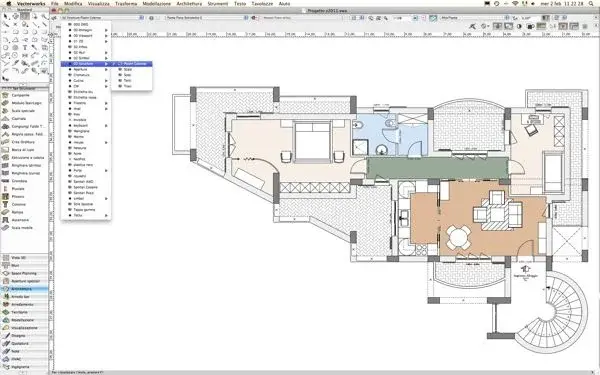
the command should be in the modeling menu -> architecture.
Obviously first you must have designed, with a rectangle or with a polygon, 2d the geometry in desired plant. Then you can run the command.
I do.
 
Thank you 1000!
I was looking for it in the instrument palette...:redface:
Bye!
 

Forum statistics

Threads
44,997
Messages
339,767
Members
4
Latest member
ibt

Members online

No members online now.
Back
Top