• This forum is the machine-generated translation of www.cad3d.it/forum1 - the Italian design community. Several terms are not translated correctly.

insufficient ram memory in "cocreate"

  • Thread starter Thread starter BLASTIFERO
  • Start date Start date

BLASTIFERO

Guest
After a while I work in cocreate modeling, especially on rendering, there appears a message "insufficient memory. specific that I have at disposal 3giga of ram.....is there a way to clean the ram while working? I hope someone can help me... thank you
 
reboot the program and get rid of the ram otherwise move to a 64-bit and manage as much as you want.
 
restart is from suicide!!!! even if it works!!!! What are you going to pass to a 64bit? Do I have to change pcs?
 
restart is from suicide!!!! even if it works!!!! What are you going to pass to a 64bit? Do I have to change pcs?
I would say that it is necessary to have greater clarity of ideas, otherwise suicide could be a relief not harm!

If you launch the task manager you can check how much memory is using osd and decide what to do.

3 ram gigs are many, but it depends on what you're doing, the error (if it's wrong) when it appears?
Are you using annotation?
Are you updating a 2d layout?
rendering?

if you give us precise information about the size of the model you are managing and what you do we can help you, otherwise suicide could be a great alternative!
:
 
The problem is when I use the rendering and more precisely when I make the rendering several times to search for the most suitable one for me..... . it seems that every time I click rendering I eat a slice of ram....after a dozen renderings I appear the insufficient memory message....as if they were all in memory... I think you can understand the loss of time if all the times reboot the modeling...... what I don't understand is because if I close the session and I reopen a new thing doesn't change...while reboot everything goes That's why I was wondering if there was a way to clean the ram, maybe even from the command prompt..... no matter where I just clean it. Perhaps there is a system setting or a config to change to solve the problem. I come from proes that gave me the opportunity to make a "purge" of the current session......I was looking for something like....I hope I was clear.... thank you for now
 
I don't know how to do...? Help!
do so:
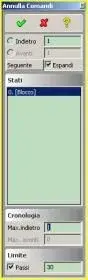
go to change => cancel again
and click on it
you can set the maximum number of undo steps and the maximum number of steps back.
this should free you memory
I'm not here to explain to you in detail. I'm quite intuitive to set.

then there is an icon to have in detail how much memory you are using.
I attached it to you as an image
like me now says this:
memory required by the system: 156.8 mb
additional memory available in the system: 3843.2 mb
memory limit: 4000 mb
 

Attachments

  • Image6.webp
    Image6.webp
    544 bytes · Views: 37
  • Image7.webp
    Image7.webp
    4 KB · Views: 15
Okay, I'll try to erase the history when it gives me the mistake.
found the icon... says to me:
memory required by the system: 301.5 mb
additional memory available in the system: 1585.5 mb
memory limit: 1887 mb

I also train what the task tells me:

...? but how do you put an image?? I'm sorry, but every once in a while, I'm in the shit! ! !
 
... I'll attach the task

Thank you very much
 

Attachments

  • Immagine.webp
    Immagine.webp
    41.3 KB · Views: 13

Forum statistics

Threads
44,997
Messages
339,767
Members
4
Latest member
ibt

Members online

No members online now.
Back
Top