
• This forum is the machine-generated translation of www.cad3d.it/forum1 - the Italian design community. Several terms are not translated correctly.

interrupted link

  • Thread starter Thread starter reb_bl
  • Start date Start date

reb_bl

Guest
Hi.
I started developing a new option from an existing set: save by name and way.
I take it, I put it, embroidery etc., all right.
I'm going to see the design manager and I see that he loads a set (obviously of the old project) but in the tree of mine I don't see.

by modification link I can not remove it, how do I remove that link?
 
Hi.
I started developing a new option from an existing set: save by name and way.
I take it, I put it, embroidery etc., all right.
I'm going to see the design manager and I see that he loads a set (obviously of the old project) but in the tree of mine I don't see.

by modification link I can not remove it, how do I remove that link?
Maybe it's part of a sub-assistance and has the prolific need to be hidden in the upper arm? Try to open the axieme that contains this subaxieme/part you don't see, and then you show everything, then you can see it, if the cause is this.
 
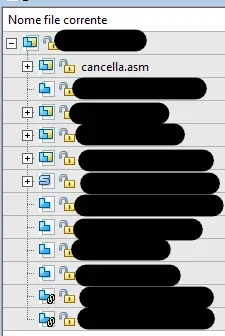
this is how you present the tree in design manager1716972312262.webpthis is the tree as it presents in 3d or in management occurrence
1716972352914.webpthe file erases.asm I did it to avoid unnecessary loads of stuff and should be deleted, but I can't do it
 
is the file erasing.asm actually existing?
Have you tried design manager to replace it with something else?
 
is the file erasing.asm actually existing?
Have you tried design manager to replace it with something else?
Yes, it exists and yes I replaced it.
in variables I find nothing that binds it to the axieme and if I insert it, the solid edge tree makes me see it as quantity 1
 

Forum statistics

Threads
44,997
Messages
339,767
Members
4
Latest member
ibt

Members online

No members online now.
Back
Top